FCA‐22InstructionManual
Page16
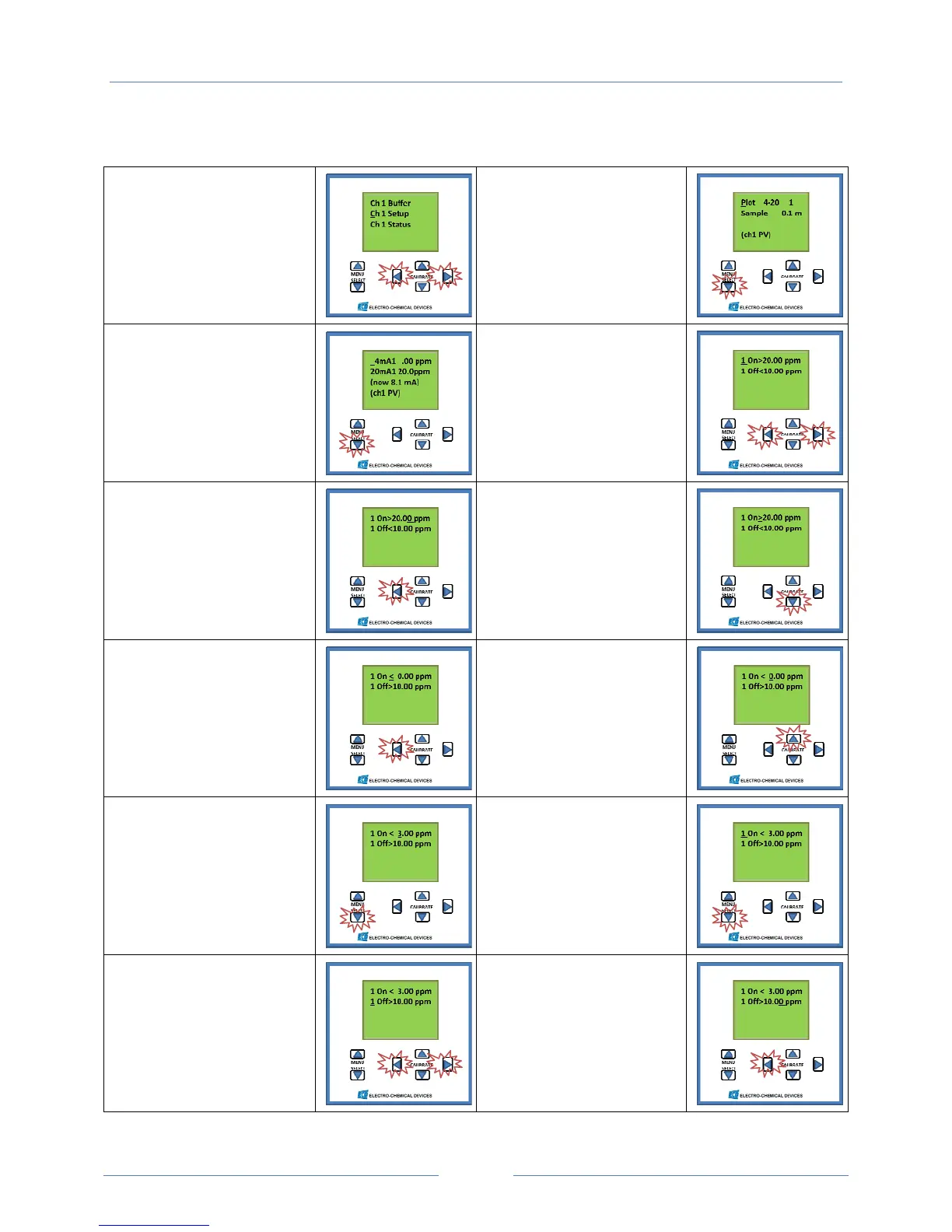
SettingtheRelays
#1Ch1SetupMenu
Therelaysarefoundinthe
Setupmenuofthechannel
towhichtheywereassigned
Simultaneouslypressboth
HorizontalCALIBRATEkeys
toaccessthemenu.
#2PlotScreen
PressMenuSelect
Downbutton,twice
#3mARangeScreen
PressMenuSelect
Downbutton,twice
#4Relay1SetupScreen
1On=SetPoint
1Off=Hysteresispoint
Toaccessthemenu
Simultaneouslypressboth
HorizontalCALIBRATEkeys
#5ChooseHigh/LowAlarm
Pressthehorizontal
CALIBRATEkeytomovethe
cursorunderthe>.
#6SetHigh/LowAlarm
PressthedownCALIBRATE
keytochangeto<.Notice
theHysteresissignalso
changed.
#7LowAlarmvalue
Pressthehorizontal
CALIBRATEkeytomovethe
cursorunderthe0.
#8LowAlarmValue
PresstheverticalCALIBRATE
keystoadjustthevalue
#9AccepttheValue
PressMenuSelect
Downbutton
#10MovetoHysteresis
Line
PressMenuSelect
Downbutton
#11SettheHysteresis
Simultaneouslypressboth
HorizontalCALIBRATEkeys
#12Adjustthevalue
Pressthehorizontal
CALIBRATEkeytomovethe
cursorunderthedigittobe
changed.



 To Next Page