22/157
SDi Decades Extreme Service Manual www.ecoer.com
May. 2023Manufacturer reserves the right to change specifications or designs without notice.
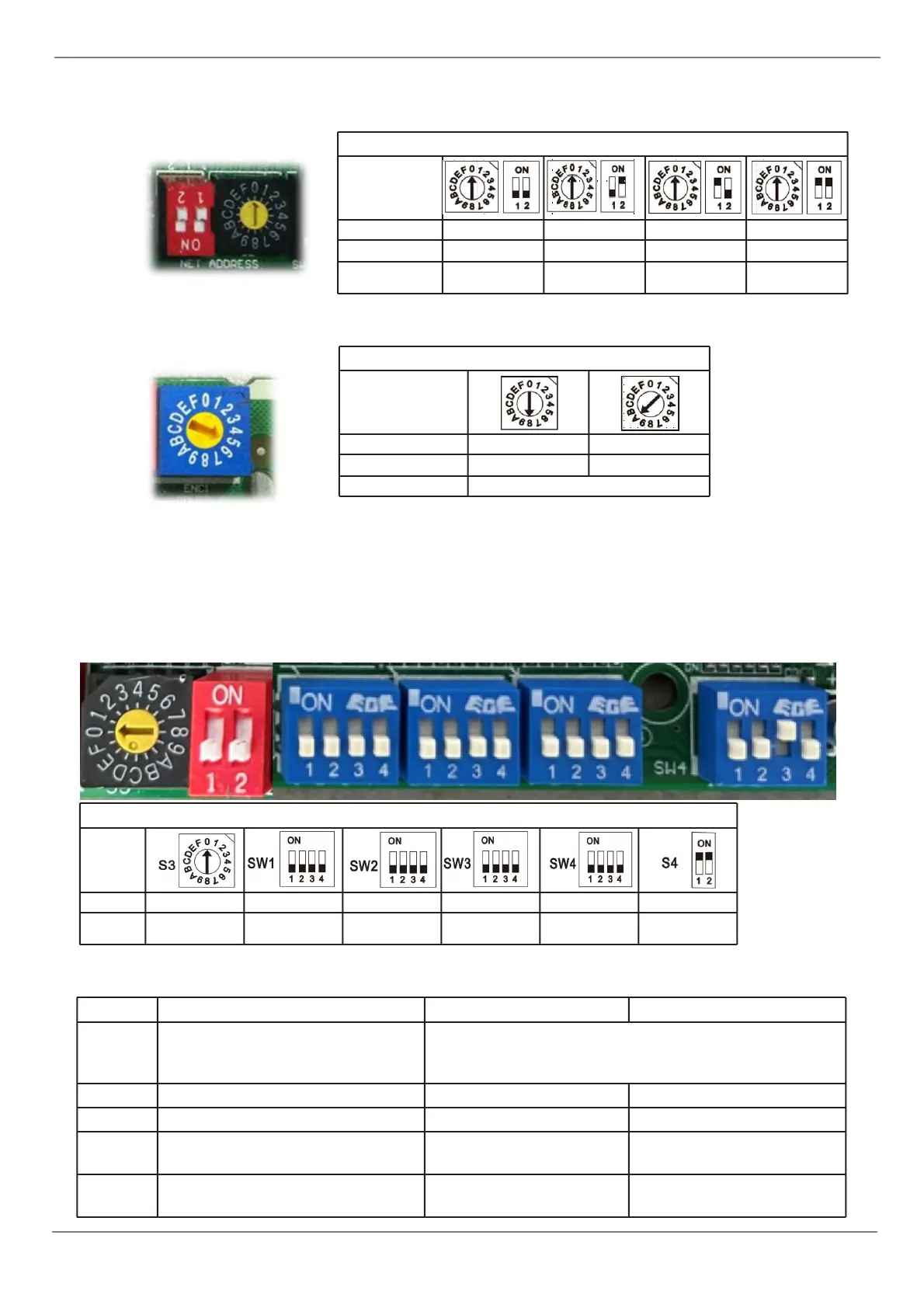
A. Micro-switch S1 and dial-switch S2 are for address setting when you want to control this unit by a central
controller. Range: 00-63
B. Dial-switch ENC1: The indoor PCB is universal designed for whole series units(36K & 60K). This ENC1
setting will tell the main program what size the unit is.
NOTE: Usually there is glue on it because the switch position cannot be changed at random unless you want to
use this PCB as a spare part to use in another unit. Then you have to select the right position to match the size
of the unit.
“105” means 10.5kW(36K), “160” means 16kW(60K)
C. Function DIP Switch Settings
Electric heating turns on outdoor
T4 temperature
0 means that the temperature protection is not
turned on, 1-F is -20-8℃ (-4-46℉) respectively, and
each scale represents 2℃(3.6℉)
Whether 24V control selection
Cold wind protection option
Single cooling / heating and
cooling options
Set machine/single internal
machine selection
3.10.2 Micro-Switch Introduce:
FOR SETTING POWER(DC MOTOR MODEL ONLY)
ACCORDING TO RELATED MODEL.


 To Next Page