Part 10 - Lighting the appliance / First start-up
Before first domestic use of the boiler, software parameters need to be set and the appliance needs to
be calibrated via the control panel and display.
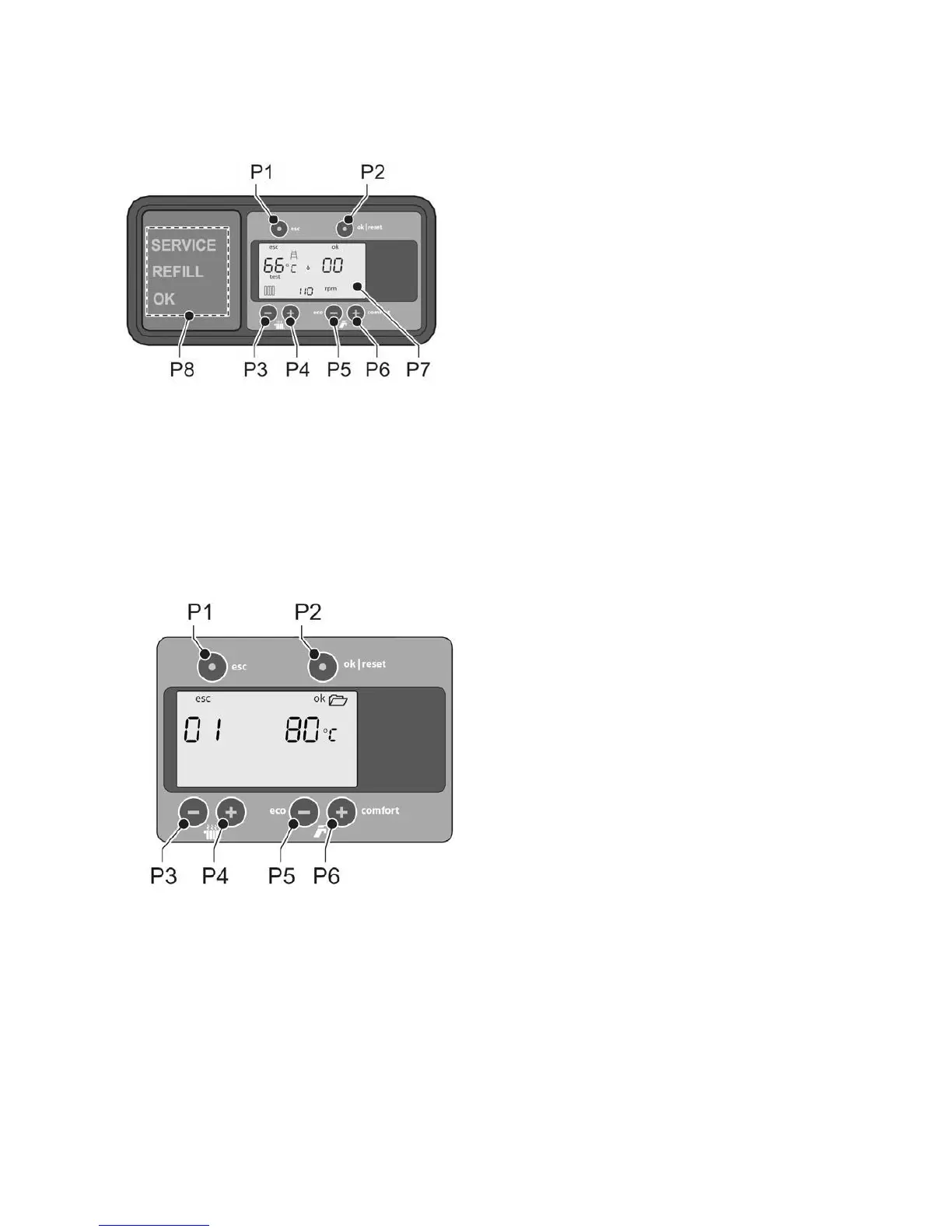
General use of the control panel
P1: esc: escape / cancel
P2: ok (confirm) | reset
P3: CH temperature down
P4: CH temperature up
P5: eco / ecomfort down (tap symbol). Ecomfort only with OpenTherm® thermostat.
P6: comfort up (tap symbol)
P7: Display
P8: LEDs: Displays the general status of the appliance.
Setting of parameters
1. Go to the installer level:
a. Simultaneously press [P1] and ‘[P2] for 5 seconds.
b. Put the number on the left side of the display to ’08’ with [P3] or [P4].
c. Press [P2] to confirm. You have accessed the installer level.
2. Press [P3] or [P4] to select the required parameter (index number). The index number is shown on the left
side in the display (see the list below). The set value is shown on the right side in the display.
3. Press [P5] and [P6] to adjust the value.
4. Press [P2] to confirm. (moving to the next parameter without confirmation will not store the change made)
The table below contains the parameters that can be set via the display or using a hand terminal (palm).
53


 To Next Page