EN
2. Package Contents and Technical Specifications
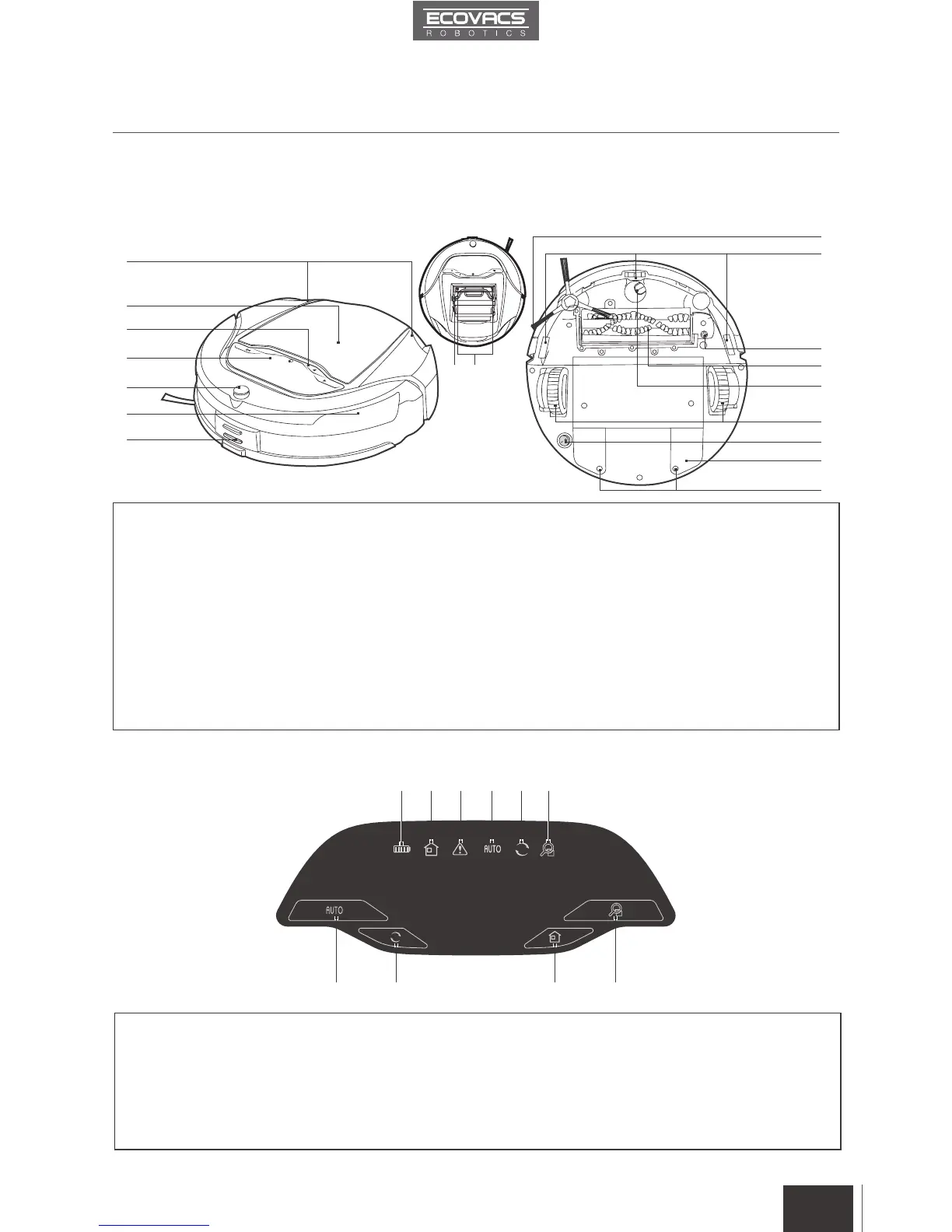
2.3 Product Diagram
Robot
Control Panel
1. Status Light Indicators
2. Top Cover
3. Control Panel
4. Control Panel Screen
5. Infrared Receiver for Remote Control
6. Anti-Collision Sensors
7. Charging Contacts
8. Side Brush
9. Anti-Drop Sensors
1. Battery Display
2. Return to Charger Mode Indicator
3. Alarm Indicator
4. AUTO Cleaning Mode Indicator
5. Intelligent Scheduling Indicator
10. Main Brush Screw
11. Main Brush
12. Universal Wheel
13. Driving Wheels
14. Bottom Power Switch
15. Battery Cover
16. Battery Cover Screws
17. Dust Sensors
18. Dust Bin
6. Intensive Cleaning Mode Indicator
7. AUTO Mode Button
8. Intelligent Scheduling Button
9. Return to Charger Mode Button
10. Intensive Cleaning Mode Button
9
10
11
12
13
14
15
16
1
8 97 10
2 3 4 5 6
8
1
2
3
4
5
6
7
5
1718














 To Next Page