26
LOW SALT ALARM
Use this feature to program when the electronic control
will display a low salt alarm. The number of days can
be customized, or the feature can be turned off. The
default is 30 days.
1-3. Go to the Salt settings menu by following Steps 1-
3 in “Procedure for Two-tank Models” at left.
4. Press the DOWN (6) button to scroll through the
menu options until Low salt alarm is highlighted.
5. Press the SELECT (¡) button to display the Low salt
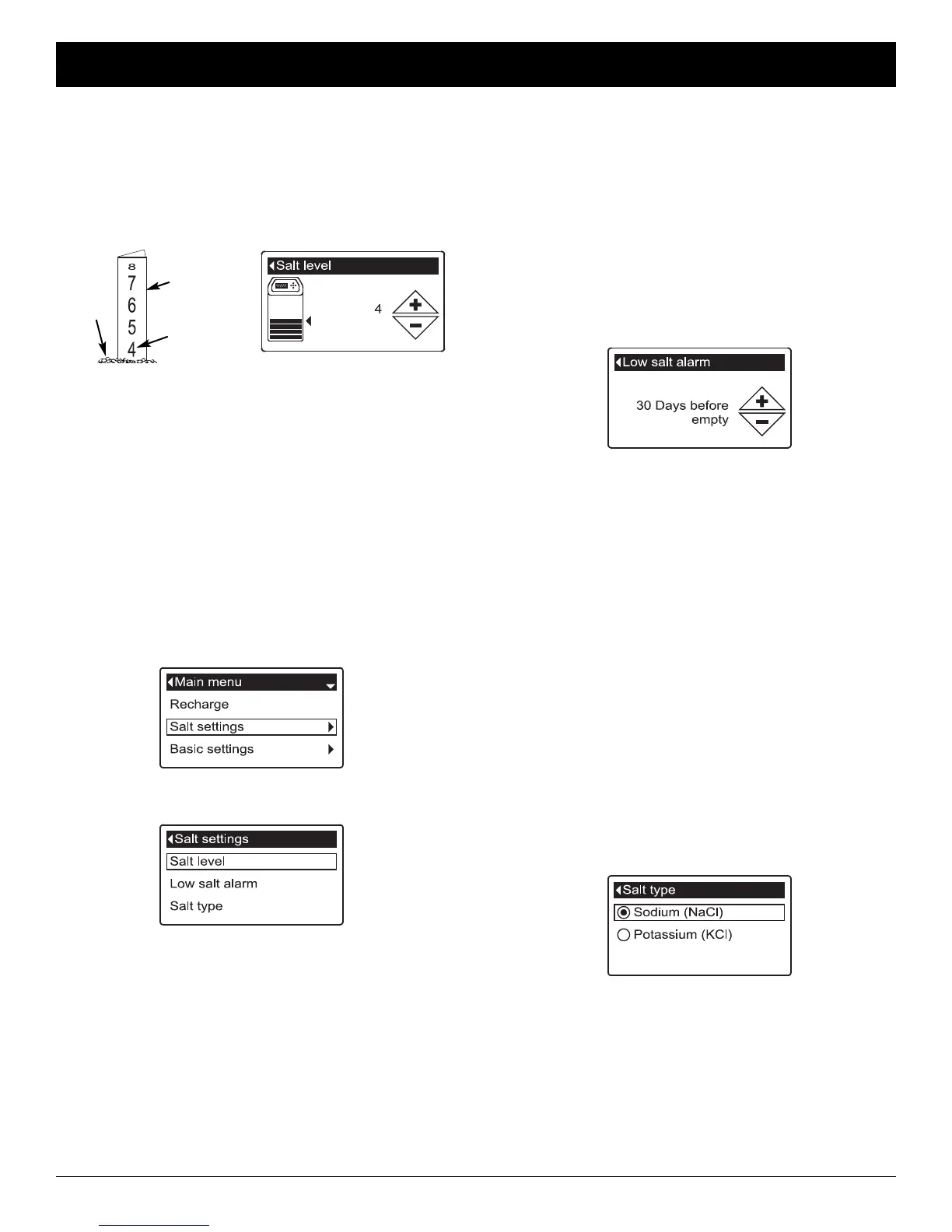
alarm screen (See Figure 91).
6. Press the UP (5) or DOWN (6) buttons to change
the number of days. Set the number of days to pro-
vide enough time to purchase salt and avoid running
into hard water. Setting the number of days below 1
turns the alarm feature off.
7. Press the SELECT (¡) button. The display will go
back to the Salt settings menu.
8. Press the LEFT (3) button twice to return to the
rolling status screens.
SETTING SALT TYPE
Use this feature to program the electronic control with
which type of salt is used. The default is NaCl.
Selecting KCl increases fill time 25% and brine/slow
rinse times 12%.
1-3. Go to the Salt settings menu by following Steps 1-
3 in “Procedure for Two-tank Models” at left.
4. Press the DOWN (6) button to scroll through the
menu options until Salt type is highlighted.
5. Press the SELECT (¡) button to display the Salt type
menu (See Figure 92).
FIG. 91
FIG. 92
6. If the desired salt type already has a black dot next
to it (See Figure 92), go to Step 7. Otherwise, press
the conditioner/refiner’s DOWN (6) or UP (5) but-
tons to scroll to the other salt type, then press
SELECT (¡) to choose it.
7. Press the SELECT (¡) button. The display will go
back to the Salt settings menu.
8. Press the LEFT (3) button twice to return to the
rolling status screens.
ECOWATER
S Y S T E M S
Conditioner/Refiner Operation
FIG. 88
Procedure for Cabinet Models
1. When the conditioner/refiner is displaying the rolling
status screens, open the salt lid. The tank light turns
on and the Salt level screen appears (See Figure 88).
2. After adding and leveling salt, observe the numbered
scale on the brinewell (See Figure 88). Press UP (5)
or DOWN (6) to match the lowest number visible
above the salt.
NOTE: If you will be setting the salt level via the web,
instead of pushing buttons on the faceplate,
make sure that the salt lid is closed first.
3. Close the salt lid. The tank light turns off and the dis-
play goes back to the rolling status screens.
Procedure for Two-tank Models
1. From any of the rolling status screens, press the
SELECT (¡) button to display the Main menu.
2. Press the DOWN (6) button to scroll through the
menu options until Salt settings is highlighted (See
Figure 89).
3. Press the SELECT (¡) button to display the Salt set-
tings menu (See Figure 90).
FIG. 89
FIG. 90
4. Make sure Salt level is highlighted.
5. Press the SELECT (¡) button to display the Salt
level screen (See Figure 88). This screen will not
automatically exit for 15 minutes.
6. After adding and leveling salt, observe the numbered
scale on the brinewell (See Figure 88). Press UP (5)
or DOWN (6) to match the lowest number visible
above the salt.
7. Press the SELECT (¡) button. The display will go
back to the Salt settings menu (Figure 90).
8. Press the LEFT (3) button twice to return to the
rolling status screens. It will also exit automatically if
no buttons are pressed for four minutes.
SETTING SALT LEVEL
Use this feature when adding salt to the conditioner/ refiner.
Brinewell
Numbers
Salt
Level




 To Next Page