33
SPECIAL FEATURES
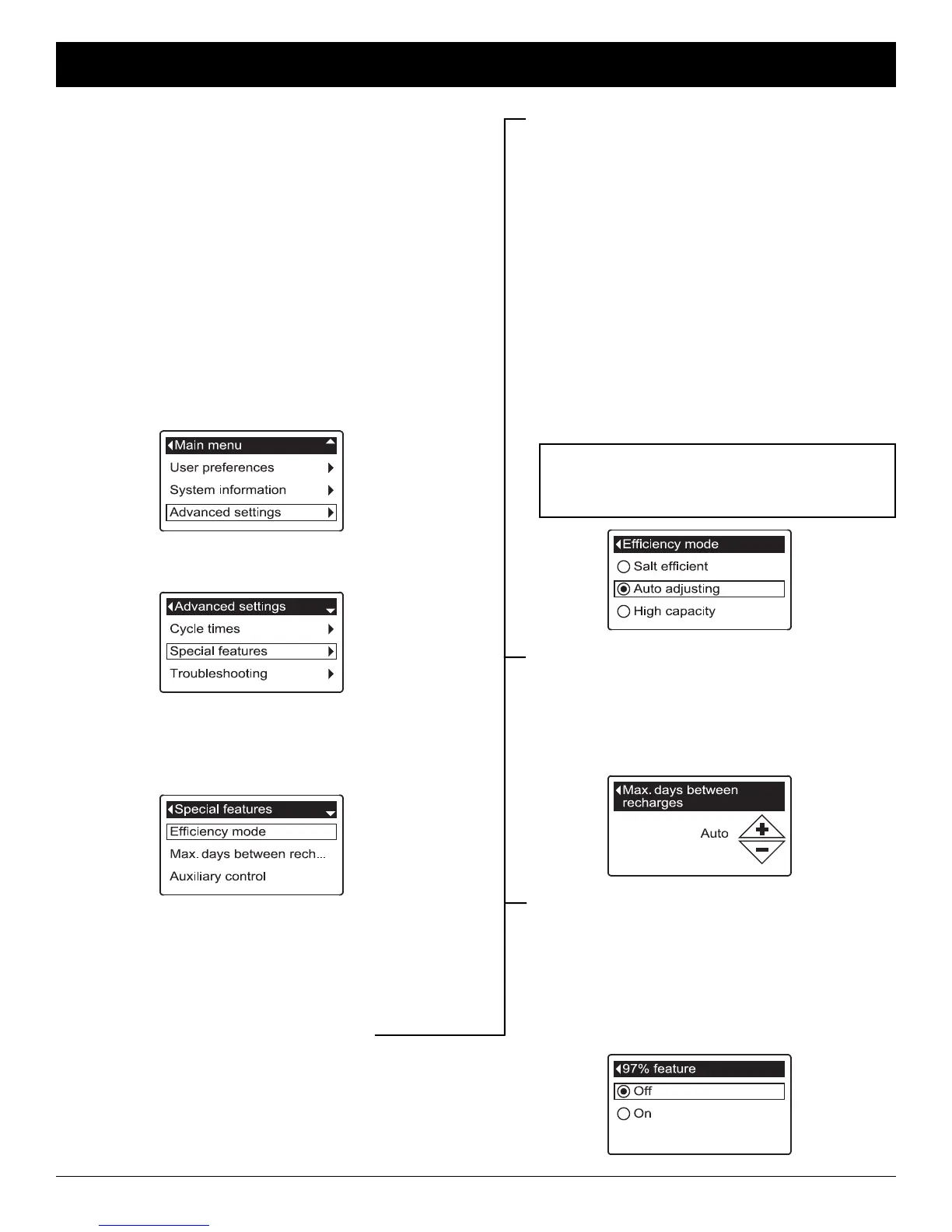
Use these features to change the following operations:
=Efficiency mode
=Maximum days between recharges
=Auxiliary control (described on Page 34)
=Chemical feed volume* (described on Page 34)
=Chemical feed timer* (described on Page 34)
=97% feature
=Service reminder (described on Page 35)
To display one these screens:
1. From any of the rolling status screens, press the
SELECT (¡) button to display the Main menu.
2. Press the DOWN (6) button to scroll through the
menu options until Advanced settings is highlighted
(See Figure 133).
FIG. 134
4. Press the DOWN (6) button to scroll through the
menu options until Special features is highlighted.
5. Press the SELECT (¡) button to display the Special
features menu (See Figure 135).
FIG. 133
3. Press the SELECT (¡) button to display the
Advanced settings menu (See Figure 134).
FIG. 135
6. Press the DOWN (6) button to scroll through the
menu options until the desired option is highlighted
(See list at the top of this column).
7. Press the SELECT (¡) button to display the desired
information screen (See Figures 136-138).
8. See the right column on this page for specific
instructions on each cycle time screen.
9. Press the SELECT (¡) button. The display will go
back to the Special features menu (Figure 135).
10. Press the LEFT (3) button three times to return to
the rolling status screens.
*
Only displayed if Auxiliary control is set to Chemical feed.
FIG. 136
FIG. 137
FIG. 138
8a. Efficiency mode: If the desired efficiency
mode already has a black dot next to it (See
Figure 136), go to Step 9. Otherwise, press
the DOWN (6) or UP (5) buttons to scroll to
the desired efficiency mode, then press
SELECT (¡) to choose it.
=Salt efficient limits available salt doses to
maintain 4000 grains/lb. of salt efficiency.
Units may recharge more frequently.
=Auto adjusting is the default. It automati-
cally adjusts salt doses to target a 3-4 day
interval between recharges. Recommended.
=High capacity is for applications where very
low “bleed” (less than 1.5 ppm) of hardness
can be tolerated. Such applications include
water for boilers. This setting will consume
higher quantities of salt.
8b. Maximum days between recharges: Press
the UP (5) or DOWN (6) buttons to change
the number of days (See Figure 137). The fea-
ture can be set from 1 to 15 days. Setting the
number of days below 1 turns the feature off
and defaults to automatic control of recharging.
8c. 97% feature: If the desired option already has
a black dot next to it (See Figure 138), go to
Step 9. Otherwise, press the DOWN (6) or
UP (5) buttons to scroll to the other option,
then press SELECT (¡) to choose it. If this
feature is On, the conditioner/refiner will auto-
matically recharge when 97% of capacity is
used, at any time of day. Default is Off.
ECOWATER
S Y S T E M S
Conditioner/Refiner Operation
NOTE: California regulations require the effi-
ciency mode be set to Salt efficient for
units installed in the state of California.



 To Next Page