35
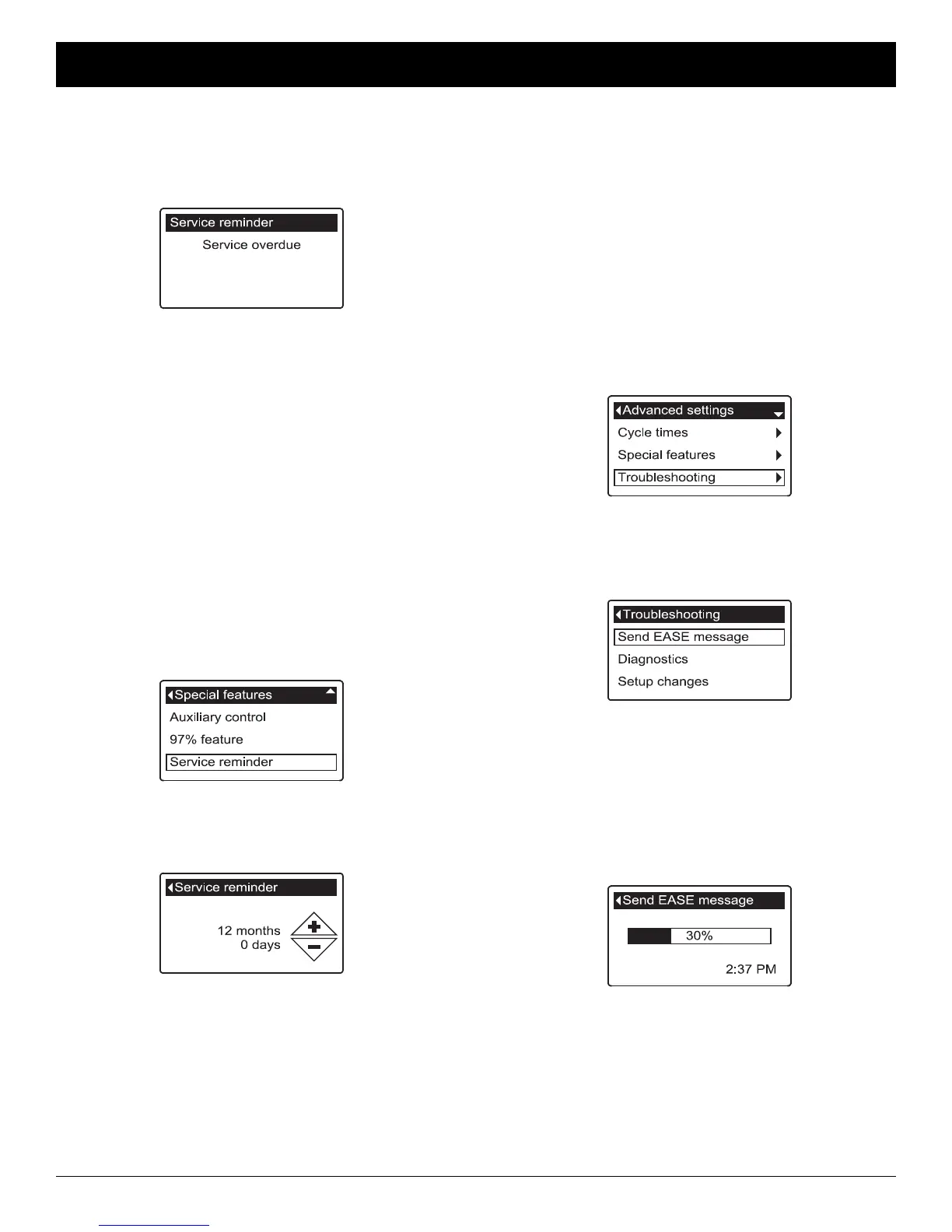
FIG. 144
FIG. 145
SERVICE REMINDER (set / reset)
Use this feature to program the number of months (up
to 24) before a “Service overdue” message will appear
instead of the rolling status screens (See Figure 143).
8. Press the UP (5) or DOWN (6) buttons to set the
number of months until the service reminder
appears. Repeatedly pressing the DOWN (6) but-
ton until the display reads “Off” turns this feature off
and zeros the number of months and days.
9. Press the SELECT (¡) button. The display will go
back to the Special features menu (Figure 144).
10. Press the LEFT (3) button three times to return to
the rolling status screens.
6. Press the DOWN (6) button to scroll through the
menu options until Service reminder is highlighted.
7. Press the SELECT (¡) button to display the Service
reminder screen (See Figure 145).
This message also appears on the remote. This will be
a reminder to call your dealer for service. Once pro-
grammed, this feature displays the number of months
and days left until the service reminder.
Once the “Service overdue” message has appeared,
dealers performing service clear it by setting the num-
ber of months until the next service reminder. Set or
reset the service reminder as follows:
1. From any of the rolling status screens, press the
SELECT (¡) button to display the Main menu.
2. Press the DOWN (6) button to scroll through the
menu options until Advanced settings is highlighted.
3. Press the SELECT (¡) button to display the
Advanced settings menu.
4. Press the DOWN (6) button to scroll through the
menu options until Special features is highlighted.
5. Press the SELECT (¡) button to display the Special
features menu (See Figure 144).
FIG. 143
SEND E.A.S.E. MESSAGE
With E.A.S.E. (Electronic Automated Service
Evaluation), a homeowner or service technician can
transmit operational data via a telephone for diagnostic
purposes. Ask your participating EcoWater Systems
dealer for more information.
To send an E.A.S.E. message:
1. From any of the rolling status screens, press the
SELECT (¡) button to display the Main menu.
2. Press the DOWN (6) button to scroll through the
menu options until Advanced settings is highlighted.
3. Press the SELECT (¡) button to display the
Advanced settings menu (See Figure 146).
FIG. 147
FIG. 148
6. Make sure Send EASE message is highlighted.
7. With the phone ready, press the SELECT (¡) button
to display the Send EASE message screen and
begin transmission.
8. Hold the phone’s receiver an inch or two above the
E.A.S.E. port on the conditioner/refiner’s faceplate
(See Figure 7 on Page 9). Maintain the receiver
steadily in this position during the entire transmis-
sion.
9. A bar is displayed showing the transmission’s
progress (See Figure 148). Once completed, the
Troubleshooting screen immediately reappears
(Figure 147).
10. Press the LEFT (3) button three times to return to
the rolling status screens.
FIG. 146
4. Press the DOWN (6) button to scroll through the
menu options until Troubleshooting is highlighted.
5. Press the SELECT (¡) button to display the
Troubleshooting menu (See Figure 147).
ECOWATER
S Y S T E M S
Conditioner/Refiner Operation



 To Next Page