16
ECOWATER
SYSTEMS
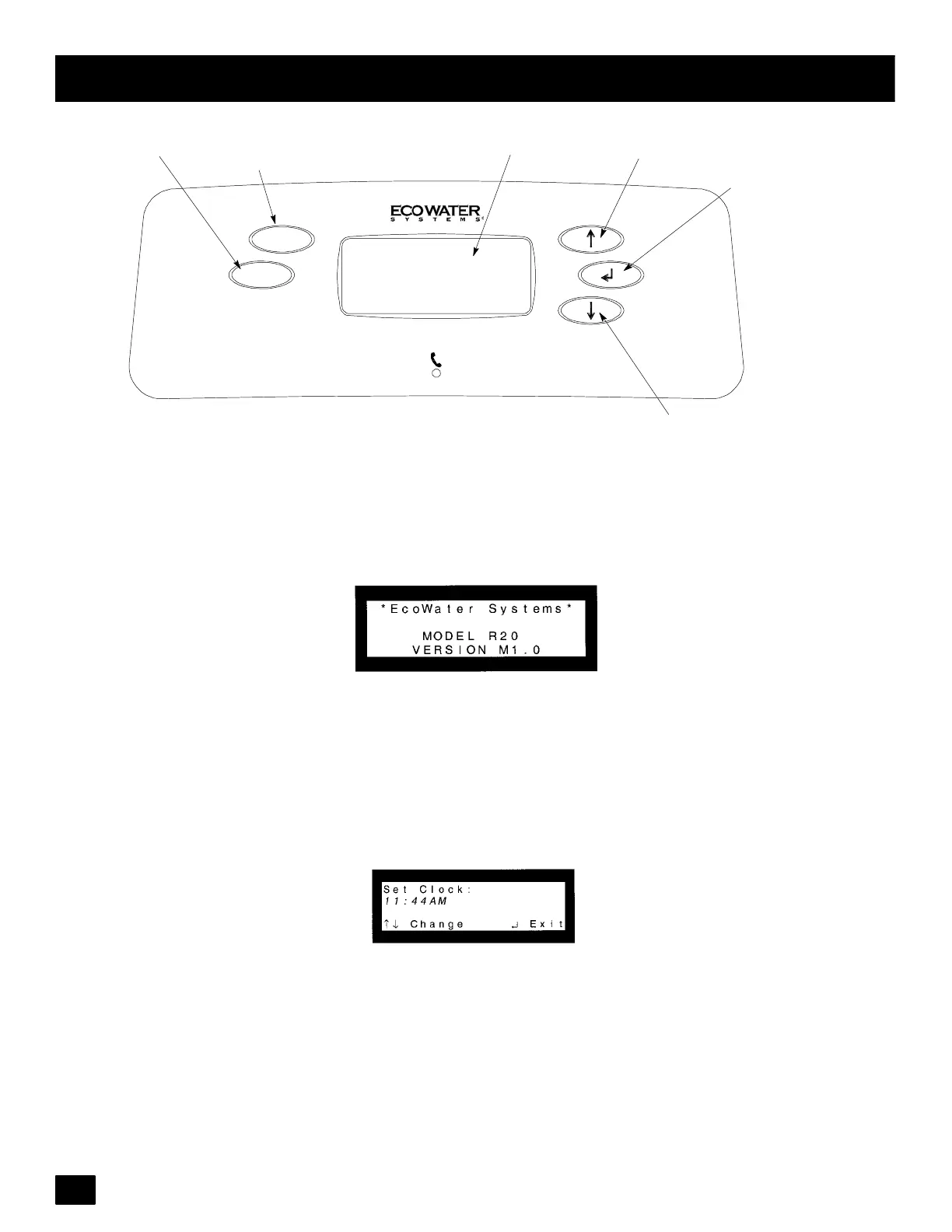
Programming the Digital Demand Faceplate Controller
UP Keypad
DOWN Keypad
SELECT/EXIT Keypad
RECHARGE Keypad
Display
Digital Demand
RECHARGE
SALT
LEVEL
SALT LE VEL Keypad
Figure 12
THE FOLLOWING STEPS ARE FOR FIRST TIME SET UP ONLY.
When the transformer is plugged in, a ‘‘beep’’ will sound, followed by the factory set model code display and soft-
ware version for a few seconds. Then, 12:00 PM present time display.
1. MODEL CODE: The controller is factory set to the model code, which provides the shortest recharge times
and greatest water savings. Verify the correct model code or set if needed.
Note: To reset the model code, see page 24.
2. SET THE CLOCK: Use the (↑)or(↓) keypads to set the present time of day. Press (↑) to move the display
ahead; press (↓) to move the timebackward. NOTE:Each pressof a keypad changes the time by 1 minute.Hold-
ing a keypad in changes the time b y 32 minutes each second. Pressing the SELECT/EXIT (↵ ) keypad will set
the clock.



 To Next Page