14
NORMAL OPERATION
FILTER STATUS SCREENS
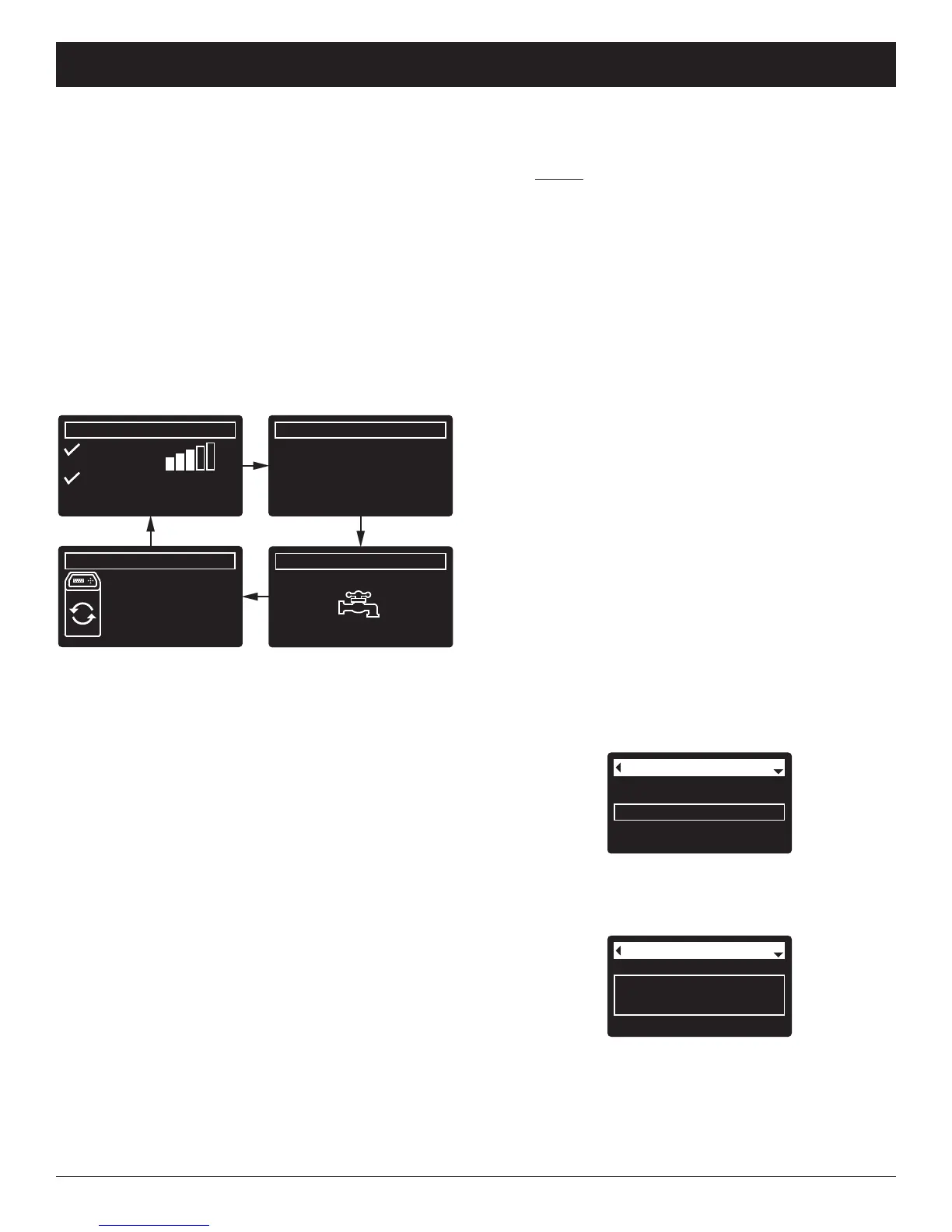
During normal operation, the EcoWater Systems filter’s
d
isplay shows up to four status screens. Page 19
explains how individual screens can be turned on or off.
Each is shown for six seconds, in a rolling sequence
(See Figure 32).
On the “Wireless status” screen, the check marks indi-
cate the following:
P WiFi - The filter is connected to a Wi-Fi router.
P Internet - The filter is connected to a Wi-Fi router
which is connected to the internet.
FIG. 32
0.0 GPM
Water flow
2:34 PM
Water use (gallons)
2:34 PM
Recharge status
2:34 PM
Set for automatic
recharge
Today: 121
Daily average: 175
Wireless status
2:34 PM
WiFi
Internet
-50 dBm
ECOWATER
S Y S T E M S
Filter Operation
Current time
Max. days between rech...
Recharge time
Basic settings
FIG. 33
Current time
Recharge time
Basic settings
Max. days between
recharges
FIG. 34
One second after being highlighted, the viewing box
expands (See Figure 34) to show the entire message.
After three seconds the view resets (Figure 33).
The filter status screens described in the previous sec-
tion will not
be displayed in a rolling sequence when
one of the following items is displayed:
=Recharge status (Displayed during recharges,
showing valve position and time remaining)
=Recharge status: Off - no automatic recharges
instead of rolling screens indicates that automatic
recharges have been turned off (See Page 17).
=Current time setting screen instead of status
screens indicates time has been lost, perhaps after
a long power loss. Set the time (See next page).
=Service reminder (See Page 23)
=Error detected (Contact your dealer for service)
FLASHING DISPLAY
The filter’s display will flash on and off when one or
more of the following conditions occurs:
=Time needs to be set (Time has been lost)
=Service is overdue (Service reminder)
=Error condition
The flashing will stop after any key is pressed.
However, it will start again at Midnight if the underlying
condition (e.g. time not set) has not been addressed.
LONG DISPLAY SCREEN MESSAGES
Most messages in the filter’s display screens are short
enough to be shown as a single line. Longer messages
will be truncated (See Figure 33 for an example) until
you highlight them.
OTHER MESSAGES, ALERTS & REMINDERS
Pressing the filter’s RIGHT (4) button manually
advances to the next screen in the sequence. Pressing
the LEFT (3) button manually returns to the previous
status screen. If no buttons are pressed for 30 sec-
onds, the automatic rolling sequence resumes.
If Recharge off has been selected, as described on
page 17, the rolling sequence will stop at the “Recharge
status” screen.



 To Next Page