DIGITAL ECU TUNER 3 – User Manual
Parametric output configuration
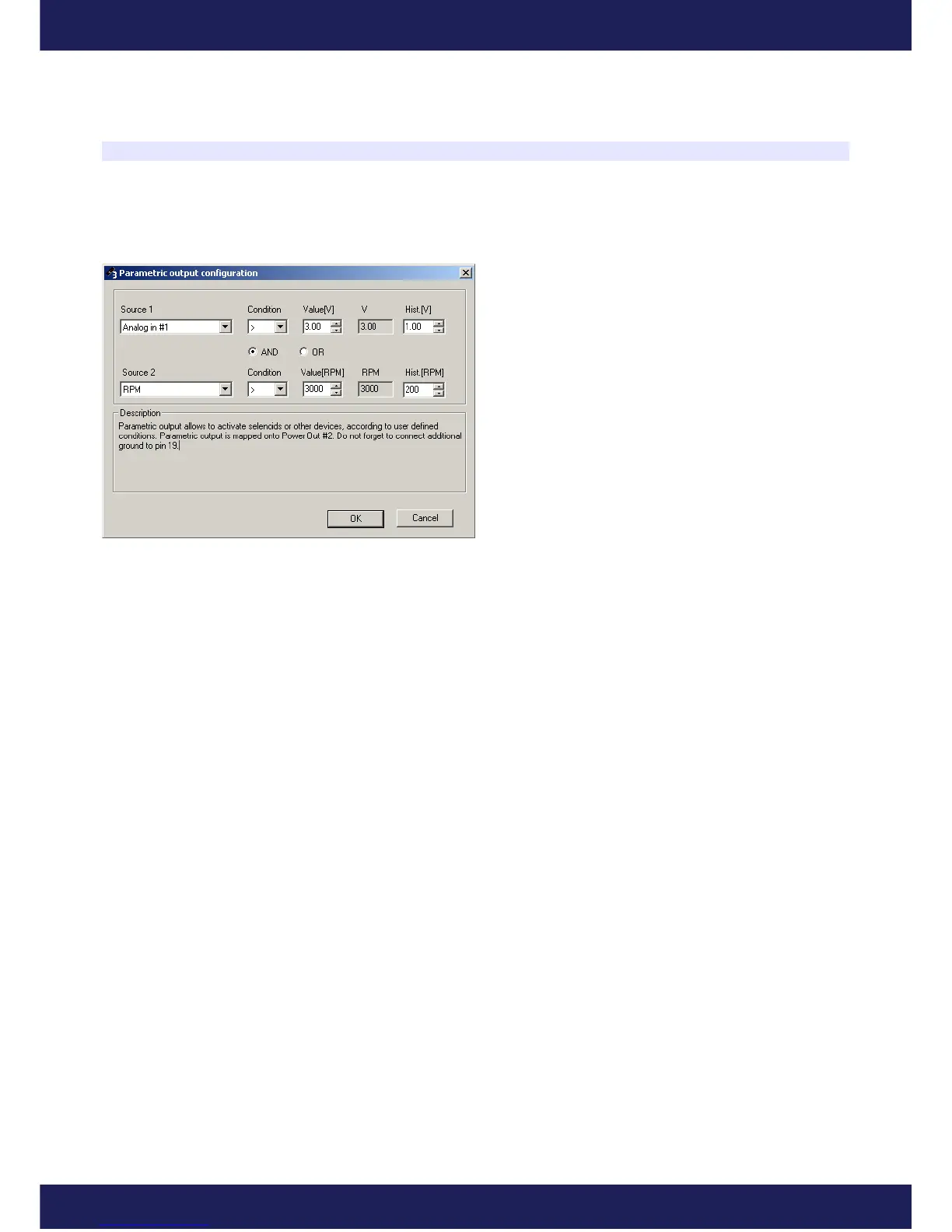
To configure the parametric output, choose the parameter window (Setup/Paramteric output configuration). In the
configuration window, choose inputs, which will be used as function parameters, referential values and conditions,
which fulfillment will activate the user output.
Parameters Source1 and Source2 allow to choose the
inputs. If interested in only one input, chose None as
Source2. For each input it is possible to choose a
condition that needs to be fulfilled to activate an output.
The Hysteresis (Hist.) is used to define hysteresis value.
This value defines the condition for the output
deactivation. For example, if the LED diode is used as a
shift light when the engine revolutions are higher than
5000, and hysteresis will be defined at the level of 500
revolutions, the LED diode will turn off when the
engine revolutions drops under 4500. Additionally,
between the conditions for the Source1 and Source2 outputs, it is possible to define a condition (AND, OR) which
must be fulfilled to activate a parametric output.
Page 30
www.ecumaster.com


 To Next Page