DIGITAL ECU TUNER 3 – User Manual
Software installation
Client installation
To install a client, executable file (EcumasterDET3_1_xx.exe) should be activated. After choosing a language and
accepting the license agreement, choose the targeted folder. It is important to remember that before installing a new
version, the old one should be uninstalled! User’s folders will be saved.
Driver’s installation
Windows XP
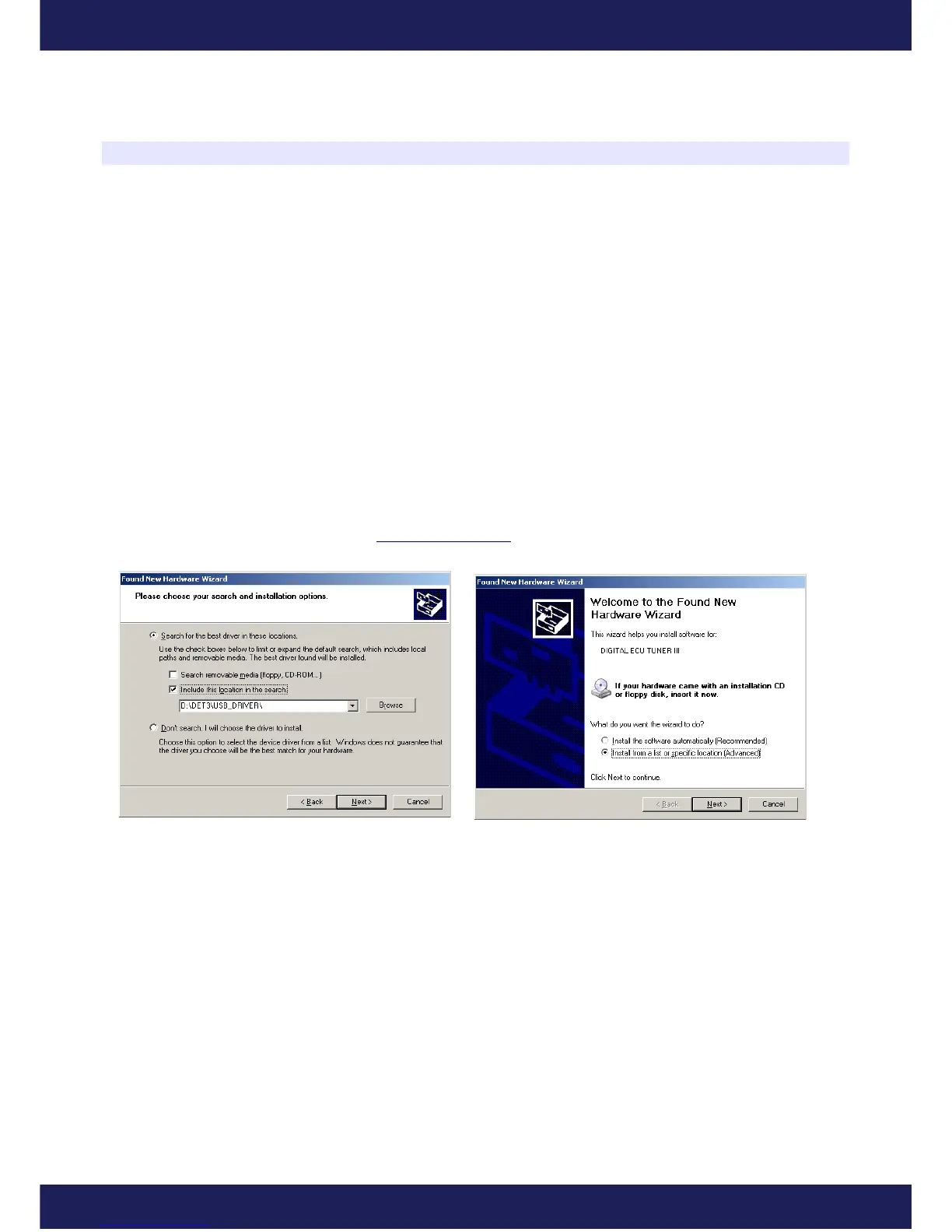
During the first connection of the device to a computer, a message will appear, informing that a new equipment is
found.
Next, choose the option: “Install from a list or specific location”. When installing from a CD from the set, choose
CD and DET3\USB_DRIVER folder, (for example, D:\DET_3\USB_DRIVER). If the driver is installed from a
hard drive (for example downloaded from www.ecumaster.com) choose a proper folder.
The above directions should be repeated for every new equipment found by the computer. If FTDI drivers of FTDI
brand are already installed on a computer, the information about finding a new equipment will not appear and the
drivers’ installation will not be necessary. After a successful installation, a client can be started.
Page 8
www.ecumaster.com


 To Next Page