DIGITAL ECU TUNER 3 – User Manual
Firmware's update
Due to the changes in the device’s firmware, (for example:
improvements, additional functions) it is possible to change the
firmware.
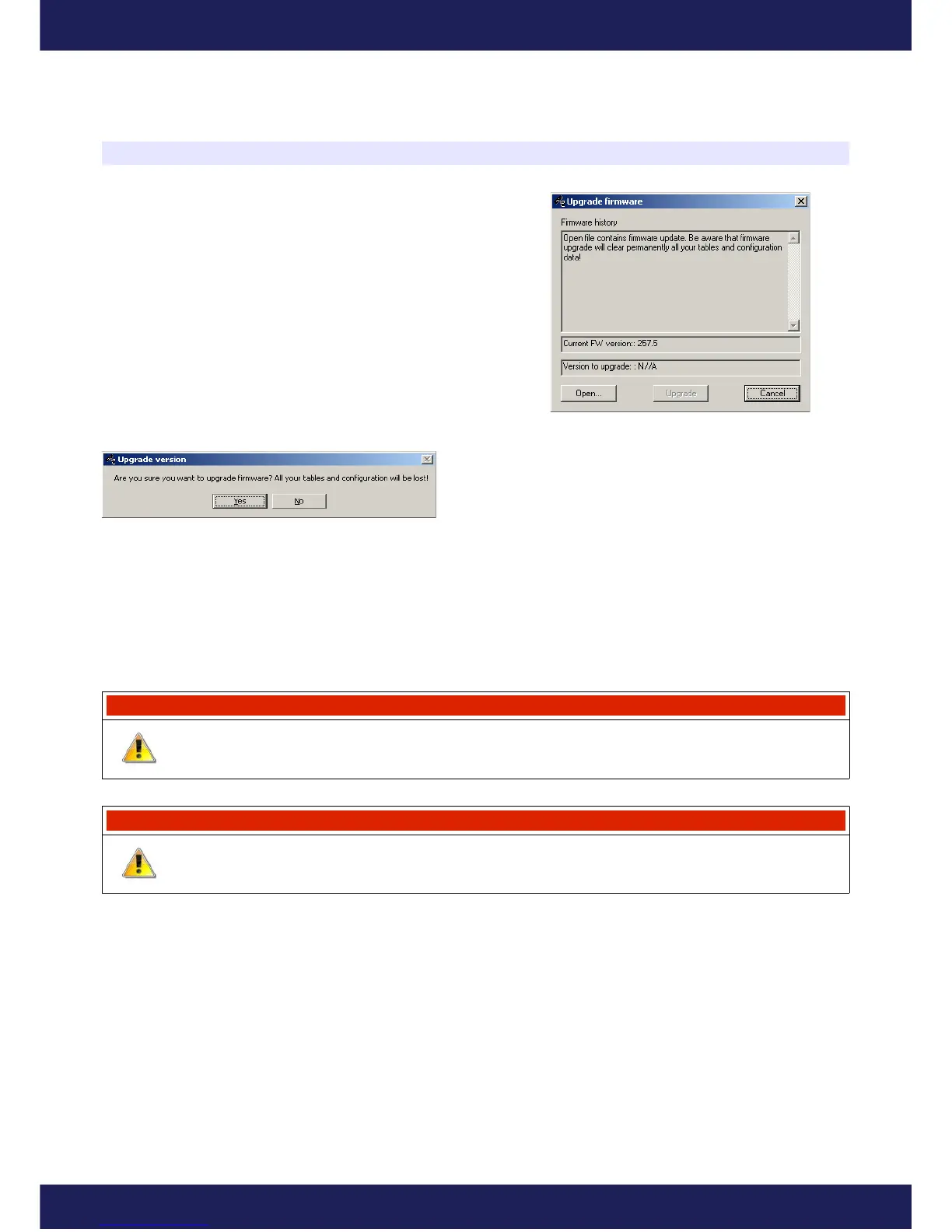
To do this, the Upgrade firmware... function should be used (in
the File menu). To choose a new firmware, press Open. In the
Firmware History window there will be displayed a list of
conducted changes for a given firmware. To continue, press the
Upgrade button.
A window with a warning will be displayed: “All your tables and configuration will be lost.”
After accepting, a window informing about the progress of
the firmware’s change will be displayed. At this time, don’t
switch off the computer nor the device! If, during the
installation, communication with the device will be broken, to rescue the installation do the following:
1) Connect the device to a laptop,
2) Power up the device,
3) Start the client for Windows,
4) Choose Upgrade Firmware from the menu and follow the above directions.
Attention!
Updating the firmware causes the loss of the saved tables and setup parameters! The
project should be saved on a disc before updating!
Warning !
Firmware change should not be conducted if there are problems with the
communication between the device and PC computer!!!
Page 6
www.ecumaster.com


 To Next Page