DIGITAL ECU TUNER 3 – User Manual
Scope
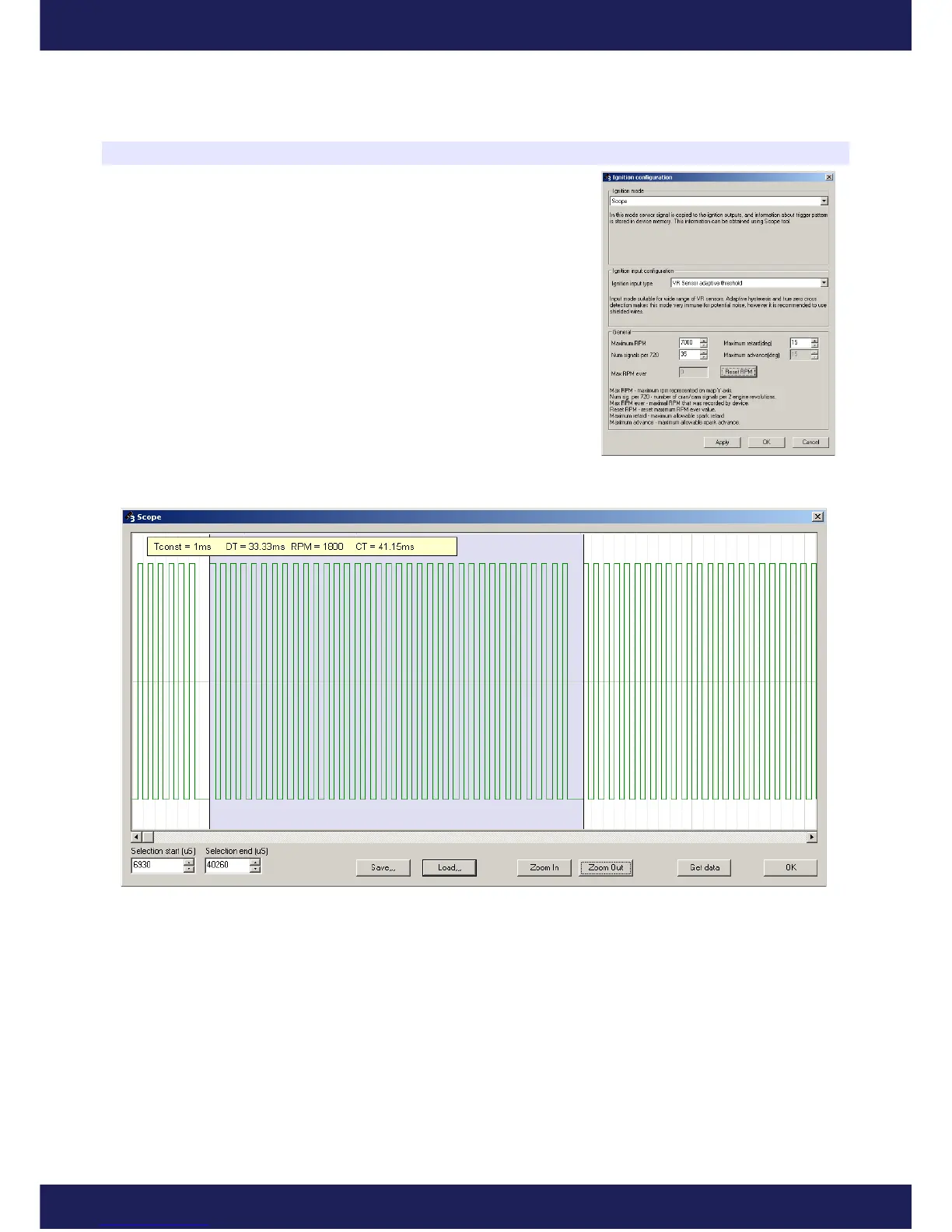
DET 3 device has a possibility to analyze the trigger signal from the
Ignition #1 input.To activate this feature, choose the Scope ignition mode
from menu (Setup/Ignition configuration), and the Ignition input type
suitable to sensor type. In this mode, the signal from the ignition input is
copied to the ignition output, what allows to run the engine, but there is no
possibility to modify ignition advance nor to store tables using the Make
maps permanent function.
After selecting the Scope ignition mode, the button Get Data from Scope
window (menu Tools/Scope) is enabled. To gather signal information,
press Get Data button. The gathered signal waveform appears. The
amplitude of the signal doesn't represent the amplitude of the real signal.
The user is able to get additional signal information by selecting the area of interest by using the mouse. In
the parameter window, there appears the waveform parameters:
DT – selection duration,
RPM – engine speed if the selected signal represents the whole revolution,
CT – current time of waveform.
Waveforms can be saved using the Save... button for further analysis.
Page 43
www.ecumaster.com


 To Next Page