DIGITAL ECU TUNER 3 – User Manual
Conversion of the frequency MAF into analog MAP sensor
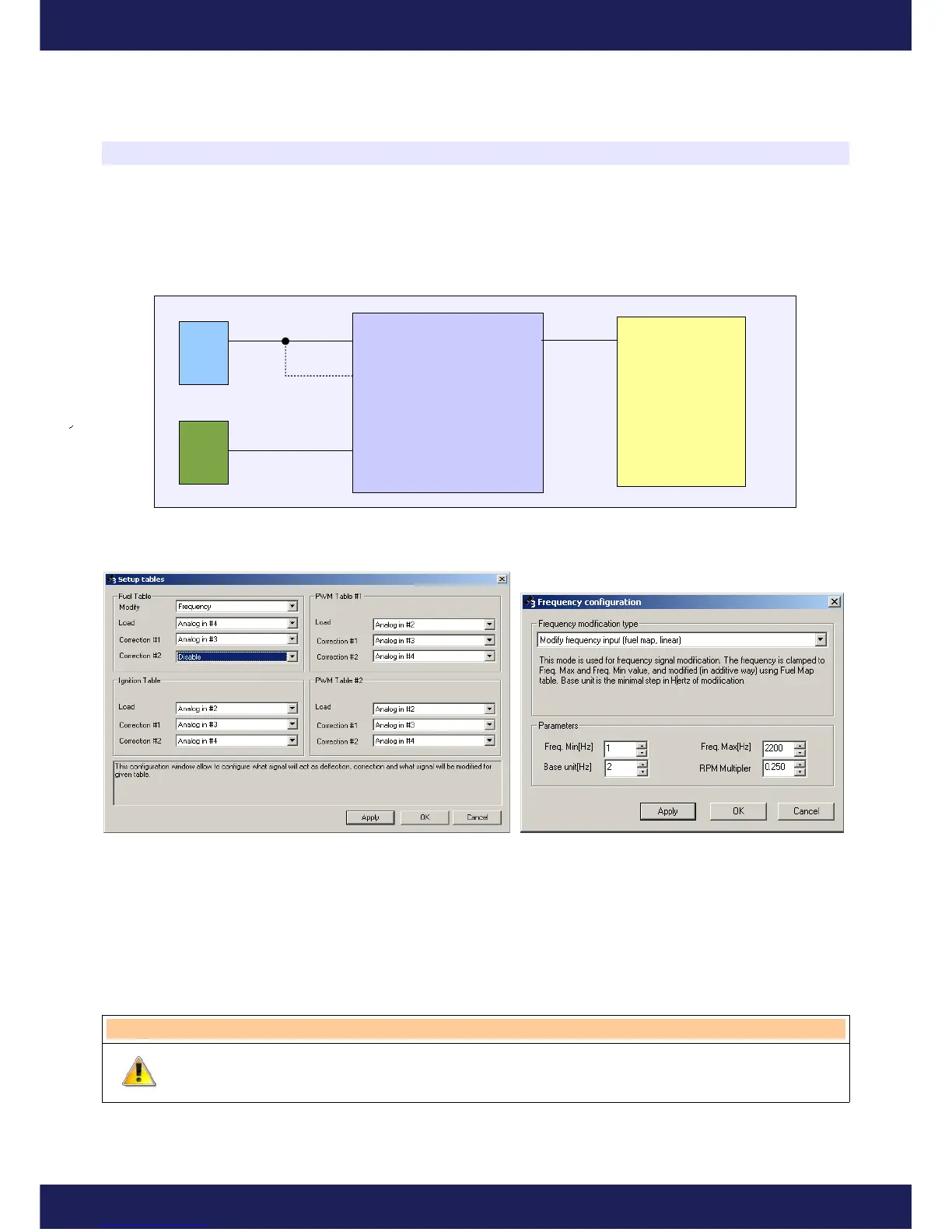
To make the conversion, connect the frequency MAF sensor to the Frequency In input and analog MAP sensor to
the one of the analog inputs (load). In most cases, signal from frequency MAF will require a pull-up resistor at the
Frequency input. In the example below, MAP sensor is connected to the analog input #4.
Fuel table and analog output configuration at this stage should look as follows:
Next, choose Log tab, press the Clear button (to reset the previous log) and then take a ride. The data gathered
during the ride will be used to generate conversion table, so it is very important to drive with diverse load and
RPM). After the stage of data gathering, on the log window press right mouse button and choose Convert Freq
MAF to MAP option. Fuel table will be created, which has to be saved in the devices memory ( Make Maps
Permanent). It is also important to change settings in the table configurations and Frequency options.
Warning!
During data gathering engine should have the working temperature.
Page 46
www.ecumaster.com
ECU
FrequencyIn Frequency Out
Pullup
DET 3
Analog #4 In
Frequency MAF
Map Sensor


 To Next Page