DIGITAL ECU TUNER 3 – User Manual
Toolbar
The useful functions of the program are placed on the toolbar. A list of icons from the toolbar and their descriptions
are placed below.
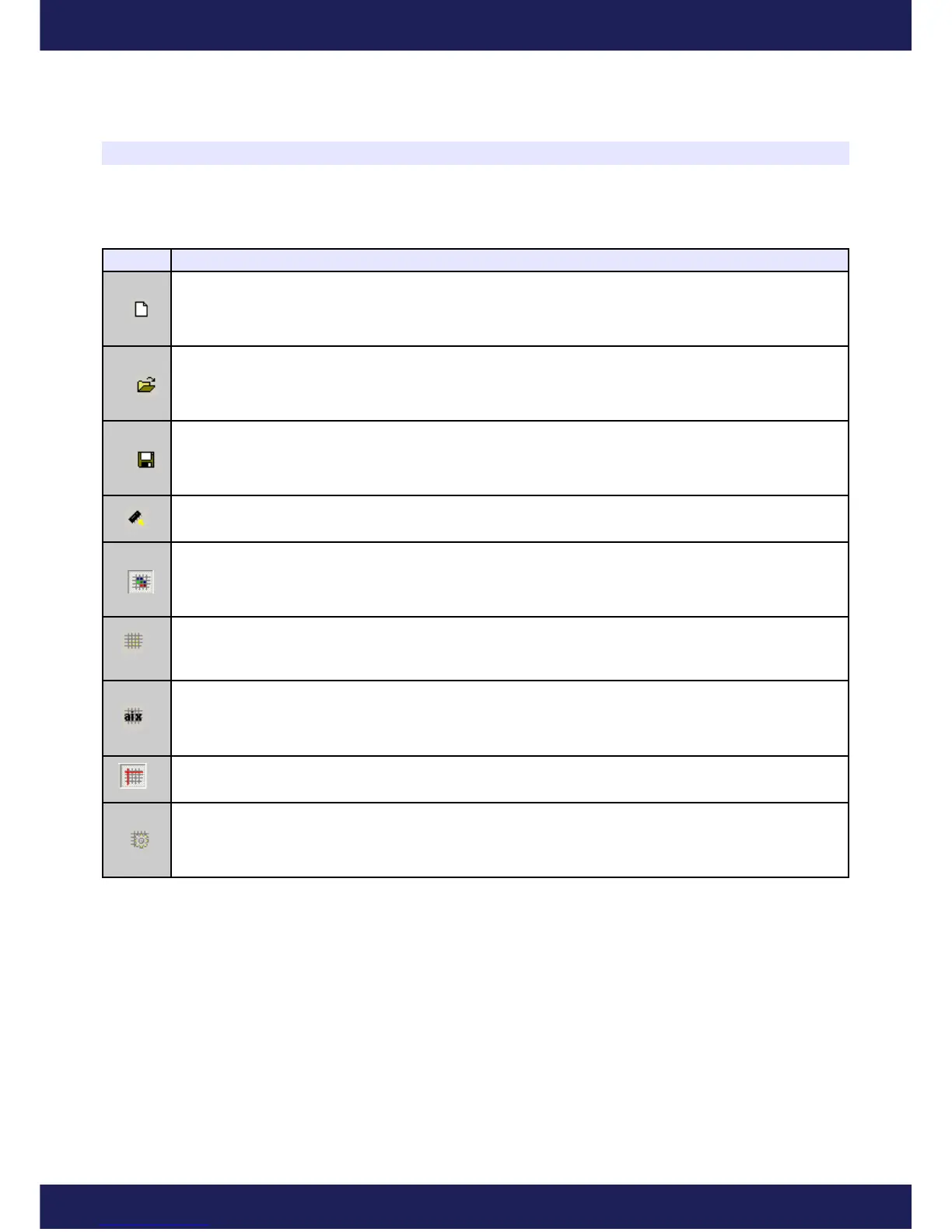
Icon Description
NEW PROJECT – erases tables' content and sets new default values.
OPEN PROJECT – project opening
SAVE PROJECT – saving a project on a disc
MAKE MAPS PERMANENT – saving tables and configuration in the Data Flash memory of the
device. Saving them is necessary so that they are not lost after power off.
COLORED CELLS - Turns on/off the colouring of the tables
MARK VISITED CELLS - Based on a data log, marks cells which have been “visited” during a
session.
DISPLAY ANALOG IN x VALUES - “covers” the table with the values from a given analog input
which are placed in a current log. It helps to, for example, cover a table with AFR or EGT values.
DISPLAY CROSS – displays an extra indicator, which precisely shows the current location of the
value from the table.
PROPERTIES – displays a window with extra options
Page 9
www.ecumaster.com


 To Next Page