DIGITAL ECU TUNER 3 – User Manual
Launch control
Launch control function (starting procedure) is used to set the optimal starting engine speed (for a given RPM the
ignition is cut off). In turbocharged engines, it also enables the increase of the boost pressure at the start thanks to
retarded ignition and an increased fuel dose.
Caution !
Using the launch control function in the turbocharged engines may lead to damaging
the turbocharger.
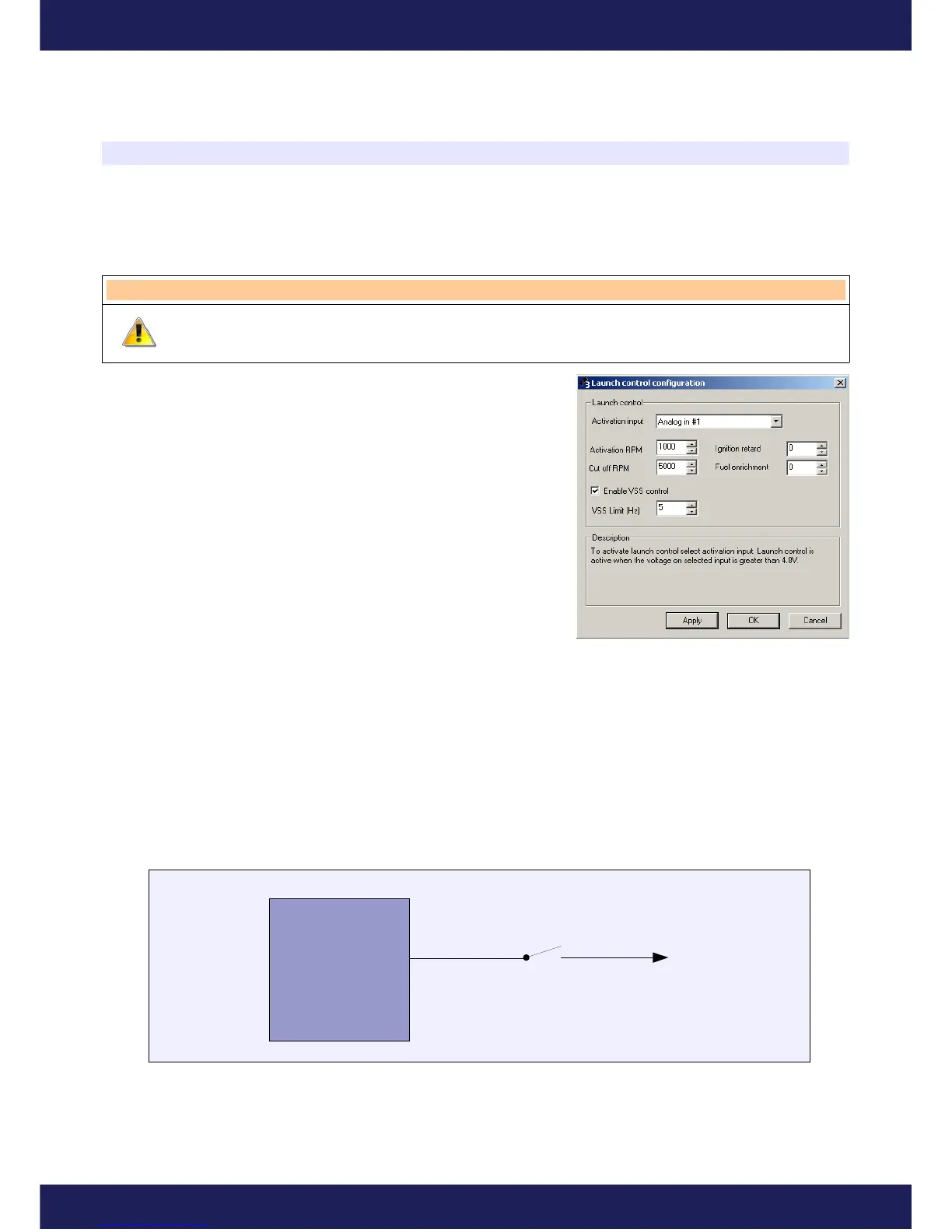
To configure the launch control, enter the “Setup” menu and choose
“Launch control configuration” option. To activate the function, select
the activation input. There is also a possibility to turn the launch
control off, when the car speed is greater than the defined value (VSS
sensor must be connected to the Frequency In input of DET 3).
Parameters:
Activation input – analog input used for activating the launch control
function,
Activation. RPM – engine speed which the ignition retardation and the fuel mixture enrichment takes place,
Cut off RPM – engine speed when the ignition will be cut off,
Ignition Retard – ignition retard angle during the staring procedure,
Fuel Enrichment – value added to the current Analog Out value.
Enable VSS control – enable vehicle speed sensor (VSS) control over launch control,
VSS Limit – frequency (in Hz) of Frequency In input, above launch control function will be automatically turned
off.
Wiring diagram
To activate the launch control, apply 5V voltage to a chosen analog input.
Page 42
www.ecumaster.com
Analog In
DET 3
Activation
switch
(SW1)
+5V


 To Next Page