C
EcubWare installation and instructions
---------------------------------------------------------------------------------------------------------------------------------------
--------
57
---------------------------------------------------------------------------------------------------------------------------------------
EcubWare Setting
--------------------------------------------------------------------------------------------------------------------------------------------
-----------------------------------------------------------------------------------------------------------------------------------------
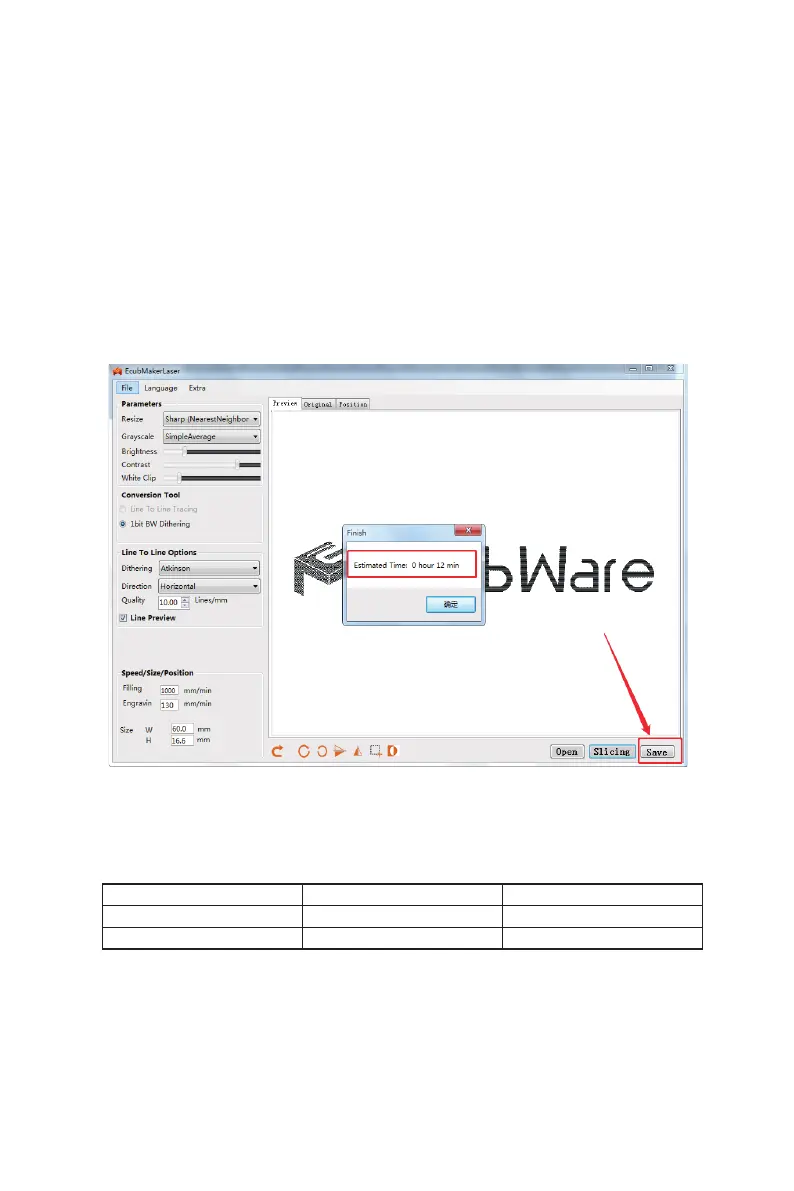
Among them:
quality.
The denser the point is, the greater
the value is, the denser the display is, and the reference
mass value is 10.
Air speed
. Represents the movement speed of the laser
head in the non-sculptured area of the image.
Carving speed
. Represents the moving speed of the laser
head in the sculptured area. The recommended value of
refractory materials should not be too high.
(6)
Save sculpture les gcode:
(7)
Laser engraving:
Step1.Insert SD cards with carved les into the slot of the machine.
Step2.Sculpture with a Wizard.Laser Print Guide.
(8)
Print Speed Recommended Value List:
Material Carving speed(mm/min) Quality(line/m)
Triple plywood 240 10
Kraft cardboard 300 10



 To Next Page