SE-601 Series Electrocardiograph User Manual Introduction
- 11 -
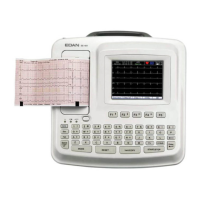
2.2 Keyboard and Keys
Figure 2-3 SE-601A / SE-601B / SE-601C Keyboard
Name Explanation
A Function Key
Selecting menu functions on the screen (Pressing F1, F2, F3 or F4
can move the cursor)
B Indicator
1 indicates that the device is powered by the mains supply
2 indicates that the device is powered by the battery
3 indicates the battery charging status
C
Power on / off
D Esc Canceling operation
E Tab
Pressing Tab can move the cursor forward, and pressing Shift +
Tab can move the cursor backward.
In the MANU mode, press Tab to switch the lead group.
F
Space: adding a space between typed characters
Feed Paper: before printing, if Paper Marker is set to Style1 or
Style2, you can press the Space key to advance the recorder paper
to the next black marker; if Paper Marker is set to No, you can
press the Space key to advance the paper for about 2cm. Press the
Space key again to stop advancing the paper.
G MODE
Press this key to select a working mode among AUTO, MANUAL
and RHYTHM.
NOTE: Only in the Work Mode Setup window can the R-R
mode be selected.
H RESET Draw the baseline to zero quickly in the case of baseline drift
I 1mV/COPY
In the AUTO mode, pressing the 1mV/Copy key can print the ECG
report which was printed out last time.
A
N
M
G
H
I
L
J
E
D
F
C
K
B (1, 2, 3)


 To Next Page