EdgeMarc 2900 Hardware Installation Guide
speeds and the overall performance of the system. Recommended micro
SD cards are class 10, UHS 1 or faster.
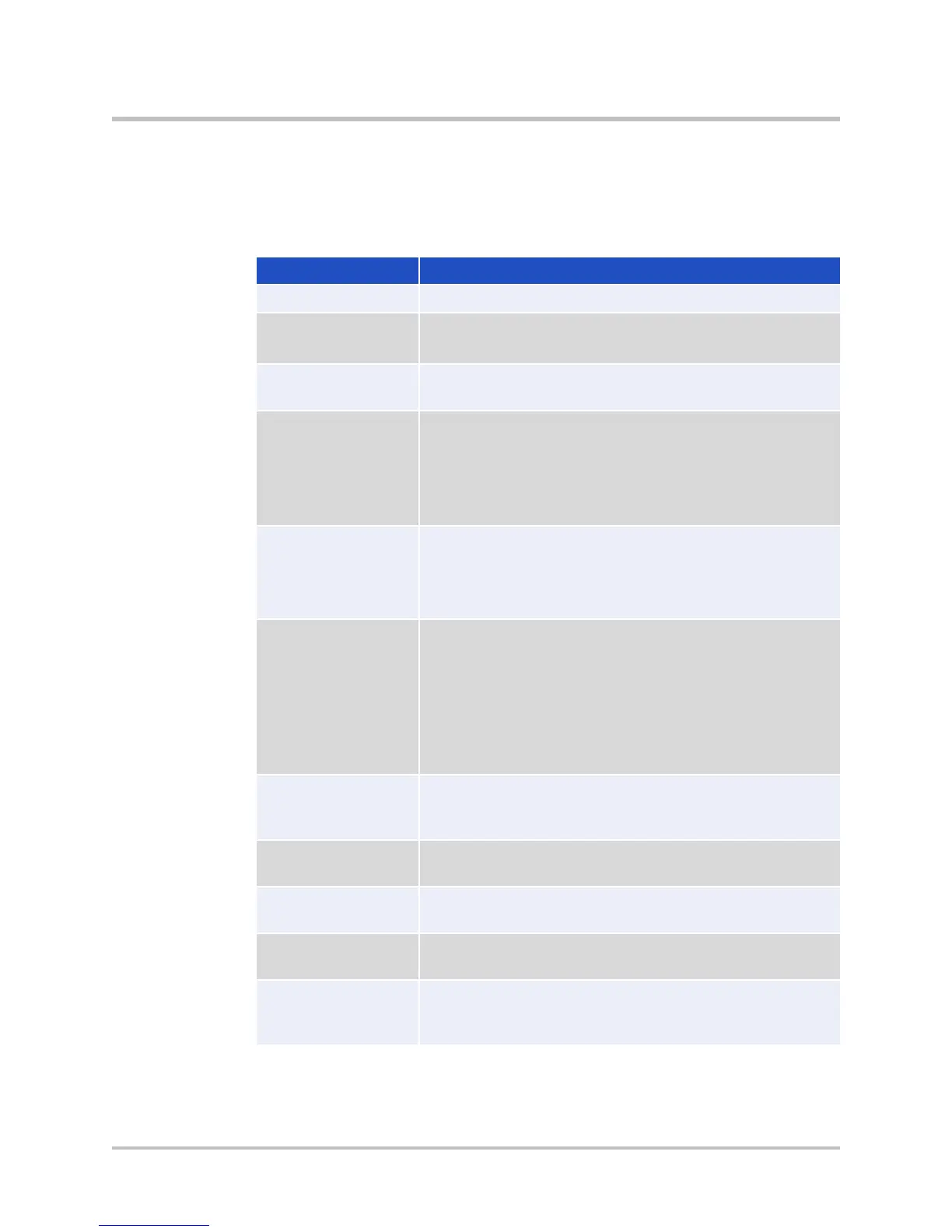
Table 2-4 SD Card Features
MS-DOS File Allocation Table FAT32
Recommended default is Class 10 or faster.
Maximum storage capacity: 32 GB per SD card,
4 GB per file.
delete = rm
copy = cp
rename = mv
edit = vi or cat
create = mkdir
delete = rmdir
rename = mv
mount = sdcard mount
unmount = sdcard umount
format quick = sdcard format
name/rename SD card = sdcard volume
<volume name>
status = sdcard check
You can copy the following types of files to and from
the SD card using the CLI: conf1, conf2, syslog,
pcap, mand logs, sys_report output.
The TFTP file server is used for endpoint
configuration file storage.
The FTP file server is used for endpoint
configuration file storage.
SSH into the EdgeMarc 2900e via SCP for remote
access to the SD card and files within the SD card.
SD card
insert/removal
A system alert is issued when an SD card is inserted
or removed. The alert contains the timestamp of
the event.
11 © 2017 Edgewater Networks. All Rights Reserved.


 To Next Page