Product Overview - 2900e
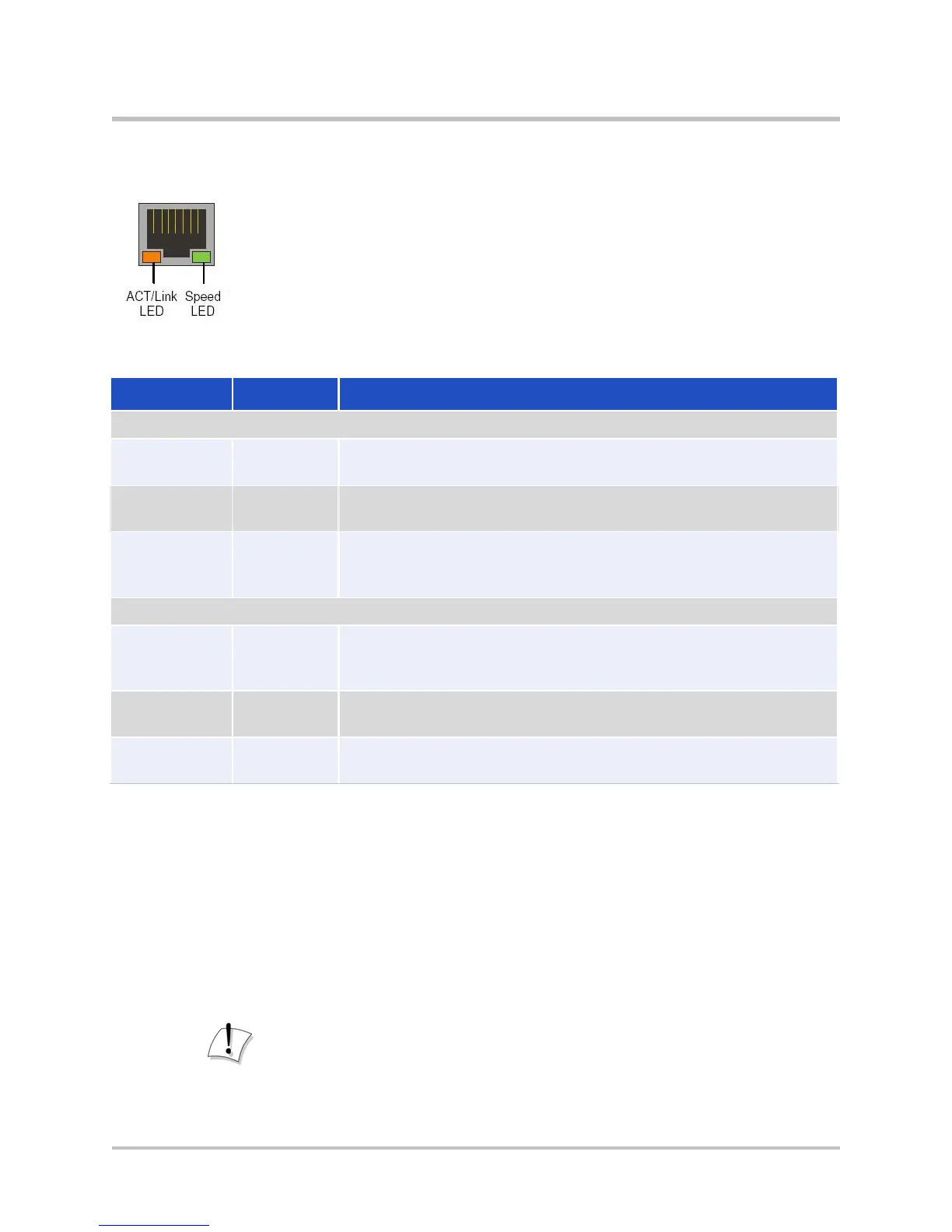
Ethernet Port LEDs
Table 2-3 Ethernet Port LEDs
Label Indication Status
Green
The device is powered and there is a good link between the
Ethernet port and the connected switch.
There is no connection between the ends of the network
cable. Check cable, replace cable.
Flickering
Green
The adapter is sending and receiving network data. The
frequency of the flashing varies with the amount of data
being transferred.
Flickering
Amber
A powered device is connected and the port speed is set to
1000 Mbps.
Green
A powered device is connected and the port speed is set to
100 Mbps.
The device is not powered, no cable connected, or the port
speed is set to 10 Mbps.
EdgeMarc 2900e micro SD Card Specifications
Table 2-4 describes supported EdgeMarc 2900e micro SD card features.
For information about configuring micro SD card settings, see the EdgeMarc
VOS User Guide in the Edgewater Networks Knowledgebase:
www.edgewaternetworks.com/kb
Disclaimer
Some older and slower speed micro SD cards do not support the entire
MMC specification. These cards can dramatically reduce the card write
© 2017 Edgewater Networks. All Rights Reserved. 10


 To Next Page