Product Overview - 2900a
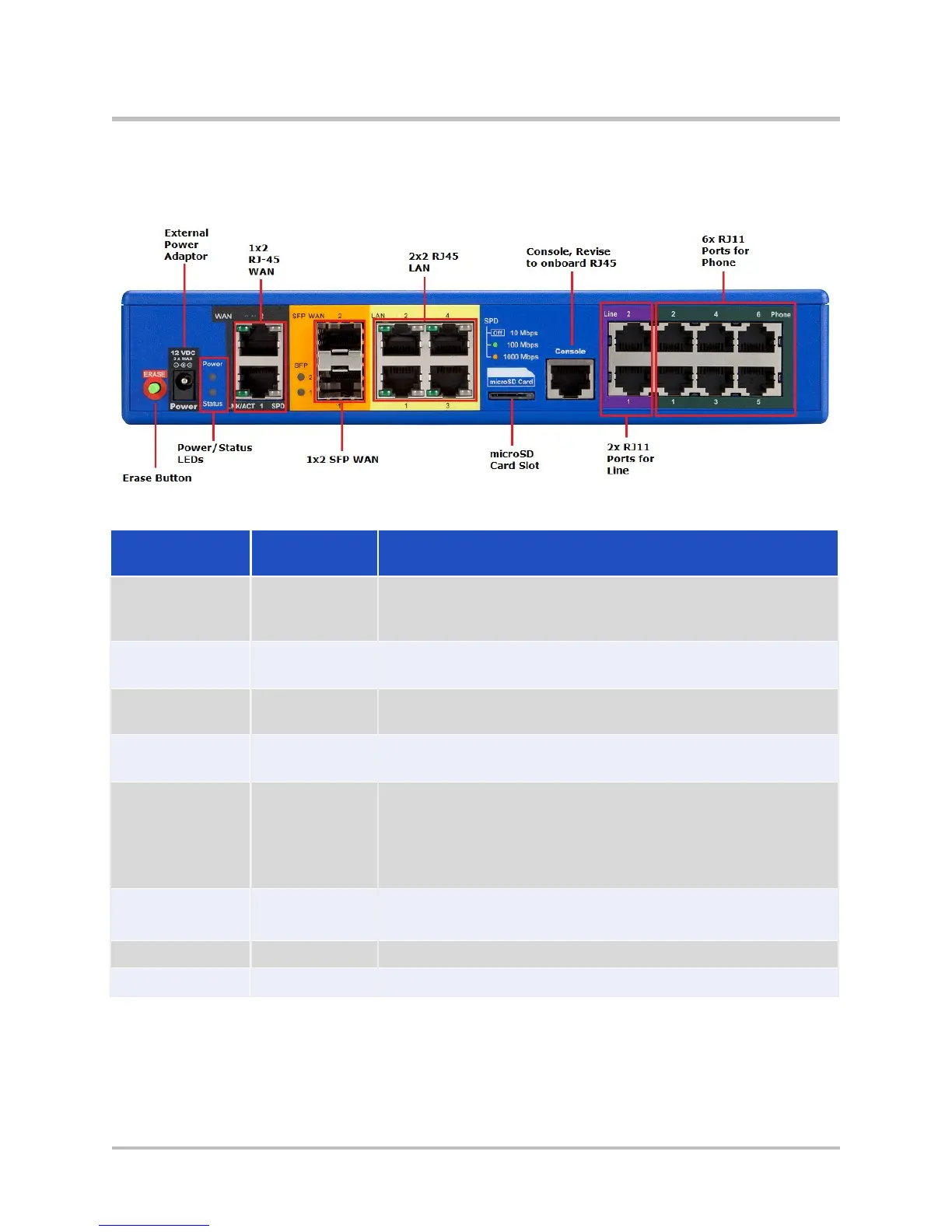
EdgeMarc 2900a Back Panel
Figure 3-2 EdgeMarc 2900a Back Panel
Table 3-2 EdgeMarc 2900a Back Panel Components
Label/Type
Function
Description
power
adapter
LEDs
and status
Refer to Table 3-1 for system and power status details.
Ports 1-2
2 x 10/100/1000 Mbps RJ-45 Ethernet ports for WAN
network connectivity (copper).
When lit, the SFP port is active and the copper RJ- 45
port is inactive.
SFP Ports 1-2
Small Form-Factor Pluggable (SFP) for fiber (RJ-45)
Gigabit Ethernet connectivity.
Either the SFP port (operating at 100/1000 Mbps) or the
RJ-
45 (operating at 10/100/1000 Mbps) port can be
active at a time.
4 x 10/100/1000 Mbps RJ-45 Ethernet ports for LAN
network connectivity (copper). Default IP: 192.168.1.1
2 x RJ-11 ports for 2 FXO channels
6 x RJ-11 ports for 6 FXS channels
© 2017 Edgewater Networks. All Rights Reserved. 15


 To Next Page