EasyManua.ls Logo

Edimax IC-7001W - VI-3-1-1. Camera

Edimax IC-7001W
111 pages
Print Icon
To Next Page IconTo Next Page
To Previous Page IconTo Previous Page
Loading...
69
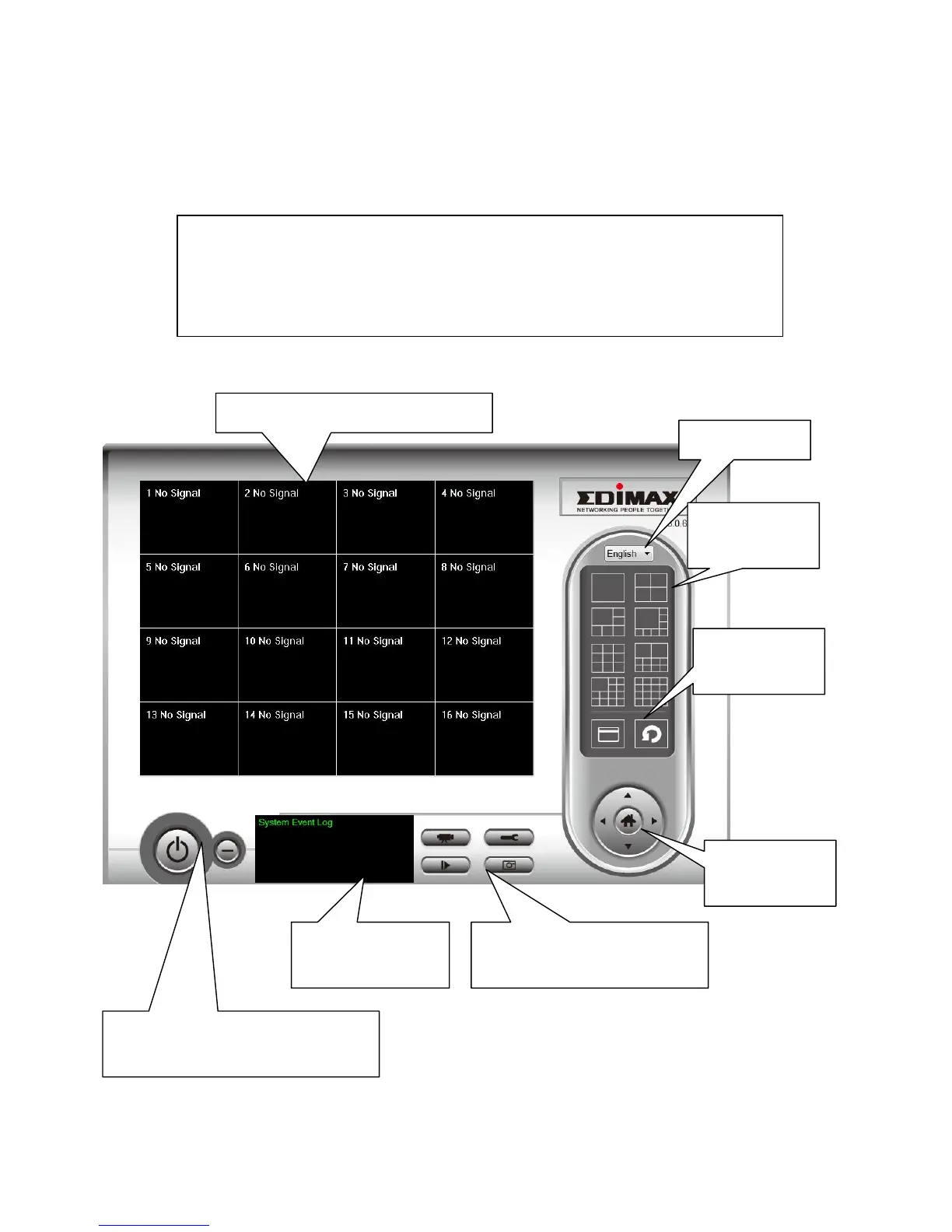
VI-2. Using the 16 Channel Viewer
You can select the ‘IPCam Surveillance Software’ icon from your desktop,
quick launch bar, or start menu to start the 16 channel viewer software.
Note: The network camera surveillance software will only work when
your monitors resolution is 1024 x 768. Please change the
resolution before you use the network camera surveillance software,
or it wont start.
Language
Display
layout
Full screen /
Scan
PTZ Control /
Home
Recording / System configure
Playback / Snap shot
Close window (stop surveillance) /
Minimize window
Video display area
Message display
box

Table of Contents

Other manuals for Edimax IC-7001W

Related product manuals