73
Using the V-8 with Other Equipment
(continued)
Input/output
settings
Introduction Connections Basic operation Switching images Effects BPM sync External devices Video fader Appendices
* Power up the RSS M-400, and then turn V-LINK mode on.
* Make sure that the M-400 and the V-8 are set to the same device ID. The V-8’s device ID is specified by the “MIDI Setup”
menu item “Device ID.”
* Set the “MIDI Setup” menu item “MIDI Out/Thru Switch” so that the V-8’s MIDI OUT/THRU connector is functioning as
“Out.”
1
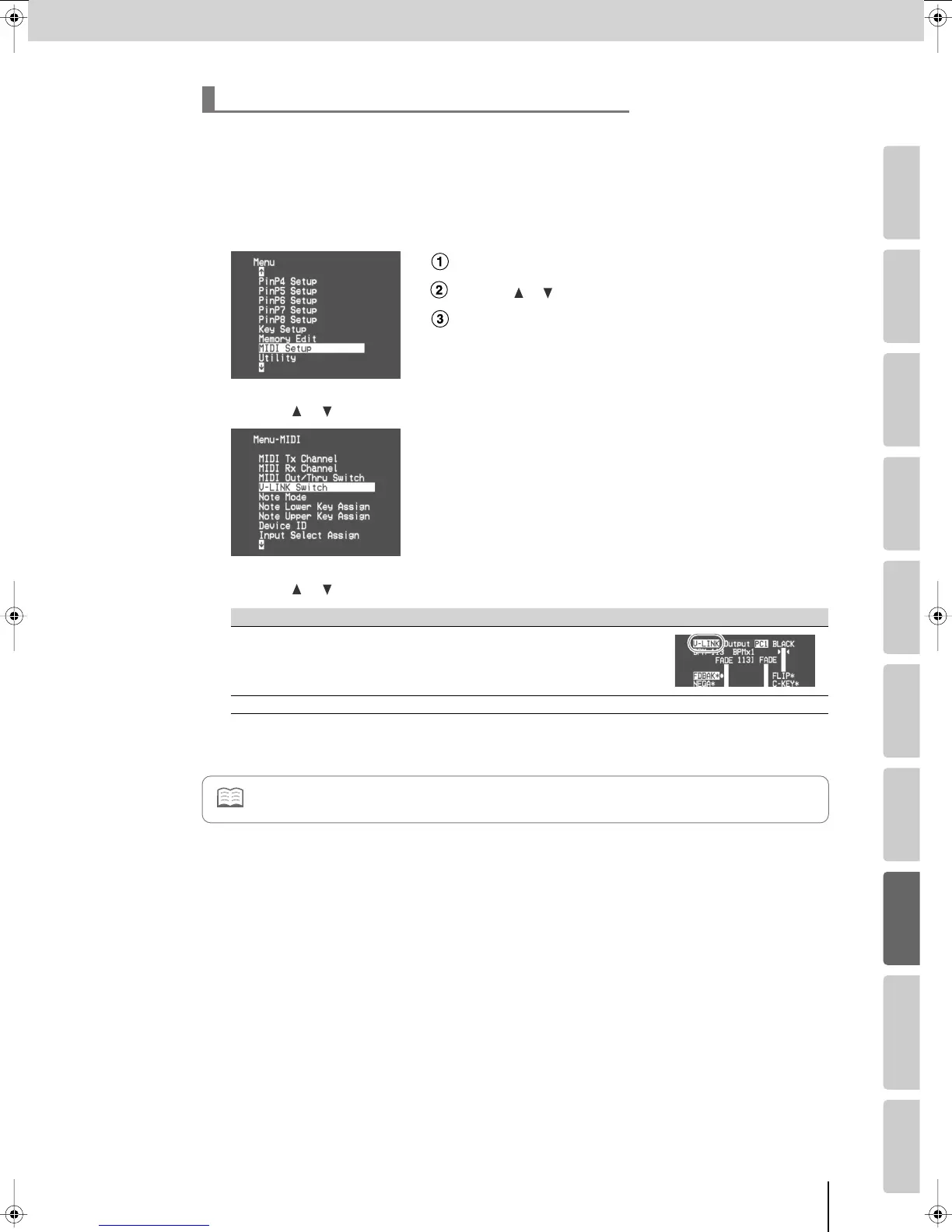
Press the [MENU] button to access the menu, and choose “MIDI Setup.”
Press the [MENU] button to access the menu.
Use the [ ] [ ] buttons to select “MIDI Setup.”
Press the [ENTER] button to confirm your selection.
2
Use the [ ] [ ] buttons to choose “V-LINK Switch,” and press the [ENTER] button.
3
Use the [ ] [ ] buttons to turn V-LINK mode on/off.
4
Press the [MENU] button several times to close the menu.
Turning V-LINK mode on/off
Value Details
On
V-LINK mode will be on.
When V-LINK mode is turned on, the preview monitor (p. 26) will
indicate “V-LINK.”
Off
V-LINK mode will be off.
Refer also to the M-400 owner’s manual.
V-8_e.book 73 ページ 2008年5月15日 木曜日 午後1時11分



 To Next Page