MaxLoader User’s Guide
9
About This Manual
TopMax/ChipMax/ChipMax2/TopMaxII/UniMax/ProMax-8G (4G) User Guide
explains how to install and run the programming software in your computer.
Chapter 2 contains instructions for installing and running MaxLoader.
Chapter 3 describes the most popular programmable devices.
Chapter 4 contains all terms and symbols used in the manual.
Chapter 5 describes basic operating examples of programmers.
Chapter 6 is organized by main operating commands and gives detailed
instructions on each command.
Chapter 7 provides troubleshooting information for identifying and
solving problems with programmers. It provides a detailed guide for
EE Tools’ technical support and return material procedures.
Chapter 8 introduces a useful product, EPROM Emulator.
Chapter 9 describes the recent information of NAND Flash
Chapter 10 contains glossary about programmable devices and package
types.
This Manual assumes that you have a working knowledge of your personal
computer and its operating conventions.
General Description
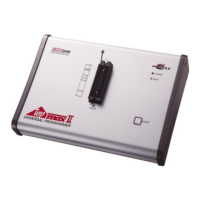
TopMax/ChipMax/ChipMax2/TopMaxII/UniMax/ProMax-8G /4G are software
driven device programmers that support a wide variety of programmable
devices including: EPROM, EEPROM, Serial PROM, EPLD, PEEL, GAL,
FPGA, and single chip Microcontroller.
TopMax/ChipMax easily connects to the parallel printer port of any IBM PC,
and can operate with a full spectrum of IBM compatibles: PC 386, 486, Pentium,
PS/2, portable (laptop), and clone computers. TopMaxII/UniMax/ProMax-8G
(4G) connects to the USB(2.0) port of any IBM PC, and can operate with a full
spectrum of IBM compatibles.


 To Next Page