5.3 WiFi
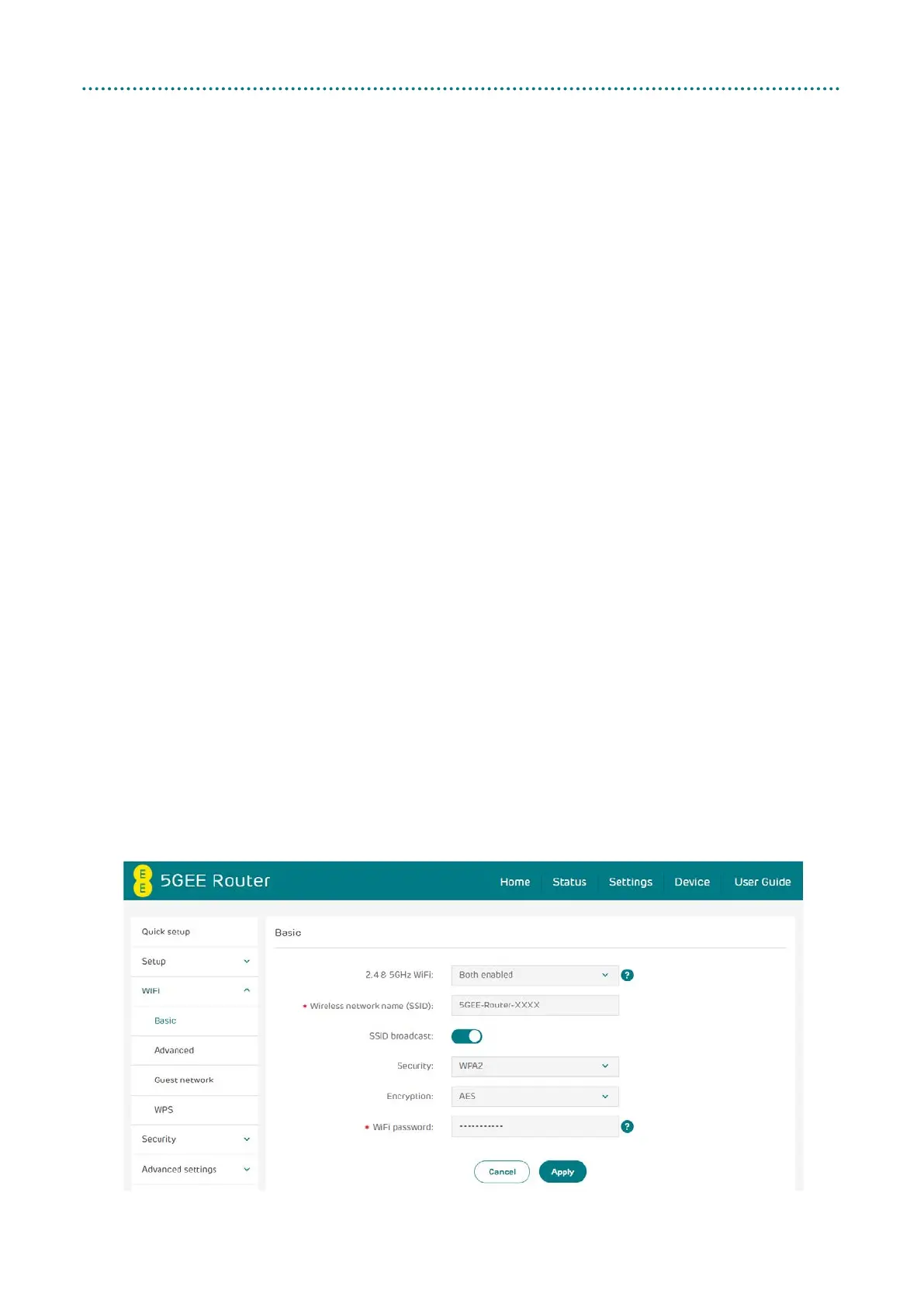
Basic
• 2.4 & 5GHz WiFi: Disable WiFi, or select the 2.4 or 5 GHz bands only. Please
note that changes made here will also affect the Guest WiFi feature.
• Wireless network name (SSID): This is the name of the WiFi network
and is used to identify your WiFi network.
Note: The SSID can be between 1 and 32 characters long, but must not
contain the following characters, ?, ", $, [, \, +, and cannot start/end with
a space.
• SSID broadcast:
Note: If you do choose to disable this, the SSID will no longer be
displayed and you will need to set up a connection to the SSID manually
on your device. You will need to know the exact SSID and password to
connect.
• Security: You can choose the security mode. Available options are
Disabled, WPA2, WPA/WPA2, WPA3 or WPA2/WPA3.
• Encryption: This is set to AES by default. Available options are TKIP,
AES, or Auto.
• WiFi password: The WiFi password should be at least 12 characters in
a combination of numbers, upper case letters, lower case letters and
non-repeating characters one after another (e.g. aaBBccdd33).



 To Next Page