Parameterization
Page 50 of 72 MSM-USM2G-BA-UK-004
Assignment to collective reports
If one of these check boxes is activated, the alarm triggers the corresponding
collective alarm. Multiple assignments or none are possible. All alarms assigned to a
collective alarm form a group. This assignment is also important for alarm
acknowledgement and RESET.
Horn triggering
None: Alarm does not trigger horn
With horn lock: Horn acknowledgement only possible after lamp acknowledge
No horn lock: Horn acknowledgement always possible
Triggering of the alarm channel
The source of the signal for each channel can be defined with this checkbox.
Physical input: Alarm via the physical input
Interface: Alarm via interface command (IEC101/104 or IEC61850)
Display: Alarm occurs via interface command and is only displayed (LED), it is not
included in the fault alarm sequence (No horn activation and no collective alarm
formation etc.)
Logic: Alarm via internal logical link (currently only possible via an EXCEL list to be
imported Section "Parameterization via Excel list")
Device error: Alarm channel is triggered by a device error as defined in the menu
“System” “Error mask”
Analog input: Alarm is formed from an analog input
Watchdog: Alarm is generated from the function Watchdog object for monitoring of
the IEC 61850 communication.
Activation of the alarm channel
If this checkbox is unticked, the channel will not be processed. The alarm will be
ignored within the complete system.
Default setting: channel activated
Table 5.1b: Parameters of reporting channel
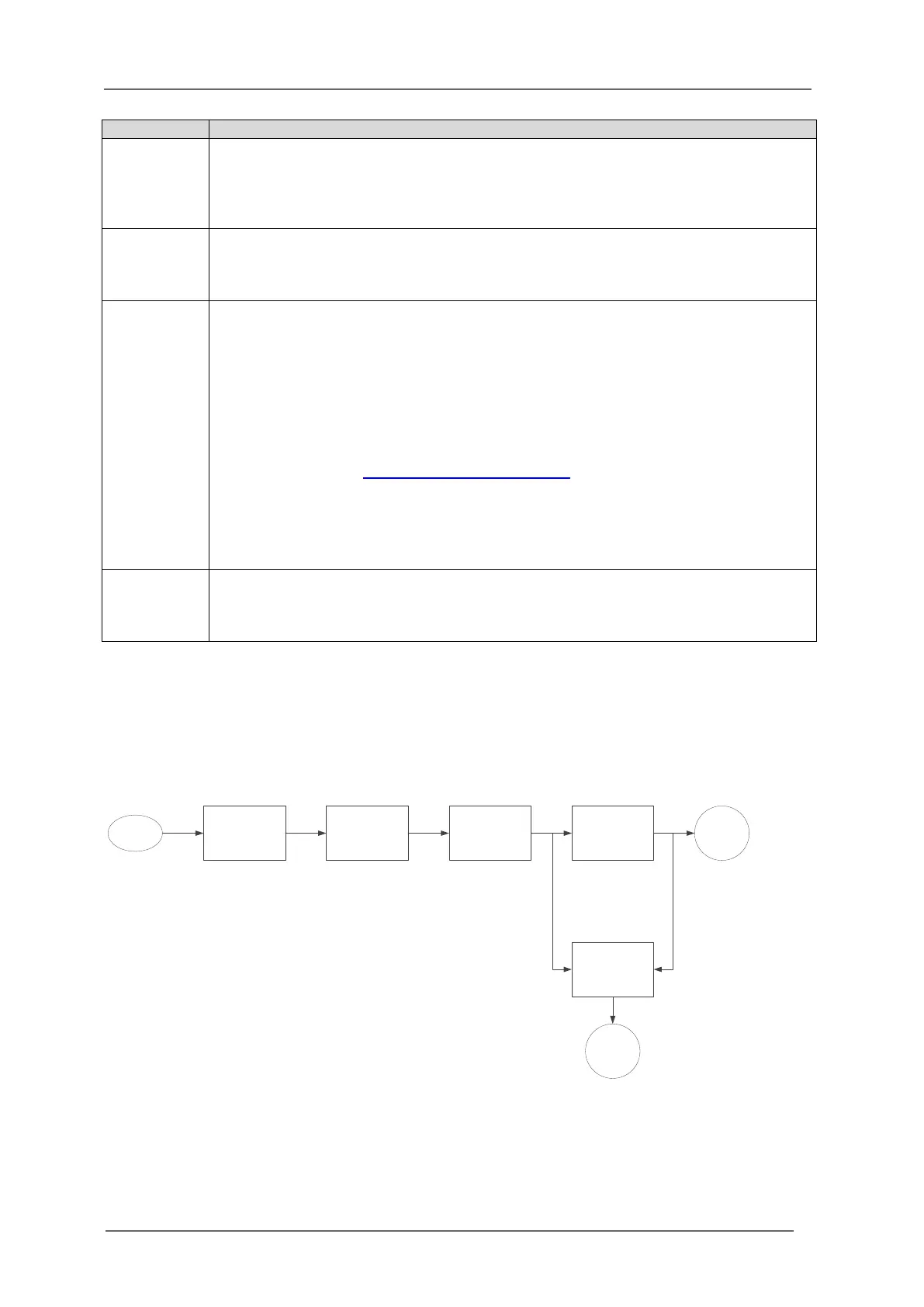
Explanation of the delay times
The following drawing illustrates the mode of operation of the two delay times and the defluttering.
The options for triggering of the optionally integrated repeat relays is displayed as well ( section
“Repeat relays”).
Fig. 5.14 Schematic illustration of the alarm processing in the annunciator
Debouncing
Defluttering
(Supression of
fluttering inputs)
Raising / falling delay
(Alarm response delay)
Reporting sequence Alarm
Triggering of repeat
relays
Relay
activated
Signal input
Input-parallel
Output-parallel


 To Next Page