EasyManua.ls Logo

Effekta AX M2 Series - Export Data Protocol

Effekta AX M2 Series
132 pages
Print Icon
To Next Page IconTo Next Page
To Previous Page IconTo Previous Page
Loading...
Operation Page 97
Solar inverter
|
V1.7
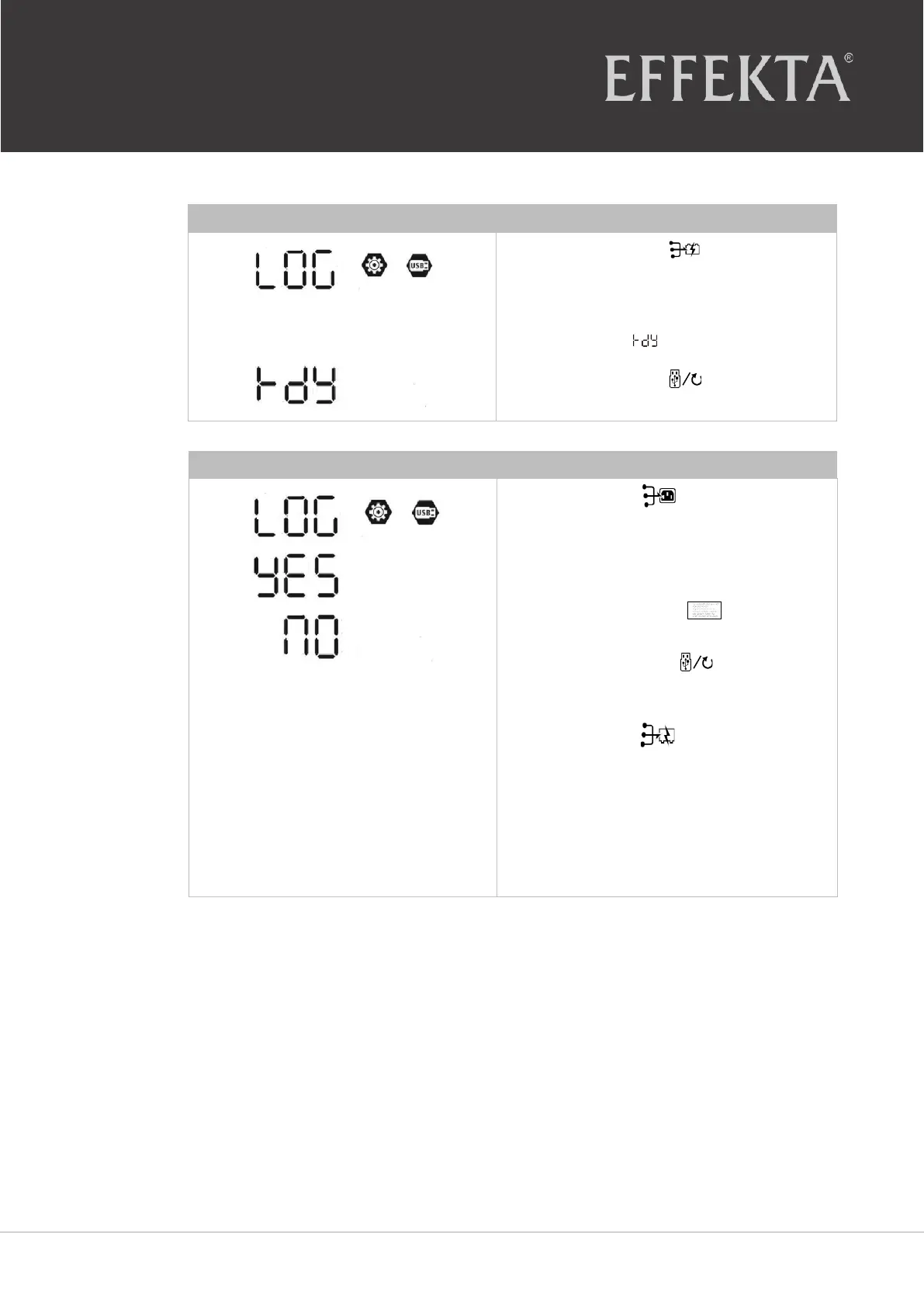
10.4 Export data protocol
Step 1
Press the button to export the
data protocol from the inverter to the
USB flash
drive
.
When the selected function is
ready
,
the LCD shows
.
Press the button to reconfirm
the
selection
.
Step 2
Press the button
,
to select
"yes."
LED 1 blinks once per second
during the process.
Once this action has been completed,
the display shows ;
all LEDs light up!
Then press the button
to return
to the main
screen
.
Or:
Press the button to select "no"
and return to the main
screen
.
If a button is not pressed for 1
minute, the main screen is
automatically
displayed
.

Table of Contents

Related product manuals