EasyManua.ls Logo

Effekta AX M2 Series - LCD Display Information

Effekta AX M2 Series
132 pages
Print Icon
To Next Page IconTo Next Page
To Previous Page IconTo Previous Page
Loading...
Control and display elements - Page 47
Solar
inverter
|
V1.7
:
Export data
protocol
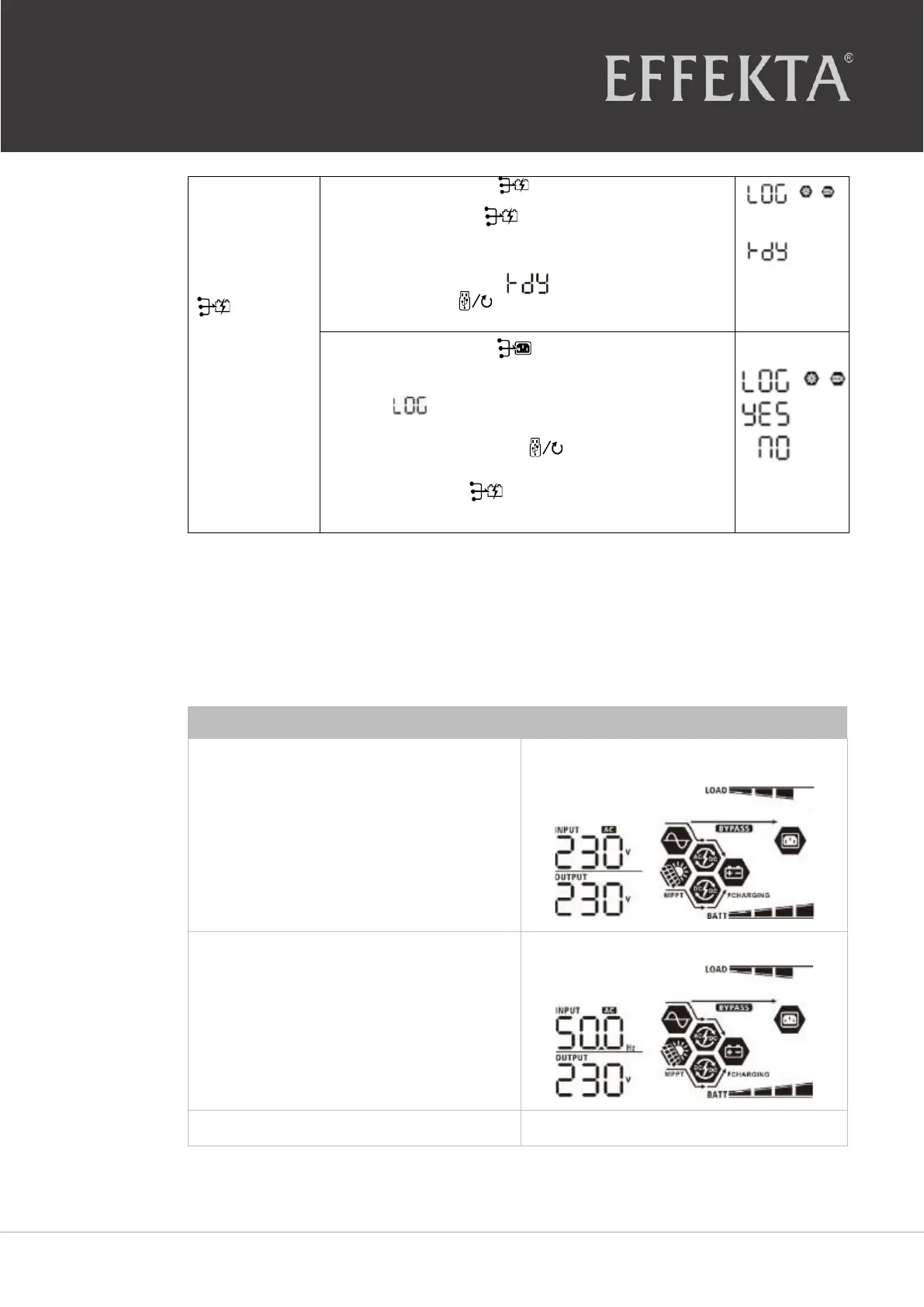
Press the button
“
”
to export the data
protocol of the inverter to the USB
disk
.
When the
selected function is
ready
,
the following is
displayed on the LCD
“
” .
Press the Button
to confirm the selection
again
.
⚫
Press the button
“
”
to select "yes." The
LED 1 blinks once per second during the
process
.
On the display, only
is displayed and all LEDs light up after
the process is
completed
.
The press the button “
”
to return to the
main screen or press
the button to select "no" and return
to the main
screen
.
When a button has not been pressed for 1 minute, the device automatically returns
to the main
screen
.
6.4 LCD display information
The LCD display information can be switched by pressing the "UP" or "DOWN" button.
The information is displayed according to the following order:
Meaning
Display information
Input
voltage/output
voltage
Input
voltage
= 230 V, Output
voltage
= 230 V
Input frequency
Input
frequency
= 50 Hz
PV voltage
PV
voltage
= 80 V

Table of Contents