17
8
1
3
2
4
7
65
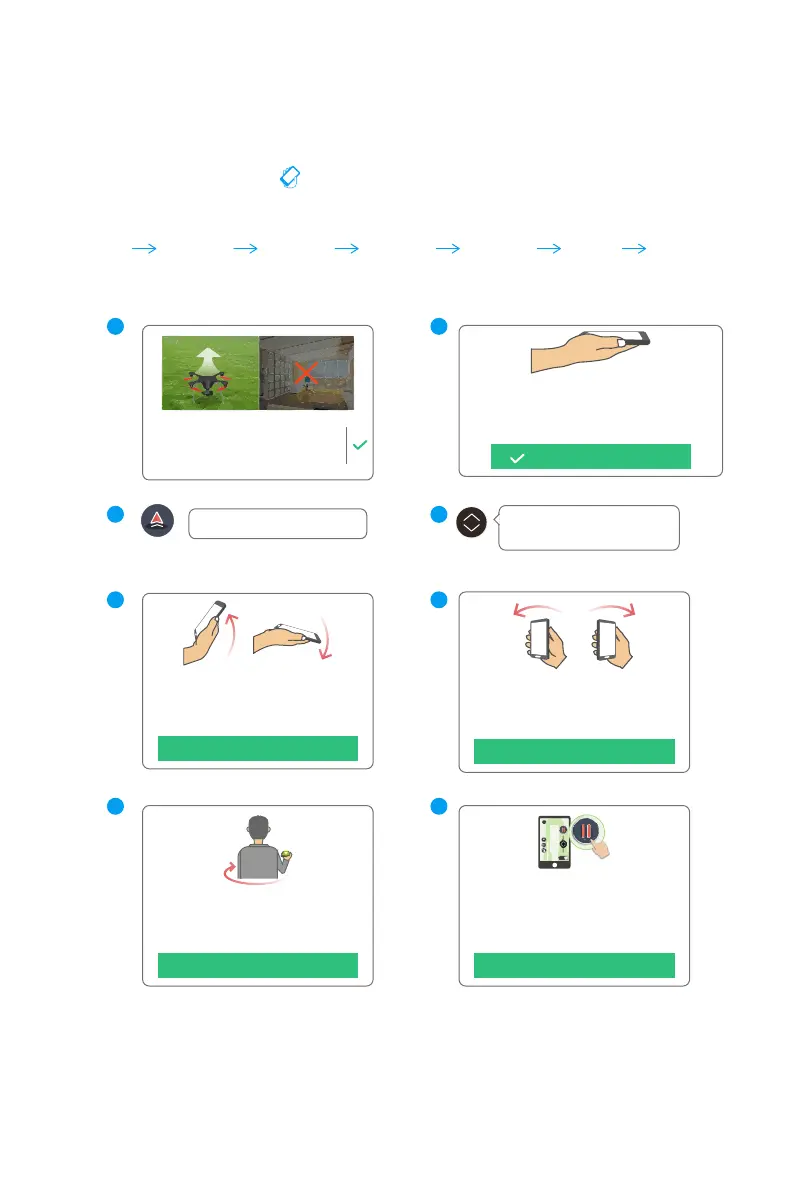
2. Practice Avatar Mode
Please hold the mobile device flat and
click "OK". And then you can tilt forward
or backward to control the drone flying
forward or backward.
OK
Please hold the mobile device flat and
click "OK". And then you can tilt
leftward or rightward to control the
drone flying leftward or rightward.
OK
Please hold the mobile device flat and
click "OK". Turn your body and the
drone will rotate accordingly.
OK
You have finished the basic tutorial course
of avatar mode, place your mobile device
flat and click "OK" to enjoy the avatar
mode. Click “Hover” and the drone will
hover.
OK
Click TAKE OFF button.
Increase the altitude to the 30
meters (100 feet) with your thumb.
Place the drone in an open space with
its nose pointing away from you. Please
keep a 5 meters(15 feet) distance from
the drone. Please do not fly indoor.
You are now in Avatar mode where
GHOSTDRONE can be controlled by tilting
and turning your phone. Before starting,
please hold your phone flat.
The mobile device is flat.
Check
battery level
Check
surroundings
Hold your
phone flat
Hover
Tilt your phone
to maneuver
Ascend
and descend
Take off



 To Next Page