03
Pre-flight Inspections
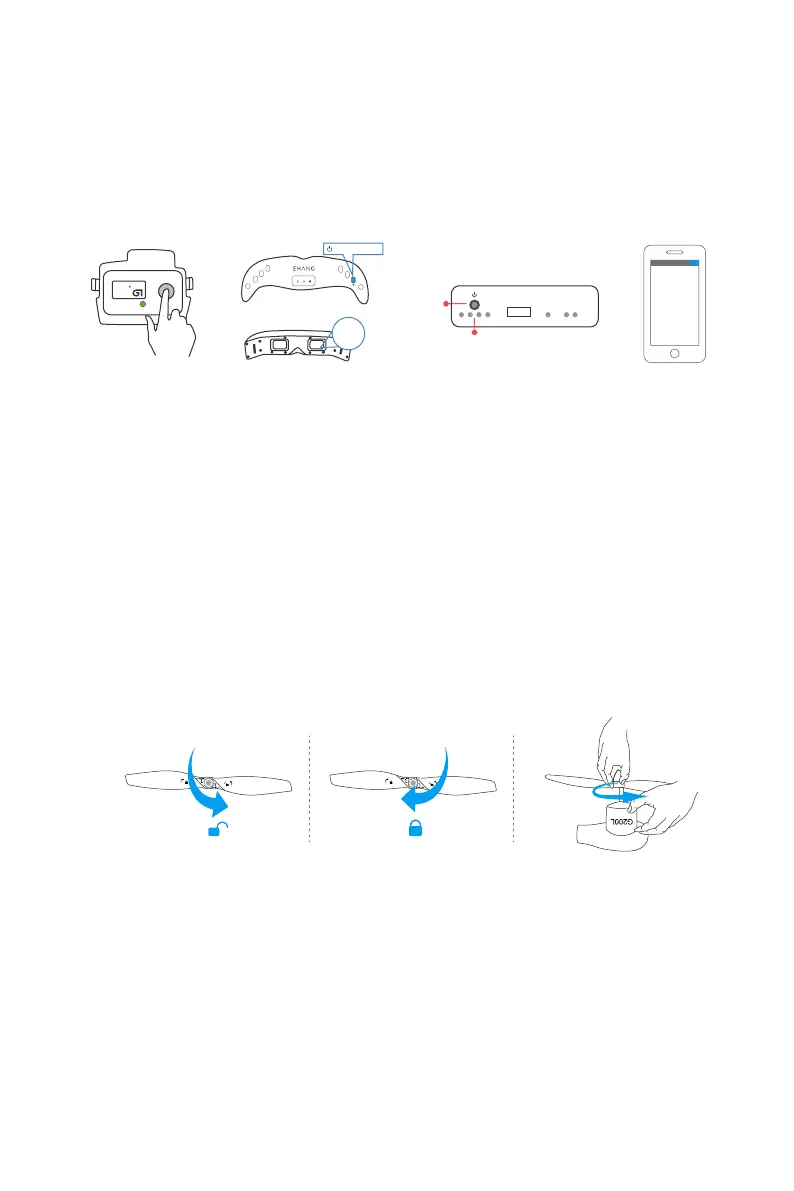
Smart Flight Battery: Press the circular button on battery once to light up the LCD screen to check the battery
percentage.
VR Goggles: Press and hold the power button on the VR Goggles until all indicator lights are lit to turn on the
goggles. Look into the VR goggles to find its battery percentage on the bottom right hand corner of the
screen. To turn off the VR Goggles press and hold the power button until all indicator lights are off.
G-BOX: Press the power button once to turn on the G-BOX. The indicator light indicates the battery level of
the device. As battery level goes low, the lights will turn off one by one from left to right. Press and hold the
power button until all lights are off to turn off the G-BOX.
Smartphone: Please check your smartphone battery level before each flight.
Please check if the propellers are properly installed before every flight by tightening the propellers again using
your hands. Please pay attentions to any damages on the propeller, broken and deformed propellers cannot
be used for flying operations.
Check Battery Life
Check Propellers
16.66
4516
mAh
98%
Smart Flight Battery
Press and hold
5.8G
VIEW SWITCH
MENU
+
_
VISION DATA POWER
CHANNEL SEARCH
2.4G
Battery xx%
VR Goggles
Switch
Charge/
Battery Life Indicator
USB
PWR DATA
G-BOX Smartphone



 To Next Page