20
Note: For your safety, Avatar Mode will be unlocked after you have flown in Touch-to-Go Mode for 3
times.
2. Avatar Mode
17
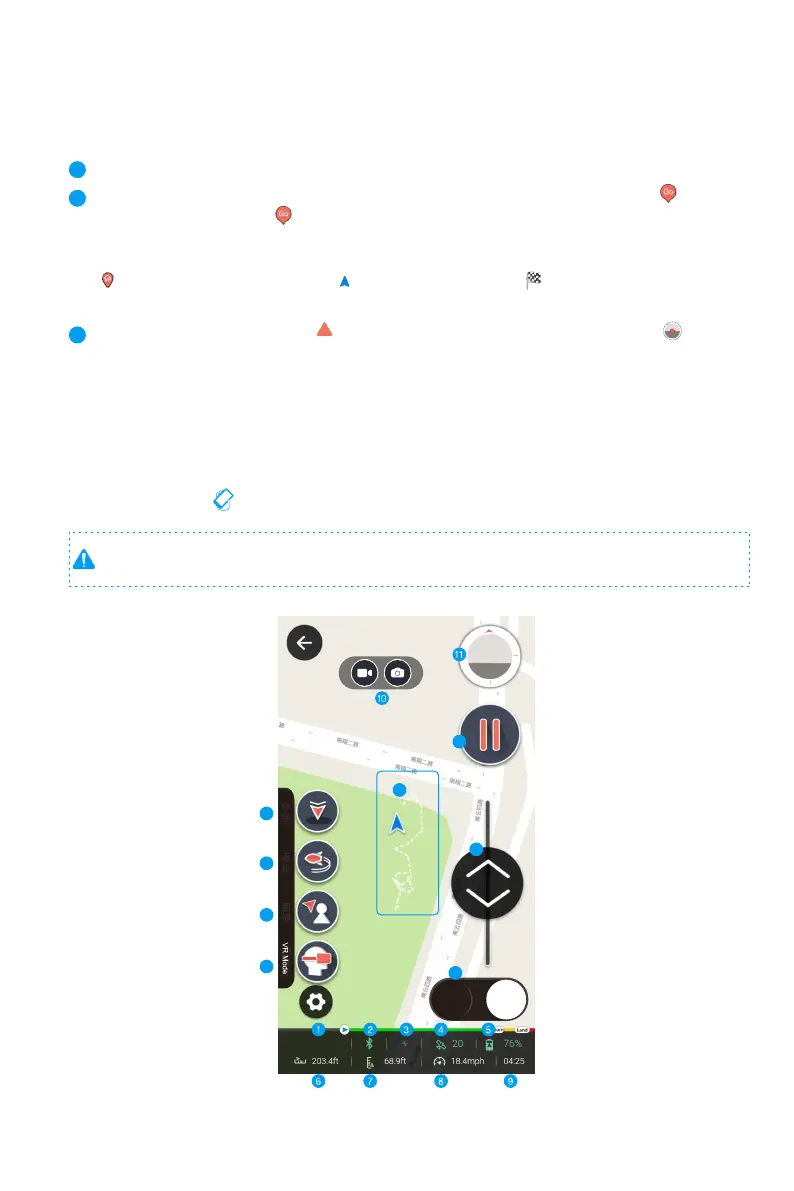
Emergency Hover: GHOSTDRONE will stop and hover at its current location.
18
GHOSTDRONE locations & Waypoint indicators: Tap anywhere on the map, a icon will
appear, tap again on the icon to confirm the command and the GHOSTDRONE will fly to
its target location. The white dotted line indicates the flight path.
Drone indicator Takeoff location
Destination
19
Micro Control: The red triangle indicates the headings of the GHOSTDRONE. Micro
control flies the GHOSTDRONE in a headless configuration, the drone will fly according to
the direction of how you drag the red circle. GHOSTDRONE will move to the same direction
as you drag regardless of where its head is currently pointing.
12
13
14
15
16
17
18
M GPS
Land
Return
Follow-me
GPS
Mode
19



 To Next Page