22
3. Waypoints Mode
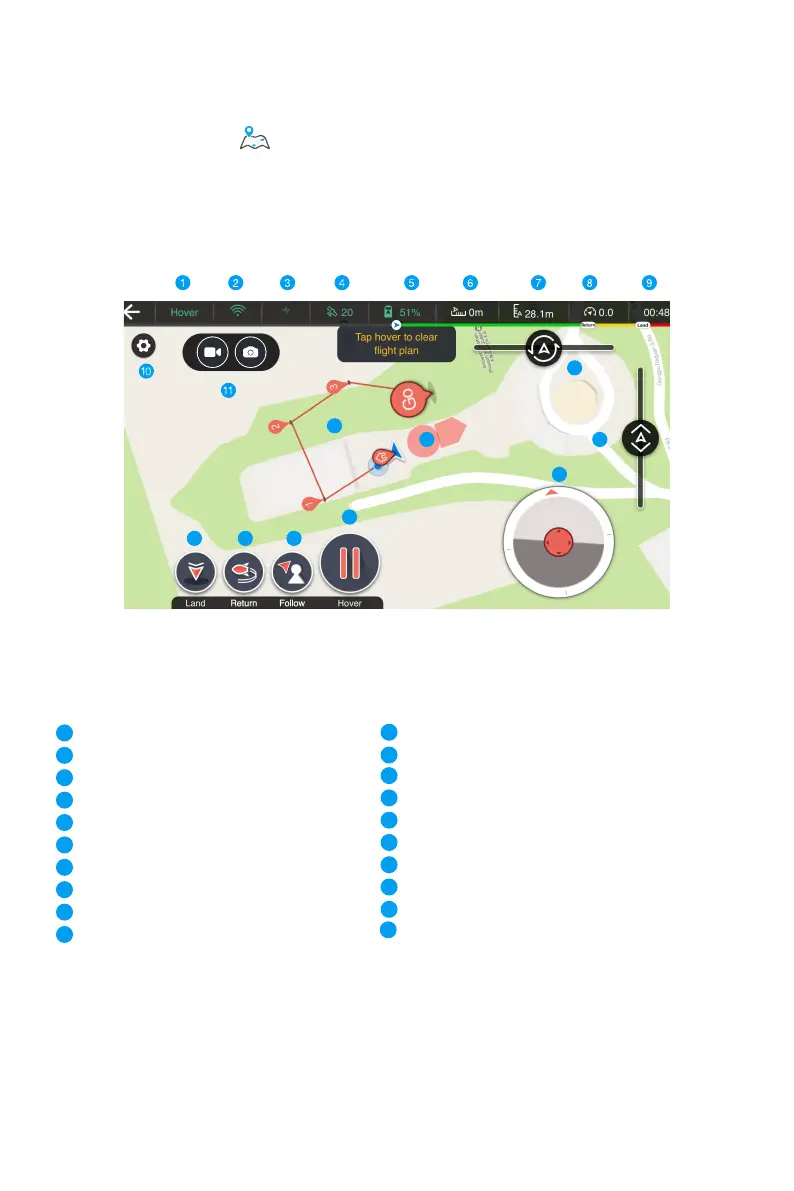
Enter the control interface of this mode, set a flight route on the map and tap Go, the drone
will start a flight following the preset route. To reset the flight route, just tap the Hover button.
12
13
14
15
16
17
18
19
20
Video/ take photo
Heading of GHOSTDRONE
Throttle control
Land
Return
Follow-me
Hover
GHOSTDRONE locations & Waypoint indicators
Micro control
No-fly zone
Current Status
Connection status of Bluetooth or Wi-Fi
Connection status of GHOSTDRONE
Number of satellites
Smart flight battery level
Horizontal distance to drone
Current altitude of GHOSTDRONE
Current flight speed
Flight time
Settings
8
9
1
3
2
4
7
6
5
10
12
13
14
11
15
16
17
18
19
20



 To Next Page