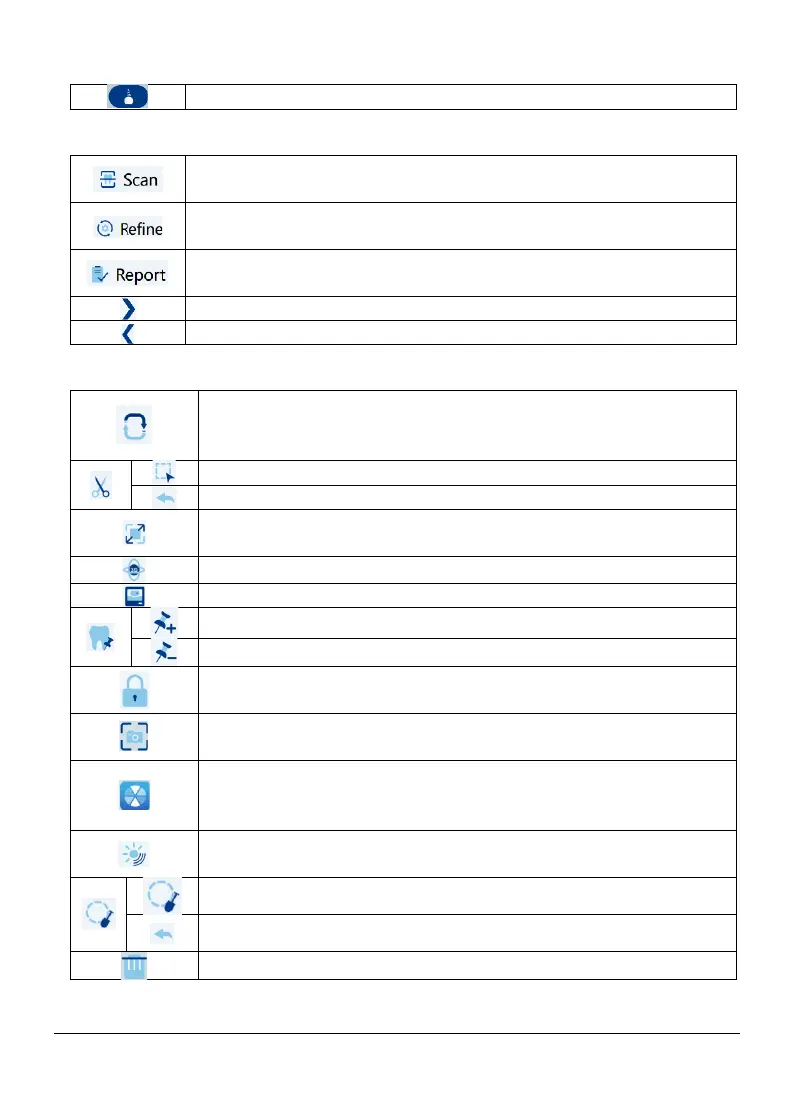
5.2.4 Process guide
5.2.5 Data editing toolbar
5.2.6 Data refining toolbar
Implant: Acquires a 3D model of scanning rod
Scan: Enables you to scan the upper and lower jaw, and the
bites
Refine: Refines the acquired 3D model, and enables you to
use various tools to check the refined results
Report: Complete the case information and save the scan
results
Next step: Proceed to the next step
Previous step: Proceed to previous step
Swap upper and lower jaws: Changes the acquisition mode
from upper to lower or vice versa, if you accidentally scan
Free cut: draw a curve to delete unnecessary data.
Undo: Return to previous step
Zoom fit: Scales the 3D model to the best size to fit the
display region.
:
Io camera: Enables you to select intraoral images
Add tooth mark: Mark one or more preparation areas
Delete tooth mark: Delete marked preparation area
Lock area: Lock an area on the model to prevent it from
being updated by additional scanning
Take snapshot: Take a snapshot of the 3D model displayed
on the screen
Color mode: When selected, displays the 3D model in the
actual color. When deselected, displays the 3D model in
Vivid display mode: After the color mode is selected, select
the Vivid display mode, the model color is more realistic
Circle cut: draw a circle to delete unnecessary data.
Undo: Return to previous step
Delete: Delete all models from the current case.
Page 22 / 51


 To Next Page