37
Chapter4SelfCalibration
●
Setting calibration schedule
Set the calibration schedule for SelfCalibration.
Attention
• Clock adjustment is necessary for SelfCalibration to operate.
Procedure
1. Choose “SelfCalibration” from the Adjustment menu, and press
.
2. Choose “Settings” from “SelfCalibration”, and press
.
3. Choose “Schedule” from “Settings”, and press
.
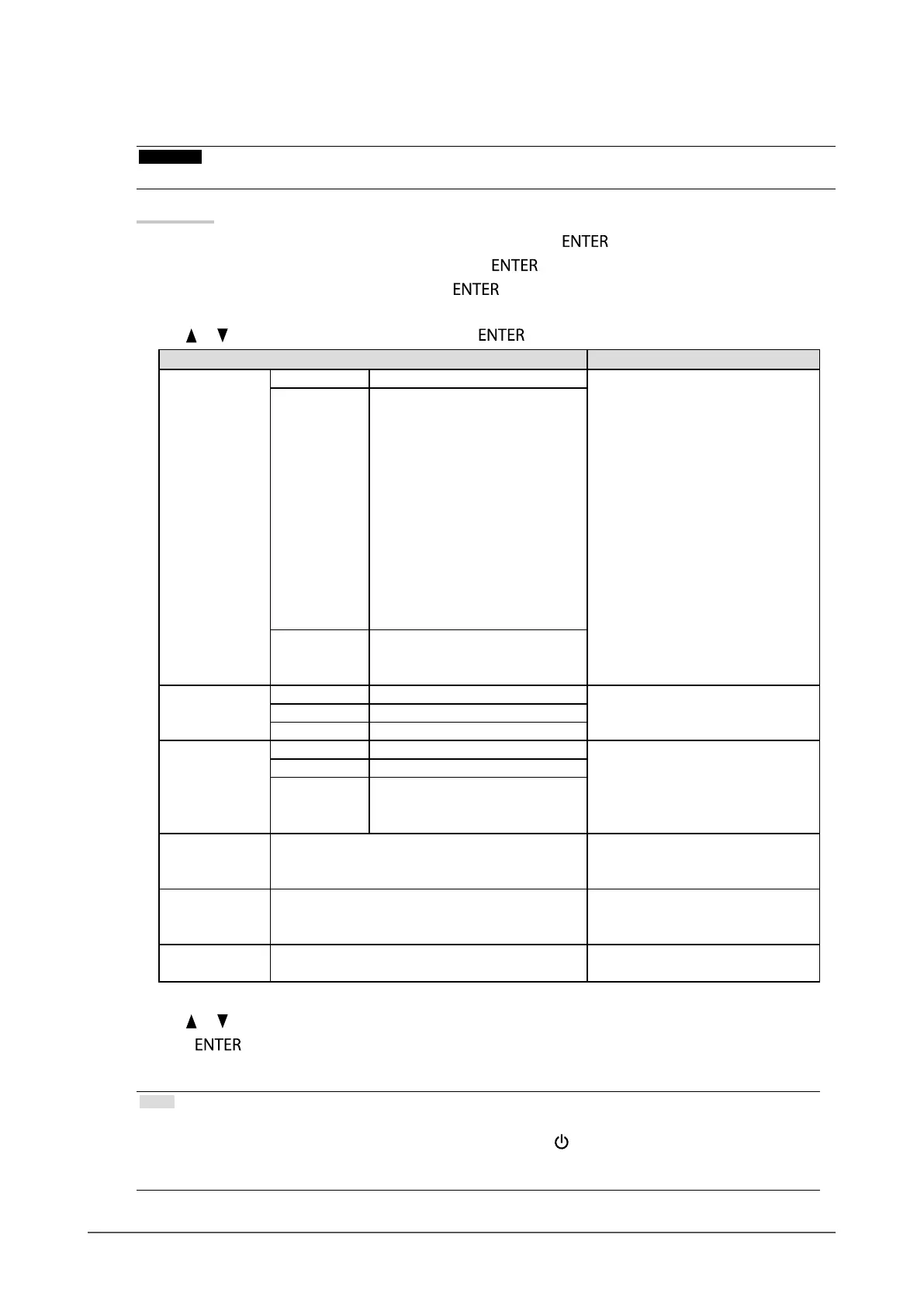
The schedule setting menu appears.
4. Use or to select the items to change, and press .
Settings Setting
StartingTime Off SelfCalibrationisnotexecuted. Setthetimingatwhich
SelfCalibrationisexecuted.
PowerSave Tobeexecutedunderanyofthe
followingconditions.
• Themonitorisinthepower
savingmodeorthepower
isturnedoffwhenthetime
periodsetinthescheduleis
reached(“Type-1”or“Type-
2”).
• Themonitorshiftstothe
powersavingmodeorthe
poweristurnedoffwhen
thetimeperiodsetinthe
schedulehaselapsed.
Immediately Whenthetimeperiodsetin
theschedulehaselapsed,itis
executedimmediately.
SettingType
*1
Type1 inmonths Setaccordingtothefrequencyat
whichSelfCalibrationisexecuted.
Type2 inweeks
Type3 inhours(monitorusagetime)
Interval Type1 1-12months Settheintervalbetweenthe
completedSelfCalibrationandthe
nextexecution.Thesettingdetails
differdependingonthetypeof
“SettingType”specied.
Type2 1-5weeks
Type3 50-500hours
Week(s) 1stweek-5thweek Setwhichweektoexecute
SelfCalibrationonforthemonthin
whichcalibrationisexecuted.
Day SUN/MON/TUE/WED/THU/FRI/SAT Setwhichdaytoexecute
SelfCalibrationonfortheweekin
whichcalibrationisexecuted.
Time 00:00-23:30 SetthetimeatwhichSelfCalibration
isexecuted.
*1 Settings that are used frequently can be preset.
5. Use or for adjustment.
6. Press
to exit.
The calibration schedule is set.
Note
• When the starting time is “Immediately”, and the setting type is either “Type1” or “Type2”, SelfCalibration is
executed according to schedule even if the power is switched off using
.
• When the starting time is “Off”, the SelfCalibration menu shows “Setting incomplete.” However, SelfCalibration can
be executed manually.







 To Next Page