2
Package Contents
Checkthatallthefollowingitemsareincludedinthepackagingbox.Ifanyitemsaremissingordamaged,contact
yourlocaldealer.
Note
• Please keep the packaging box and materials for future movement or transport of the monitor.
• Monitor
• Powercord
• Digitalsignalcable(DisplayPort):PP300
• Digitalsignalcable(DualLink):DD300DL
(forRX340/RX340-AR/GX340-CLonly)
• Digitalsignalcable(SingleLink):DD300
(forRX240/GX240-CLonly)
• USBcable:UU300
• EIZOLCDUtilityDisk(CD-ROM)
• SetupManual(thismanual)
• PRECAUTIONS
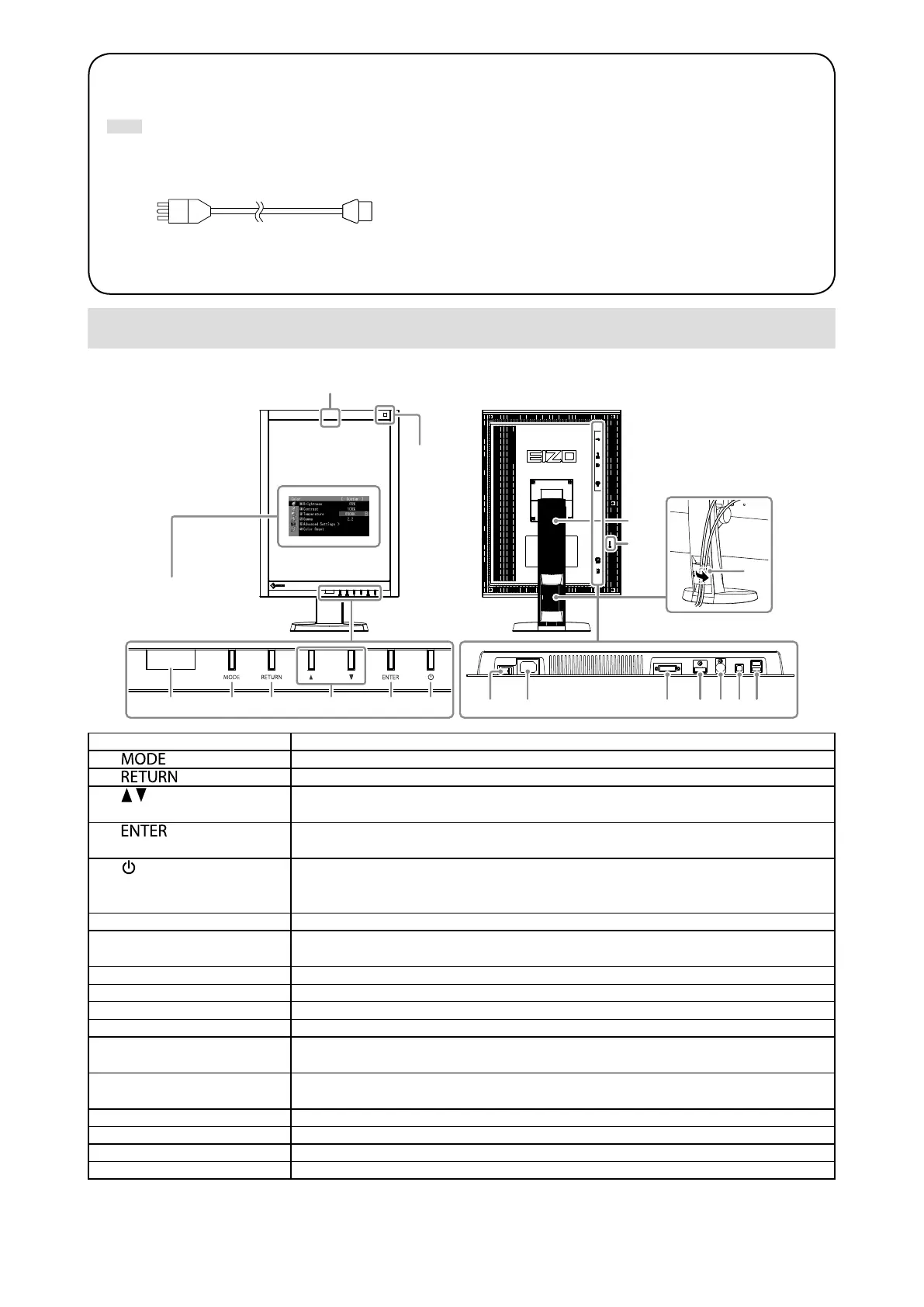
Controls and Functions
Example:RX340
17
16
7
1 2 3 4 5 6
9
18
10 11 12 13 14 15
8
Adjustmentmenu*
1. Presence Sensor Detectsthemovementofapersoninfrontofthemonitor.
2.
button
SwitchestheCALSwitchmode.
3.
button
Cancelsthesetting/adjustmentandexitstheAdjustmentmenu.
4.
button Choosesandincreases/decreasesadjustmentsettingsforadvancedadjustment
usingtheAdjustmentmenu.
5.
button
DisplaystheAdjustmentmenu,determinesanitemonthemenuscreen,andsaves
valuesadjusted.
6.
button
• Turnsthepoweronoroff.
• Indicatesthemonitor’soperationstatus.
Green:Operating,Orange:Powersavingmode,Off:Mainpower/poweroff
7. Ambient Light Sensor Measurestheenvironmentalillumination.
8. Integrated Front Sensor
(slide type)
UsedforcalibrationandGrayscaleCheck.
9. Main power switch Turnsthemainpoweronoroff.
10. Power connector Connectsthepowercord.
11. Input signal connector DVI-Dconnector
12. Input signal connector DisplayPortconnector
13. PS/2 connector Usedformaintenance.Donotuseforotherapplications.Thismaycausethemonitor
tomalfunction.
14. USB upstream port ConnectstheUSBcabletousethesoftwarethatneedsUSBconnection,ortouse
USBHubfunction.
15. USB downstream port ConnectsaperipheralUSBdevice.
16. Security lock slot ComplieswithKensington’sMicroSaversecuritysystem.
17. Stand Usedtoadjusttheheightandangleofthemonitorscreen.
18. Cable holder Coversthemonitorcables.
*
Forinstructionsforuse,refertotheUser’sManual(ontheCD-ROM).





 To Next Page