- 11 -
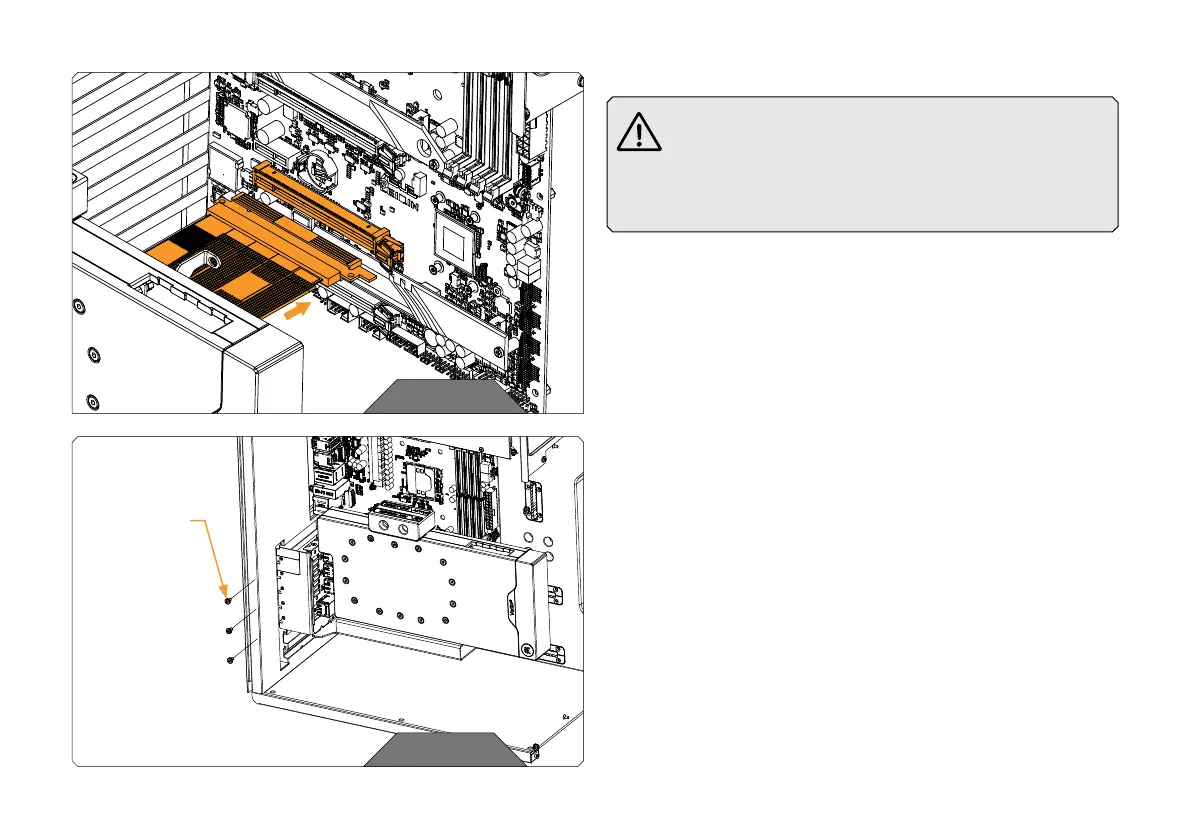
Carefully connect the Riser cable from the GPU Holder to the PCIE
slot on the motherboard.
STEP 8
During the following Steps of the installation process, be
especially careful not to hit or scratch your motherboard
or any other PC component while you’re mounting the
GPU Holder to the motherboard. Pay special attention
that the »Bracket 3« of the GPU Holder (the right side)
doesn’t hit the motherboard.
STEP 8
STEP 9
Use three or more screws to attach the GPU Holder to the left side of
the PC case.
Use the PCIE bracket screws that you’ve saved earlier or UNC 6-32x1/4
screws from the package.
If using the GPU Holder on the upper positions of the PC case, you may
have to break off one (1) or two (2) of the PCIe Brackets on the holder.
STEP 9
PCIE BRACKET
SCREW OR
UNC 6-32x1/4




 To Next Page