VI. TROUBLESHOOTING
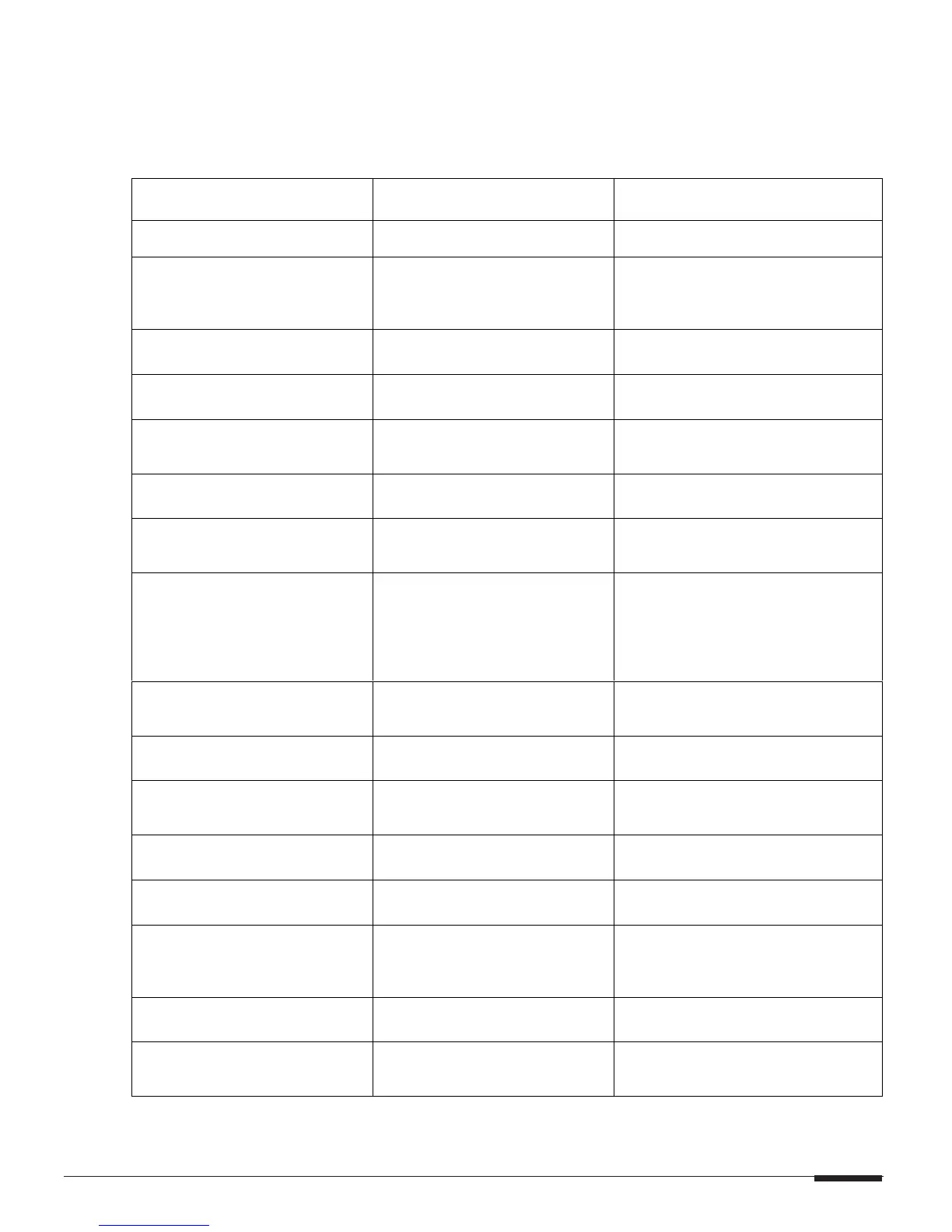
SYMPTOM CAUSE SOLUTION
No Audio From One or More
Channels
1. Loose/Bad peaker Cable S
Connection
Check Cable Ends at Binding
Posts and Speaker Terminals
2. Break/Short in Speaker Cable Check Continuity of Each Speaker
Cable Using Multimeter.
If Short or Open is Indicated, Check
Wiring for Proper Connections.
3. Speaker is Defective Swap with Known Good Speaker
4. RCA Patch Cable Defective Swap with Known Good Patch
Cable
5. Source not Sending Audio Verify Source is Powered Up and
Playing. Check any Tape Monitor
Settings on A/V Receiver
6. All Dip Switches Down Move Appropriate Dip Switches UP
“NA” flashes on display, then
Volume setting
7. Channel is in MUTE Make sure triggering device’s
remote output is connected and
producing voltage
“Er” message displayed on
front panel
8. Amplifier in Protection Mode Find short or low-impedance
condition. Correct overheating or
AC power issues. Once issue is
found and resolved, cycle power to
D1200. This condition could be
caused by 1.,2.,3., and/or 4 above
Audio “Hum”
1.Ground Potential Difference
Between Source Components
(Ground Loop)
Plug All Sources into Same AC
Outlet.
Test AC Outlet Using Ground Tester
2. Faulty/Damaged Cables Check Source Equipment Cables
For Damaged Cables and Faulty
Connections.
3. Faulty Wiring Make Sure Any Volume Controls
Are Not Hooked Up Backwards.
Check for Shorts in Wiring
(See item 2 in “No Audio…”)
Distorted Audio at Normal
Volume Levels
1. Input Gain Too High Reduce Gain to the Channel in
Question. Ensure Red Clipping
LEDs are not Pulsing or On
Constantly
2. Defective/Incompatible
Speaker
Check for Physical Damage to
Speaker
Check Power Ratings on Speaker
Do Not use Speakers Rated for
Less than 100 Watts RMS
PAGE 21
©ELAN Home Systems 2003 All rights reserved 07/03



 To Next Page