EasyManua.ls Logo

ELBE 909 - Self-Programming of Gate Operation

ELBE 909
17 pages
Print Icon
To Next Page IconTo Next Page
To Previous Page IconTo Previous Page
Loading...
ϴ
STEP5 Self programming of working times and slowing speed
Make sure that you have end stops for each wing set. Depending on the motor type, these may be built into the motor or for motors without
stops a gate wing stop will be needed. A closing floor stop, (CENTRE STOP) is highly recommended in any case because this ensures that
the gates are held tight when closed. The gates will not programme or run without any stops, it needs them to figure out its positions. If the
motor has built in electrical limit switches they must be moved out of the way and any lock strikes also removed while the set up procedure is
being carried out.
Initial dip-switch setting for the motor slowdown. Below 350W set the dip SW1-2 ON. If you are unsure set, SW1-2 ON.
SELF-PROGRAMMING
The following describes the self-programming stages for the two gates; in the event of single gate,M1 (DIP1 SW1 = ON), only the stages
relating to motor M1 are carried out.
1) Position the gate/s at fully closed and make sure the motors are locked into drive. You can check this by pulling or pushing the gate
slightly, if the motor was previously un-locked , the motor will click and the gate wing will lock into drive.
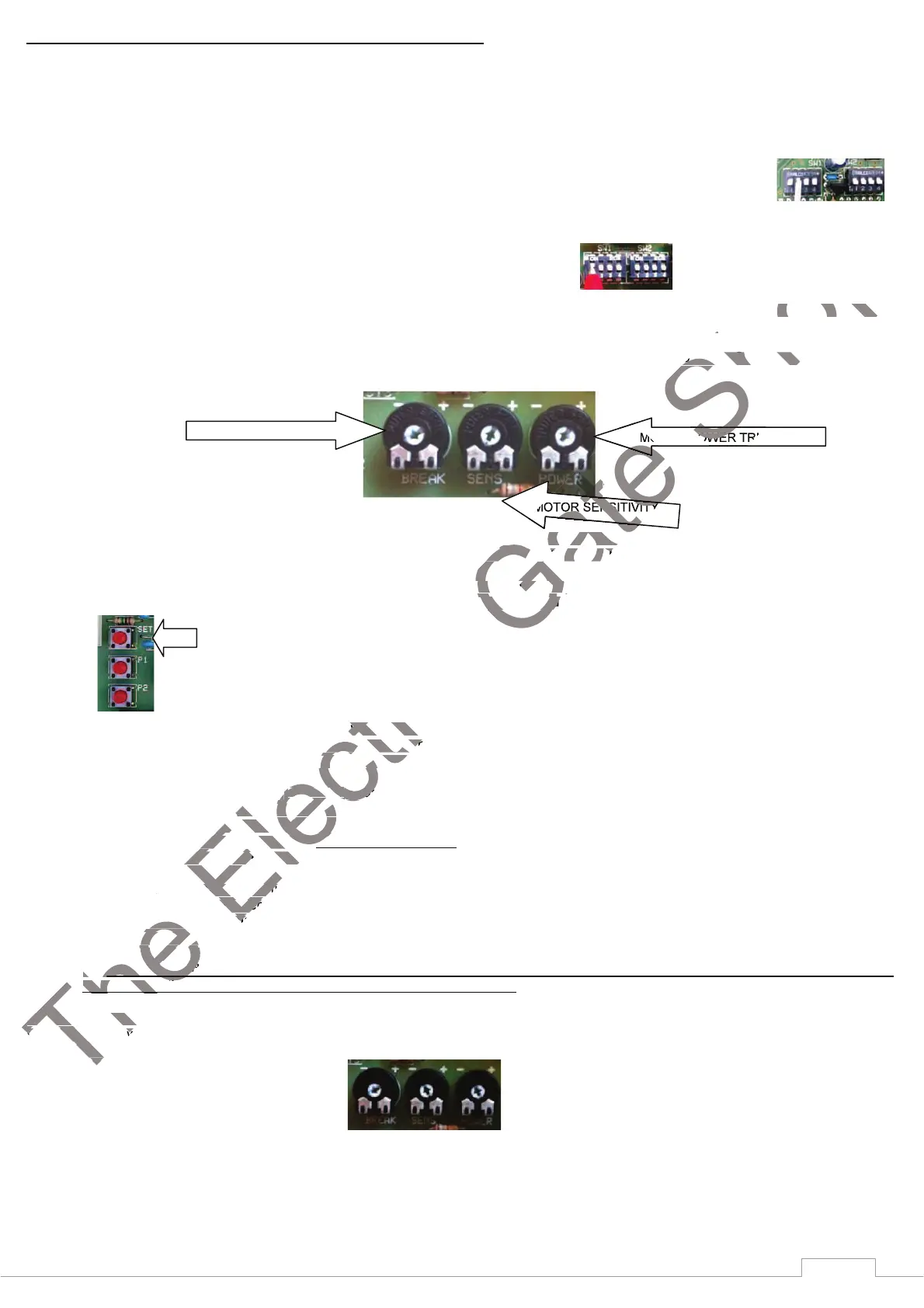
2) Arrange the trimmers to an initial setting point. Set the BREAK trimmer to - , fully anti clockwise. Set SENS trimmer to 1 O’clock.
Set the
power trimmer to 1 O’clock.
3) With the gates closed, turn the power off to the panel. Then at least 15 seconds later, turn the panel back on agian (It is important
that you leave the power off to the panel at least 15 seconds or the fuse may fail when you turn back on.
4) Press and hold on SET DL3 will start to flash, about 15 seconds later DL3 will flash much faster and one click will emit from the
board. When this happens release the SET button and the following procedures will be carried out automatically.
5) Search for closed open position Both
leaves will open for about 4 seconds , then close again. Then board automatically searches
for the “closed gate” position; the doors are moved in the closing direction until they hit the mechanical gate-closed stops forcing
itself against the mechanical gate-closed stops for a few seconds).
6) Search for open gate position. The boar
d automatically searches for the “open gate” position; the gate for motor 1 opens and
after 3 seconds (fixed or preset delay) the gate for motor 2 starts to open. In order to protect the mechanical parts, the gates start to
open slowly and then continue to open at the normal working speed. The gates reach the mechanical stops for the open gate
position at the normal moving speed (without slowing down). The motors stop automatically after recognizing the position of the two
gates, the stroke is calculated and the deceleration points are recorded.
7) Gate closes The gate automatically carries out the closing cycle. The gate starts to move slowly and then carries on to the normal
speed. A fixed delay of 3 seconds is inserted before the second gate starts to move.
Deceleration of the closing gate. The gate finishes closing with the slowing down period (calculated during previous opening
phase), and stops correctly on the mechanical stops.
End of self-calibration cycle. The gate is completely closed and the board exits from self-programming function (LED DL3 turns
off) . If the gate does not slowdown correctly or seems very weak during the slowing period, carry out the programming again with
the SW1-2 in the ON position (FASTER SLOWDOWN) option enabled.
The gates can now be operated via the remote controls and the same sequence just recorded should operate every time. Fine tuning of the
trimmers can now be adjusted to obtain the correct amount of POWER and obstacle SENSITIVITY to the gate wing/s by adjusting the
trimmers. When the gate/s are opening or closing and are obstructed, the gate/s should stop and reverse with minimal effort. It is very
important that these adjustments are carried out.
In particular check that the gates detects obstacles with a minimum effort controlled by the SENS trimmer.
OBSERVE THE APPLICABLE PARTS OF STANDARDS EN 13241-1,
EN 1
2453, EN 12445 TO FULLY COMPLY.
The SENS trimmer controls the current absorbed by the motor before the obstacle detection reverses or stops the motor.
The POWER trimmer controls the power sent to the motor in particular during the slowdown period. The POWER and SENS trimmers are
related. If the POWER is set too low, the SENS may not be able to operate.


MOTOR POWER TRIMMER
MOTOR SENSITIVITY

BREAK TRIMMER
The
Gate closes
speed. A fixed delay of 3 seconds is inserted before the second gate starts to move.
Deceleration of the closing gate.
phase), and stops correctly on the mechanical stops.
End of self-calibration cycle.
off) . If the gate does not slowdown correctly or seems very weak during the slowing period, carry out the programming againoff) . If the gate does not slowdown correctly or seems very weak during the slowing period, carry out the programming again
The
the SW1-2 in the ON position (FASTER SLOWDOWN) option enabled. the SW1-2 in the ON position (FASTER SLOWDOWN) option enabled.
The
The gates can now be operated via the remote controls and tThe gates can now be operated via the remote controls and t
trimmers can now be adjusted to obtain the correct amount of POWER and obstacle SENSITIVITY to the gate wing/s by adjusting thetrimmers can now be adjusted to obtain the correct amount of POWER and obstacle SENSITIVITY to the gate wing/s by adjusting the
trimmers. When the gate/s are opening or closing and are obstructed, the gate/s should stop and reverse with minimal effort. trimmers. When the gate/s are opening or closing and are obstructed, the gate/s should stop and reverse with minimal effort.
important that these adjustments are carried out.
Electric
Both
leaves will open for about 4 seconds leaves will open for about 4 seconds
closed gate” position; the doors are moved in the closing direction until they hit the mechanical gate-closed stops forcing closed gate” position; the doors are moved in the closing direction until they hit the mechanical gate-closed stops forcing
itself against the mechanical gate-closed stops for a few seconds). itself against the mechanical gate-closed stops for a few seconds).
Search for open gate position. Search for open gate position.
The boar
The boar
d automatically searches for the open gate” position; the gate for motor 1 opens and d automatically searches for the open gate” position; the gate for motor 1 opens and
after 3 seconds (fixed or preset delay) the gate for motor 2 starts to open. In order to protect the mechanical parts, the gateafter 3 seconds (fixed or preset delay) the gate for motor 2 starts to open. In order to protect the mechanical parts, the gate
open slowly and then continue to open at the normal working speed. The gates reach the mechanical stops for the open gate open slowly and then continue to open at the normal working speed. The gates reach the mechanical stops for the open gate
position at the normal moving speed (without slowing down). The motors stop automatically after recognizing the position of theposition at the normal moving speed (without slowing down). The motors stop automatically after recognizing the position of the
Electric
gates, the stroke is calculated and the deceleration points are recorded.
ate automatically carries out the closing cycle. The gate starts to move slowly and then carries on to the normal ate automatically carries out the closing cycle. The gate starts to move slowly and then carries on to the normal
speed. A fixed delay of 3 seconds is inserted before the second gate starts to move. speed. A fixed delay of 3 seconds is inserted before the second gate starts to move.
Deceleration of the closing gate.
Gate
With the gates closed, turn the power off to the panel. Then at least 15 seconds later, turn the panel back on agian With the gates closed, turn the power off to the panel. Then at least 15 seconds later, turn the panel back on agian
that you leave the power off to the panel at least 15 seconds or the fuse may fail when you turn back on.that you leave the power off to the panel at least 15 seconds or the fuse may fail when you turn back on.
Press and hold on SET DL3 will start to flash, about 15 seconds later DL3 will flash much faster and one click will emit from t
When this happens release the SET button and the following procedures will be carried out automatically.
Gate
Gate
Gate
Gate
Gate
Gate
Gate
Gate
MOTOR SENSITIVITY
Shop
Shop
Shop
Shop
(DIP1 SW1 = ON), only the stages
Position the gate/s at fully closed and make sure the motors are locked into drive. You can check this by pulling or pushing the gate
htly, if the motor was previously un-locked , the motor will click and the gate wing will lock into drive. htly, if the motor was previously un-locked , the motor will click and the gate wing will lock into drive.
Arrange the trimmers to an initial setting point. Set the BREAK trimmer to - , fully anti clockwise. Set SENS trimmer to 1 O’cArrange the trimmers to an initial setting point. Set the BREAK trimmer to - , fully anti clockwise. Set SENS trimmer to 1 O’c
Shop
Shop
MOTOR POWER TRIMMER

Related product manuals