EasyManua.ls Logo

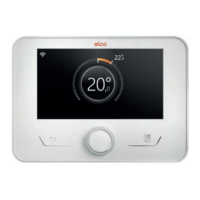
elco REMOCON PLUS 2 - User Manual

elco REMOCON PLUS 2
152 pages
Go to English
Print Icon
To Next Page IconTo Next Page
Loading...
www.elco.net REMOCON PLUS 2 - 01/2022
REMOCON PLUS 2 - 01/2022
ELCO Italia S.p.A.
I - Viale Aristide Merloni 45
60044 Fabriano (AN) Italy
ELCO GmbH
D -72379 Hechingen
ELCO Netherlands
NL - 6465 AG Kerkrade
ELCO Belgium SA
B - 1070 Brussel
ELCO United Kingdom
UK - Basildon, Essex, SS 15 6SJ
ELCO France / Ariston
F - 93521 Saint-Denis Cedex
Gastech-Energi A/S
DK - 8240 Risskov
www.elco.net
Service:
REMOCON PLUS 2
IT ISTRUZIONI TECNICHE PER L’USO
EN TECHNICAL OPERATING INSTRUCTIONS
FR INSTRUCTIONS TECHNIQUES D’UTILISATION
DE TECHNISCHE ANWEISUNGEN FÜR DEN GEBRAUCH
NL TECHNISCHE GEBRUIKSAANWIJZINGEN
DA TEKNISK BRUGSANVISNING

Table of Contents

Question and Answer IconNeed help?

Do you have a question about the elco REMOCON PLUS 2 and is the answer not in the manual?

Summary

Introduction to REMOCON PLUS 2

Warranty Information

Symbols and Warnings

Product Disposal and WEEE Compliance

System Interface Description

Glossary of Terms

Definitions of key terms like Zone and Time Slot used in the system.

Menu Navigation Guide

Explains how to use the interface buttons (Menu, Selector, Back) for navigation.

Navigation Example and Key

Illustrates navigation flow and explains control icons.

Home Page Views

Details the complete home page and its icons.

Alternative Home Screen Views

Covers base, customizable, and specific home page views like DHW and standby.

Zone Management

Zones Management Overview

Allows viewing general information and configuring main settings for up to six heating zones.

Zone Configuration Details

Covers naming zones, setting room temperature setpoints, and accessing time programs.

Time Scheduling Configuration

Two-Level Time Scheduling

Explains how to set heating/cooling time schedules with two comfort levels.

Defining Time Slots and Temperatures

Guides on setting start/end times, temperatures for time slots, and copying schedules.

DHW Time Scheduling

Details the process for configuring domestic hot water time schedules.

Multi-Level Time Scheduling

Explains the advanced multi-level time scheduling process with more time slots.

System Operation and Monitoring

Consumption and Holiday Functions

Allows viewing consumption estimates and setting holiday period.

System Operation Modes

Allows selection of overall system modes like Summer, Winter, Heating Only, Cooling, or OFF.

DHW Settings Configuration

Configures DHW setpoints, comfort function, and tank charge modes.

System Maintenance and Connectivity

Thermal Cleanse Function

Enables/disables thermal sanitisation and sets cycle frequency and start time.

Connectivity Settings

Manages Wi-Fi network, configuration, signal strength, and internet time/weather.

System Information and Diagnostics

System Information and Performance

Displays software version, zone number, performance metrics, and consumption details.

Diagnostics Overview

Shows main operating parameters of system devices and explains performance metrics.

Interface and Display Settings

Screen and Interface Settings

Allows changing display language and setting date, time, home screen, and brightness.

Advanced System Configuration

Central Heating Settings

Configures CH setpoint temperature and climate curve slope for zones.

Automatic Winter Mode

Adjusts heat request based on outdoor temperature for energy savings.

System Features and Modes

Cooling Settings and Auto Function

Sets cooling setpoints and configures automatic temperature control functions.

Buffer Tank and Boiler;Heat Pump

Manages buffer tank functions and settings for boiler circulation and heat pump modes.

Heat Pump and Hybrid Operations

Heat Pump Activation and DHW Modes

Configures secondary heat source logic and DHW operation modes for heat pumps.

Hybrid System Management

Manages hybrid system settings, including energy manager logic and tariff settings.

System Integrations and Specialized Functions

Heat Pump Water Heater (HPWH)

Sets DHW production mode and activates quiet mode for heat pump water heaters.

Photovoltaic Integration

Configures the use of DHW storage tank heating element with photovoltaic energy.

Time Program Types and Error Handling

Time Program Service Type

Sets the time schedule mode for heating and cooling (2-level or multi-level).

Room Temperature Correction

Allows correcting the room temperature measured by the device by ±5°C.

Errors and Diagnostic Messages

Explains how error codes, descriptions, and actions are displayed and managed.

Summary

Introduction to REMOCON PLUS 2

Warranty Information

Symbols and Warnings

Product Disposal and WEEE Compliance

System Interface Description

Glossary of Terms

Definitions of key terms like Zone and Time Slot used in the system.

Menu Navigation Guide

Explains how to use the interface buttons (Menu, Selector, Back) for navigation.

Navigation Example and Key

Illustrates navigation flow and explains control icons.

Home Page Views

Details the complete home page and its icons.

Alternative Home Screen Views

Covers base, customizable, and specific home page views like DHW and standby.

Zone Management

Zones Management Overview

Allows viewing general information and configuring main settings for up to six heating zones.

Zone Configuration Details

Covers naming zones, setting room temperature setpoints, and accessing time programs.

Time Scheduling Configuration

Two-Level Time Scheduling

Explains how to set heating/cooling time schedules with two comfort levels.

Defining Time Slots and Temperatures

Guides on setting start/end times, temperatures for time slots, and copying schedules.

DHW Time Scheduling

Details the process for configuring domestic hot water time schedules.

Multi-Level Time Scheduling

Explains the advanced multi-level time scheduling process with more time slots.

System Operation and Monitoring

Consumption and Holiday Functions

Allows viewing consumption estimates and setting holiday period.

System Operation Modes

Allows selection of overall system modes like Summer, Winter, Heating Only, Cooling, or OFF.

DHW Settings Configuration

Configures DHW setpoints, comfort function, and tank charge modes.

System Maintenance and Connectivity

Thermal Cleanse Function

Enables/disables thermal sanitisation and sets cycle frequency and start time.

Connectivity Settings

Manages Wi-Fi network, configuration, signal strength, and internet time/weather.

System Information and Diagnostics

System Information and Performance

Displays software version, zone number, performance metrics, and consumption details.

Diagnostics Overview

Shows main operating parameters of system devices and explains performance metrics.

Interface and Display Settings

Screen and Interface Settings

Allows changing display language and setting date, time, home screen, and brightness.

Advanced System Configuration

Central Heating Settings

Configures CH setpoint temperature and climate curve slope for zones.

Automatic Winter Mode

Adjusts heat request based on outdoor temperature for energy savings.

System Features and Modes

Cooling Settings and Auto Function

Sets cooling setpoints and configures automatic temperature control functions.

Buffer Tank and Boiler;Heat Pump

Manages buffer tank functions and settings for boiler circulation and heat pump modes.

Heat Pump and Hybrid Operations

Heat Pump Activation and DHW Modes

Configures secondary heat source logic and DHW operation modes for heat pumps.

Hybrid System Management

Manages hybrid system settings, including energy manager logic and tariff settings.

System Integrations and Specialized Functions

Heat Pump Water Heater (HPWH)

Sets DHW production mode and activates quiet mode for heat pump water heaters.

Photovoltaic Integration

Configures the use of DHW storage tank heating element with photovoltaic energy.

Time Program Types and Error Handling

Time Program Service Type

Sets the time schedule mode for heating and cooling (2-level or multi-level).

Room Temperature Correction

Allows correcting the room temperature measured by the device by ±5°C.

Errors and Diagnostic Messages

Explains how error codes, descriptions, and actions are displayed and managed.

elco REMOCON PLUS 2 Specifications

General IconGeneral
Device TypeRemote Control
Brandelco
ModelREMOCON PLUS 2
Power SupplyBattery
DisplayLCD