Quick Start Guide
- 2 -
Setup
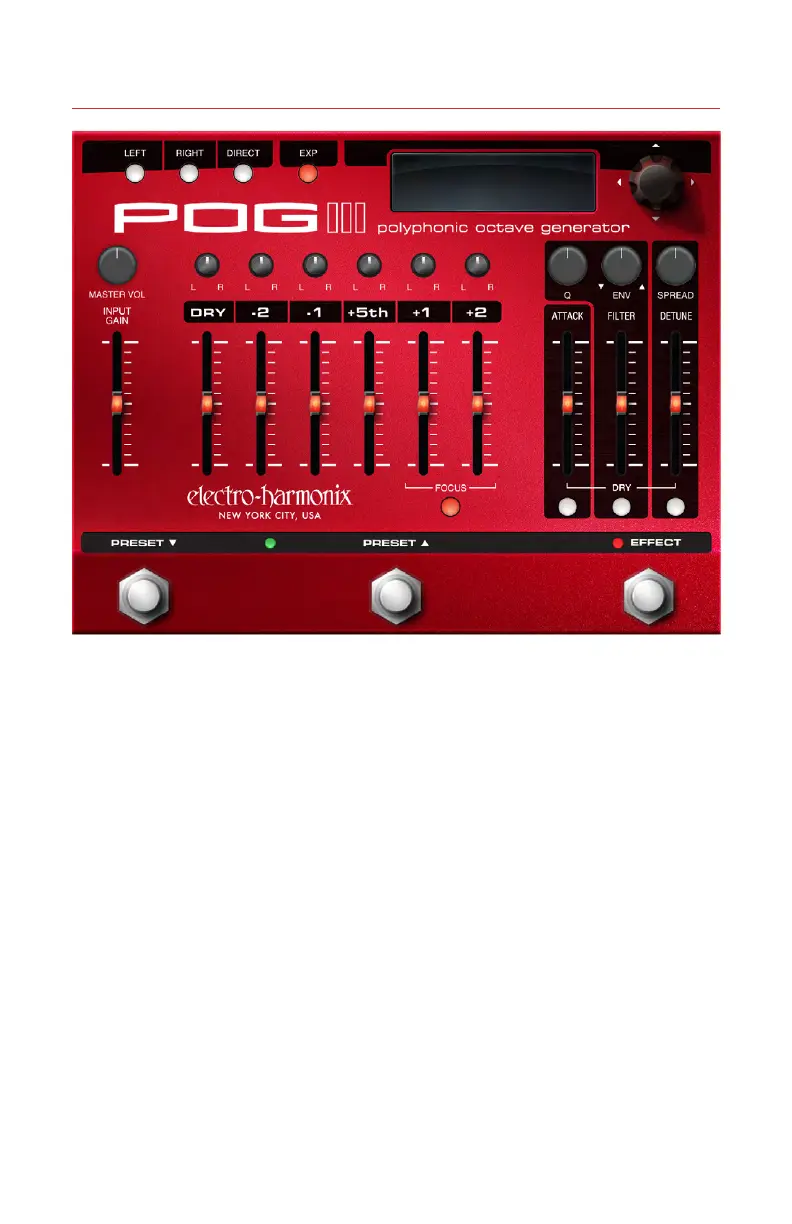
1. Plug the supplied AC adapter into
an AC outlet and insert its output
plug into the power jack on the rear
panel of the POG3.
2. Plug your instrument into the
INPUT jack.
3. Connect either the LEFT or RIGHT
sure the corresponding LEFT or
RIGHT button in the upper left
corner of the POG3 is illuminated.
4. Set the FILTER slider to maximum.
6. Push the desired octave voice sliders
up and Rock-n-Roll!
ATTACK Slider
1. Push the ATTACK slider up to the
middle of its range. The effect
voices for each note you play will
fade-in. The POG3’s Attack effect
is polyphonic so each note has its
own fade-in sweep.
2. The further up you push ATTACK,
the longer the Attack time.
3. Push the DRY slider up so you hear
your Dry signal also. Your dry voice
does not fade-in but the effect
voices do.
4. Press the DRY ATTACK button to
route the dry signal through the
Attack effect; this button is now lit.
Your Dry voice now also fades-in.
FILTER Controls
1. Set the Q and ENV knobs to 50%
and the FILTER slider to maximum.
2. While sustaining a note or chord,
move the FILTER slider down from
its maximum position. You will











 To Next Page