- 19 -
MIDI
functions including: controlling nearly every parameter on the POG3 in real-time,
choosing and loading presets, or playing the POG3 like an organ or synthesizer
MIDI Channel:
MIDI Thru:
MIDI Keyboard:
This allows the POG3 to be played as an organ or synthesizer module. The POG3
may be set in the EHXport application’s global settings.
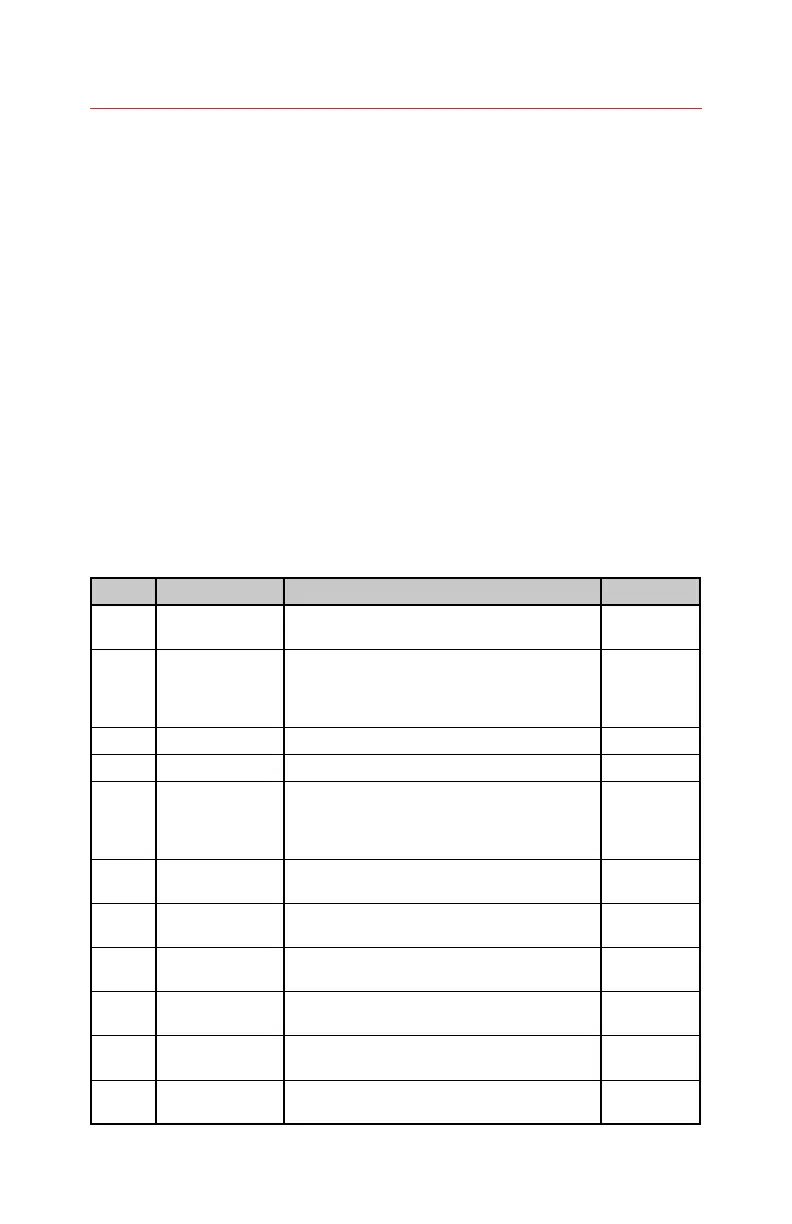
MIDI CC Map
the POG3’s top panel controls plus a number of other functions. The following
table details the CC messages the POG3 accepts and the POG3’s handling of
each message.
MIDI CC POG3 Function Description Data Range
Wheel)
DETUNE slider The mod wheel takes control of the Detune
slider.
0…127
4 Expression pedal
values
detailed control over the expression pedal
0…127
7 Controls POG3’s output volume. 0…127
9 INPUT GAIN slider Controls the INPUT GAIN slider. 0…127
36 Expression pedal
LSB or lower
values
detailed control over the expression pedal
over the expression pedal sweep.
0…127
70 LEFT output
button
Enable or disable the Left Output jack. 0=Disable,
1...127=Enable
71 RIGHT output
button
Enable of disable the Right Output jack. 0=Disable,
1..127=Enable
72 DIRECT output
button
Enable or disable the Direct Output jack. 0=Disable,
1...127=Enable
73 EXP enable
button
Enable or disable the Expression pedal. 0=Disable,
1...127=Enable
74 FOCUS enable
button
Enable or disable FOCUS function. 0=Disable,
1..127=Enable
75 DRY ATTACK
enable button
Enable or disable the DRY ATTACK button, where
the DRY signal is routed through the Attack effect.
0=Disable,
1..127=Enable







 To Next Page