- 8 -
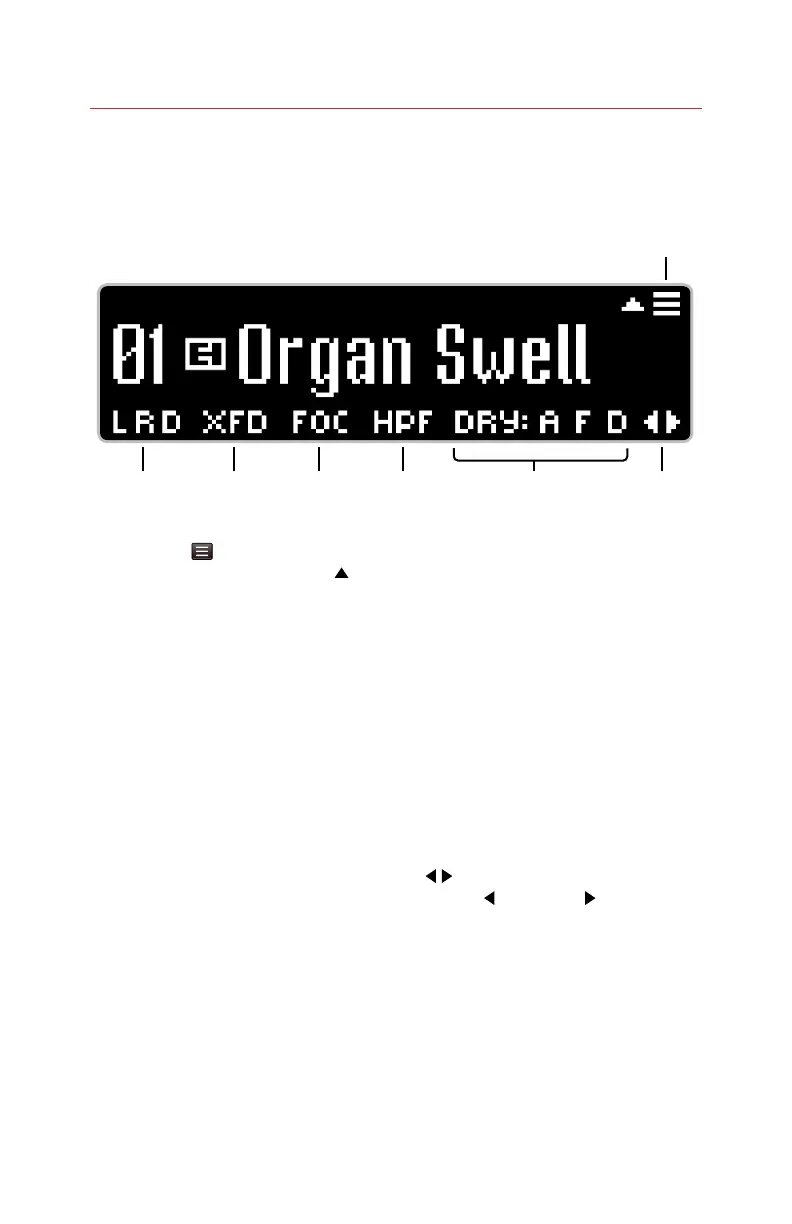
OLED Display and Home Screens
For most display screens, the graphics provide instructions or hints on the
When performing more critical tasks, usually having to do with presets or
expression, the display will provide instructions.
1. Menu Icon The hamburger menu
icon indicates that pushing UP (
)
on the NavCoder will open the POG3
-
Home View pages.
2. Output Icons: L, R, D Indicate when
the LEFT, RIGHT, and DIRECT outputs
are active.
3. Expression Icons:
VOL, XFD, WRP, FIL, FRG, FRV
The expression icons, located to the
right of the L R D icons, are displayed
when expression is enabled. The icon
displayed represents the currently
selected Expression mode:
VOL = Volume
XFD = Crossfade
WRP = Warp
FIL = Filter
FRG = Freeze+Gliss
FRV = Freeze+Volume
4. FOCUS Icon: FOC Indicates when the
FOCUS feature is active. The FOCUS
button switches +1 and +2 Octaves
between the original POG algorithm
(Focus Off) and a Pitch Fork style
algorithm (Focus On)
5. FILTER Icons: LPF, BPF, HPF
type: Low-Pass, Band-Pass or High-Pass.
6. DRY Icons: A, F, D
Indicate when the Dry signal is being
routed through the ATTACK, FILTER,
and DETUNE effects, respectively.
7.
Arrows Indicate that pressing
the LEFT (
) or RIGHT ( ) arrows on
the NavCoder will change the user’s
Home View.
Home Screen Default View
1
2 3 4 5 6 7







 To Next Page