- 21 -
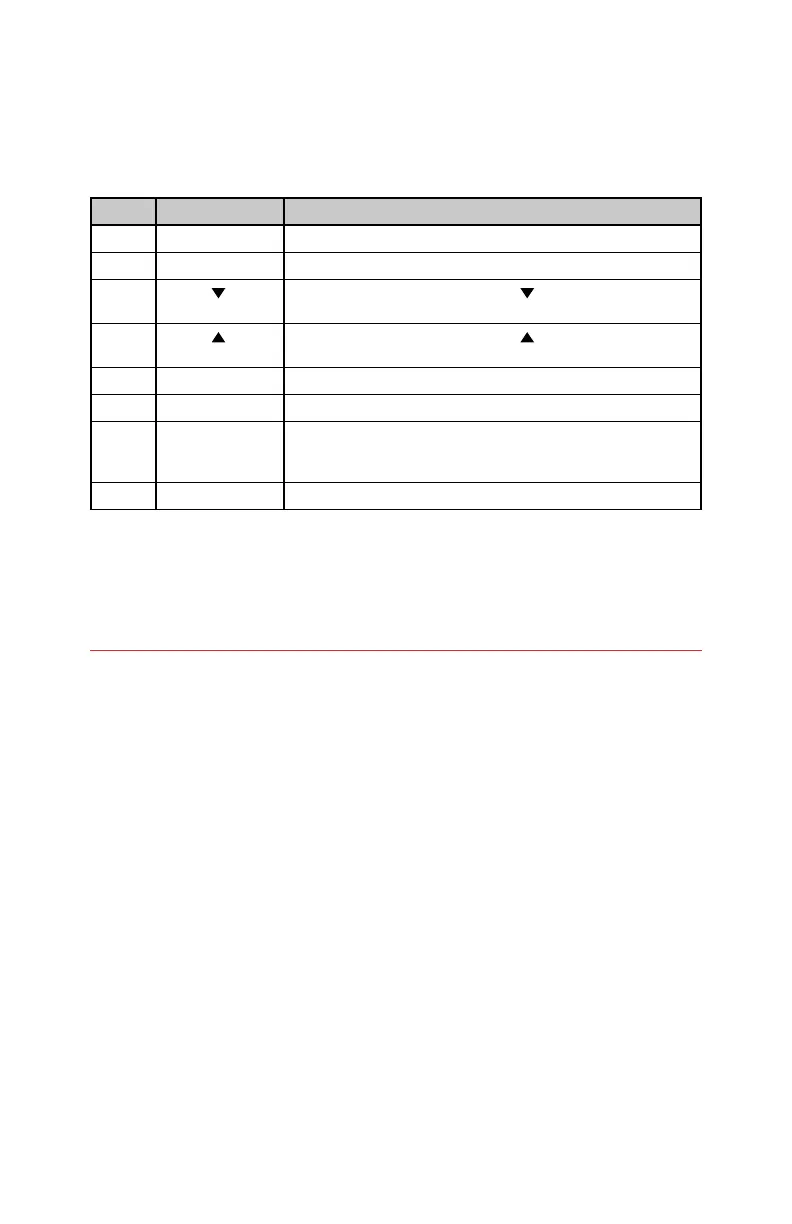
MIDI PC Map
initiate certain functions related to footswitches. The following table details all
PC messages the POG3 accepts.
Display Options
This menu allows for control over POG3’s OLED display.
Home View: Standard (default), Graphic, Data (Pg) 1, Data (Pg) 2, Performance.
This menu provides the option to choose the default home screen upon power
up. Please see the Home Views section on page 8 for examples and descriptions
of each Home View.
Please Note: the Home View may be changed by moving the NavCoder left and
right while on any of the Home screen views but the Home screen shown on power
up will be determined by this Home View setting in the Display Options menu.
Contrast: 1-10 (default = 10): adjusts the brightness or contrast of the POG3’s
OLED display. A setting of 1 is the lowest contrast and is the darkest setting.
A setting of 10 has the highest contrast and is the brightest setting.
Name Crawl: Off/On (default = On): the Name Crawl setting comes into play when
a preset is loaded with a name longer than can be fully displayed on the Home
screen’s Standard View; usually longer than 14 or 15 characters. The POG3 will
scroll the name from right to left three times after the preset is loaded. The
maximum preset name length is 24 characters.
MIDI PC POG3 Function Description
1 – 100 Preset Load
122 EFFECT footswitch Equivalent to pressing the EFFECT footswitch
123 PRESET
footswitch
Equivalent to a press on the PRESET down footswitch
124 PRESET
footswitch
Equivalent to a press on the PRESET up footswitch
125 EFFECT OFF Put the POG3 into bypass no matter the state of the POG3
126 EFFECT ON Enable Effect mode no matter the state of the POG3
127 Toggle between
Preset and Live
mode
Toggle between loading the current preset or Live mode.
128 Go to Live mode Go to Live mode, no matter the state of the POG3







 To Next Page