- 20 -
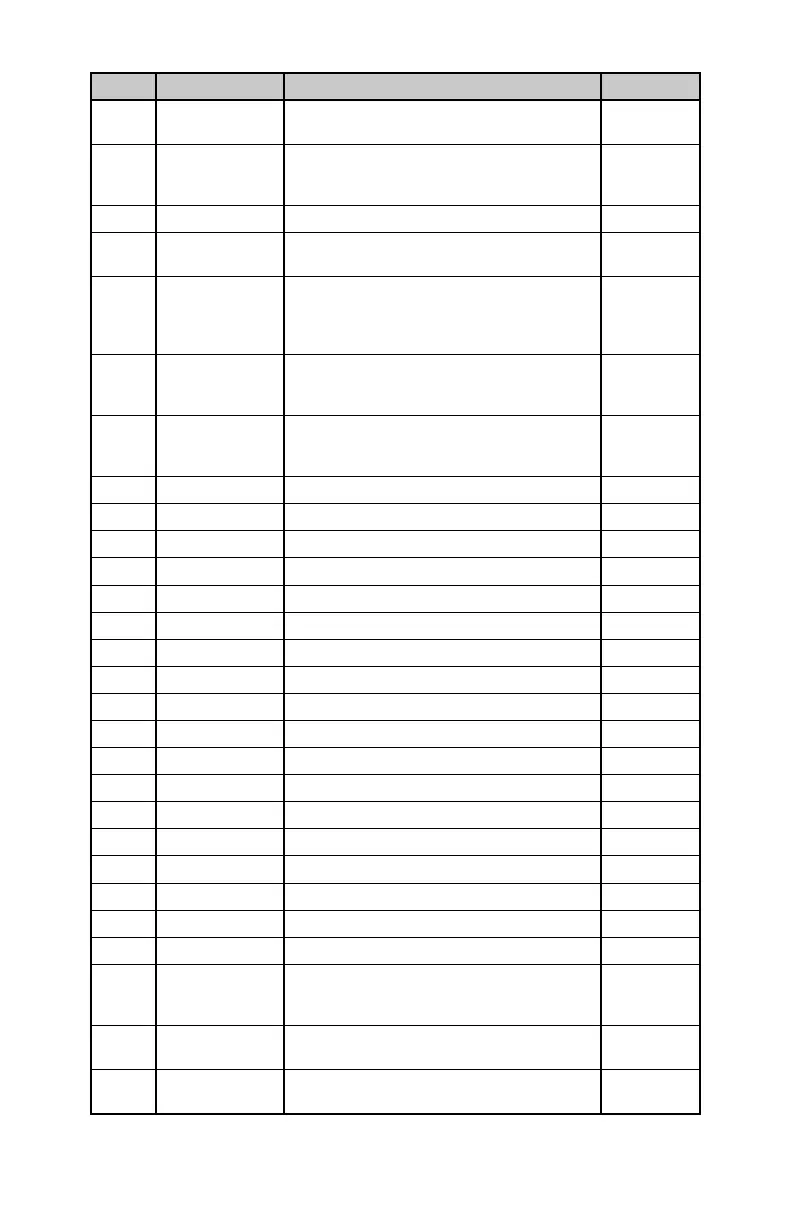
MIDI CC POG3 Function Description Data Range
76 DRY FILTER en-
able button
Enable or disable the DRY FILTER button, where
the DRY signal is routed through the Filter.
0=Disable,
1..127=Enable
77 DRY DETUNE en-
able button
Enable or disable the DRY DETUNE button,
where the DRY signal is routed through the
Detune effect.
0=Disable,
1..127=Enable
78 Home Screen Choose home screen view. 0…4
79 EFFECT enable
footswitch
Enable or bypass the POG3 effect. 0=Bypass,
1..127=Effect
80 Save to preset Save the current POG3 settings to the preset
1. For example, send data value 00 to save to
Preset 1.
0…99
81 Load Preset and
Effect On
value + 1. Enable the POG3 effect. For example,
send data value 00 to load to Preset 1.
0…99
82 Load Preset and
Effect Off
value + 1. Put the POG3 into bypass. For ex-
ample, send data value 00 to load to Preset 1.
0…99
102 DRY Pan knob DRY L/R position 0…127
103 -2 Pan knob -2 L/R position 0…127
104 -1 Pan knob -1 L/R position 0…127
105 +5th Pan knob +5th L/R position 0…127
106 +1 Pan knob +1 L/R position 0…127
107 +2 Pan knob +2 L/R position 0…127
108 Q knob Q knob setting 0…127
109 ENV knob ENV knob setting 0…127
110 SPREAD knob SPREAD knob setting 0…127
111 DRY Level slider DRY volume 0…127
112 -2 Level slider -2 volume 0…127
113 -1 Level slider -1 volume 0…127
114 +5th Level slider +5th volume 0…127
115 +1 Level slider +1 volume 0…127
116 +2 Level slider +2 volume 0…127
117 ATTACK slider Attack time 0…127
118 FILTER slider Filter frequency sweep 0…127
119 DETUNE slider Detune depth 0…127
122 Local Control
On/Off
Enables or disables physical control of all
Default is Local Control set to On.
0=Local Off,
1=Local On
124
sent on Channel 16.
0…127
125
sent on Channel 16.
0…127







 To Next Page