- 7 -
-
sages, you can control every parameter
messages allow you to play the POG3
it into an organ or synthesizer module.
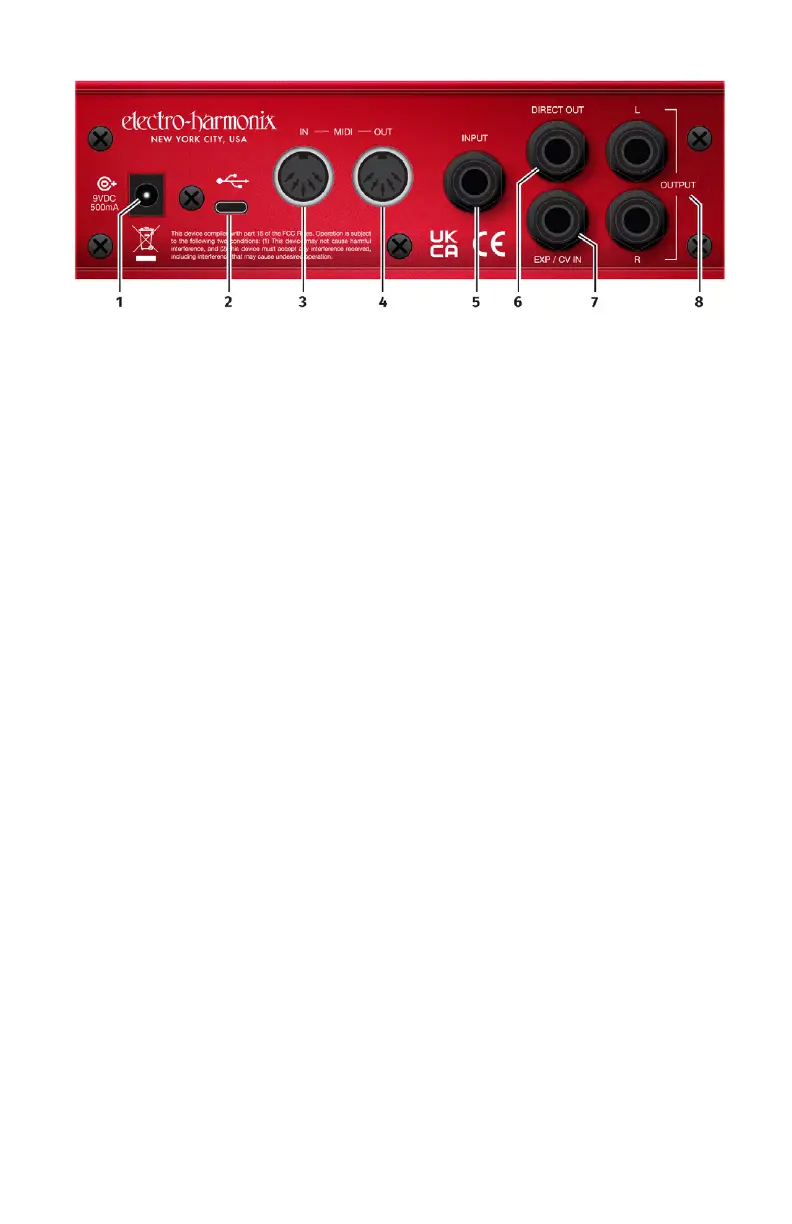
4. MIDI OUT Jack Connect a standard
-
connection.
5. INPUT Jack The 1/4" INPUT jack is
an unbalanced, high impedance input
intended for both instruments and
line level signals. The Input can accept
signal amplitudes up to +6.2dBu. The
input impedance presented at this
6. DIRECT OUT Jack The DIRECT OUT
jack is an unbalanced, low impedance
output, which carries a buffered version
of the signal present at the INPUT jack.
Direct Out is enabled or muted by the
DIRECT button on the top panel of the
POG3. The output impedance present-
output level is +12.5dBu.
7. EXP / CV IN Jack Supports either an
expression pedal with a 1/4" TRS plug
or a control voltage ranging from 0-5V
on a TS plug. Nearly all the top panel
features can be controlled via expres-
sion pedal or CV and expression control
is easy to setup via the expression
menu. The Exp/CV In jack will accept
any expression pedal that uses a
to the tip (T) of the plug.
Accepted expression pedals include
(but are not limited to):
• Electro-Harmonix Expression Pedal
• Electro-Harmonix Dual Expression
Pedal
• Electro-Harmonix Next Step
Expression Pedal
• Expression pedals by other
manufacturers include:
- Boss FV-500L
- Moog EP-3
- M-Audio EX-P
8. L & R OUTPUT Jacks The LEFT and
RIGHT OUTPUT jacks are unbalanced,
low impedance outputs. Connect these
interface, tape recorder or any other
suitable device. Use the PAN controls
on the front of the POG3 to split or
blend the various voices between these
two jacks in fun and creative ways.
You may also quickly mute or unmute
these outputs using the LEFT and RIGHT
buttons on the top panel. The output
impedance sourced by each of these
level is +7.2dBu.









 To Next Page