- 9 -
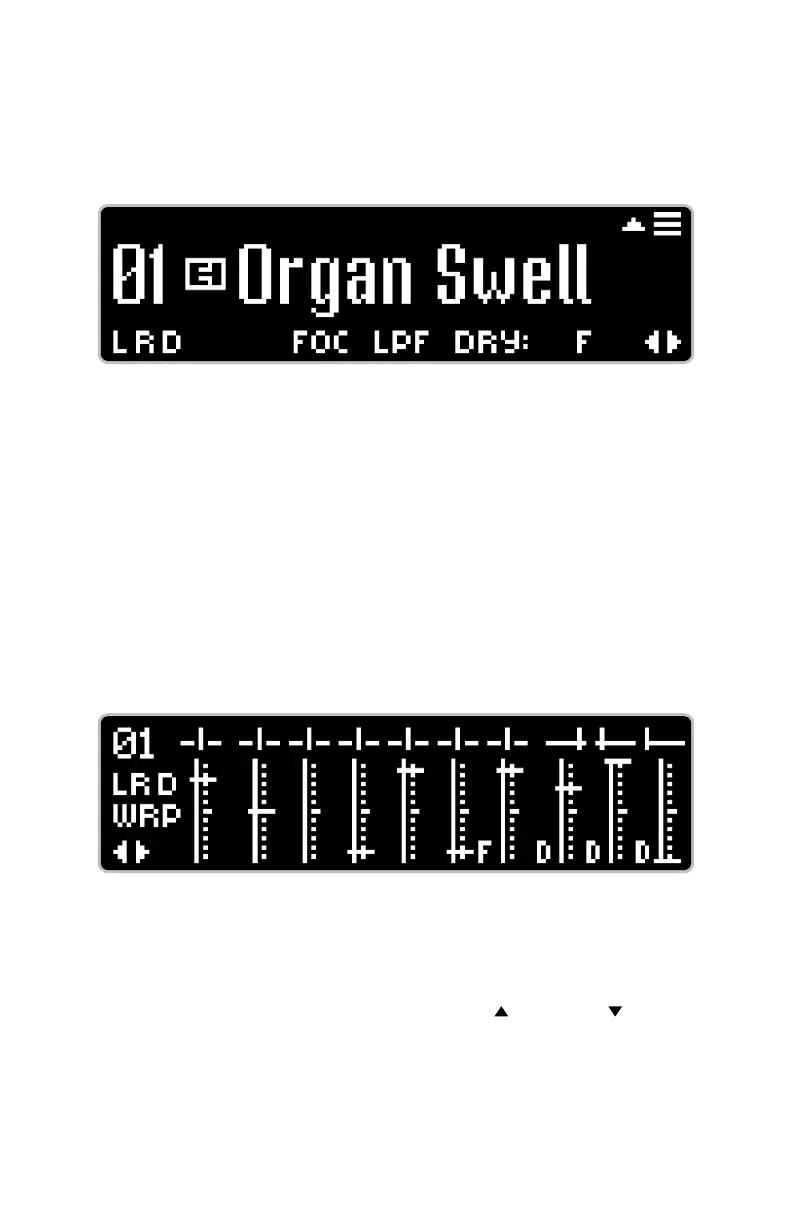
STANDARD View
The STANDARD Home View is the factory default. It displays the preset
number, preset name, all available status icons, as well as the hamburger
menu and left-right icons. Only the status icons that are currently active
will be displayed.
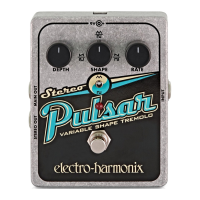
GRAPHIC View
The GRAPHIC Home View’s main feature is that it displays a graphical
representation of the POG3’s sliders and knobs, all of which move in real-time
on the display. This view is helpful if you want to get an idea of where the
controls are set after loading a preset. This view also displays the preset
number, all available status icons, as well as the left-right icons. The status
of each DRY button is indicated by a ‘D’ icon next to their respective slider.
The status of the FOCUS button is indicated by an ‘F’ icon.
Helpful Hint: If you move a slider or knob after loading a preset, the short
end of the control’s line graphic blinks and remains at the location saved
in the preset while the long end of the line graphic moves in real-time with
the control.
DATA View
DATA view displays the current value of each control, whether the setting
DATA view is two pages long. Use the NavCoder UP (
) and DOWN ( ) arrows
each octave voice in a column. The top row of the column shows the voice’s
name, the middle row shows the value of the voice’s PAN control, and the
bottom row shows the value of the voice’s volume/slider position. When
FOCUS is on, an ‘F’ icon appears next to the +1 and +2 Octave names.
Standard View
Graphic View







 To Next Page