- 5 -
outputs and buttons, and more.
Detailed descriptions of all OLED
display information can be found on
page 8. Use the NavCoder knob to
navigate around the display.
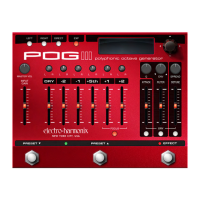
5. MASTER VOL Knob Controls the
POG3’s overall output volume.
6. INPUT GAIN Slider Controls the level
of the signal seen at the POG3’s input.
The gain of this control ranges from
0.5-3X.
7. PAN Knobs Allow each voice to be
hard left to hard right and anywhere
in between.
8. DRY Slider Control the output vol-
ume of the dry/unison signal.
9. VOICE Sliders Controls the volume
of the -2, -1, +5th, +1 and +2 octave
voices.
10. FOCUS Button Toggles between
the original POG octave algorithm and
the Pitch Fork style algorithm for the
+1 and +2 octave voices. The POG algo-
rithm, which features lower latency,
is active with the FOCUS button off.
The Pitch Fork algorithm is active
when the FOCUS button is lit. Focus
allows the +1 and +2 voices to engage
in whammy-style pitch bends and
freeze effects when using Expression
Warp and the two Freeze modes.
Please Note: Focus changes the algo-
rithm for both the +1 and +2 octave
voices simultaneously.
11. ATTACK Slider Controls the attack
envelope of all octave voices. As the
ATTACK slider is pushed upward, the
attack time increases producing a
time is 3 seconds. Push the ATTACK
slider down to its minimum position
to disable the attack effect. The
attack effect will also work on the
DRY signal whenever the DRY button
below it is lit.
12. FILTER Slider Controls the cutoff or
center frequency of the multimode
rises. The FILTER control can be used
to shape the tone of the POG3’s voices.
All of the generated signals go through
the FILTER. The dry signal can also be
routed through the FILTER when the
DRY button below the FILTER slider is lit.
FILTER menu which is accessed by
pressing and holding the DRY Filter
button for about 2 seconds.
13. Q Knob Adjusts the resonance of
the FILTER. As Q is turned clockwise,
pronounced.
14. ENV Knob Adjusts the depth of
envelope sweep applied to the Filter
frequency. With ENV turned CW from
noon, a positive envelope sweeps the
frequency upward from the FILTER
slider’s setting. Turn ENV CCW from
noon, a negative envelope sweeps the
frequency downward from the FILTER
slider’s setting. The ENV knob’s center
position disables the envelope.
15. DETUNE Slider Controls the amoun
of chorus/doubling effect applied to the
+1 and +2 Octave signals. As the DETUNE
slider is pushed up, the depth of the
detune effect increases. When DETUNE
is pushed down to its minimum position,
the detune function is disabled. The
DETUNE slider may also be applied to
the dry signal by enabling the DRY
button below the DETUNE slider.
16. SPREAD Knob Independent of the
DETUNE slider, the SPREAD knob
introduces a short delay line on the
+5th, +1, and +2 voices, and the Dry
voice when the DETUNE DRY button is
enabled. The two suboctave voices do
not go through the Spread effect. The







 To Next Page