- 29 -
DGS-TDS-N 05.09 A. B. © Electrolux 599 521 367 EN
Start position: The appliance must be switched off.
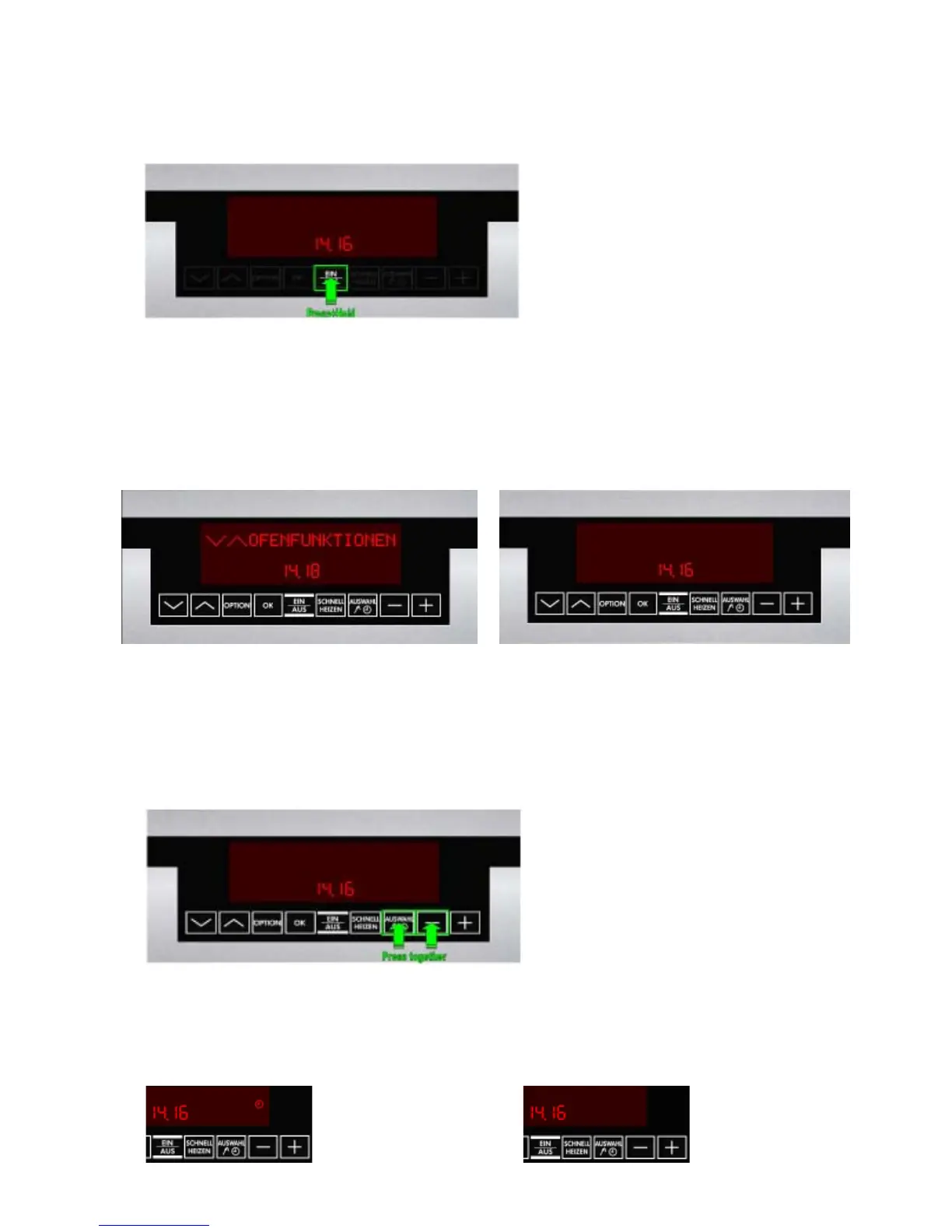
Display: "Time" (fig. 1).
6.3.2 Activating / deactivating Version b
Operating step 1: Press the main switch for 5 seconds (fig. 1), the appliance switches itself
"ON" and then "OFF" again.
Display: "Standby" (fig. 2) ---> "Time" (fig. 3).
Background illumination for 10 seconds after releasing the main switch.
Acoustic signal: 1x "Beep" as confirmation.
Operating step 2: Simultaneous pressing of the two buttons "Timer" and "Minus" for 2
seconds (fig. 4).
Acoustic signal: 3 x "Beep" as confirmation.
Operating step 3: Switching the appliance on with the main switch
Display: active Demo Mode ---> "Time" (fig. 5), even if the appliance
is switched off.
deactivated Demo Mode ---> none (fig. 6)
Fig. 1
Fig. 2 Fig. 3
Fig. 4
Fig. 5 Fig. 6





 To Next Page