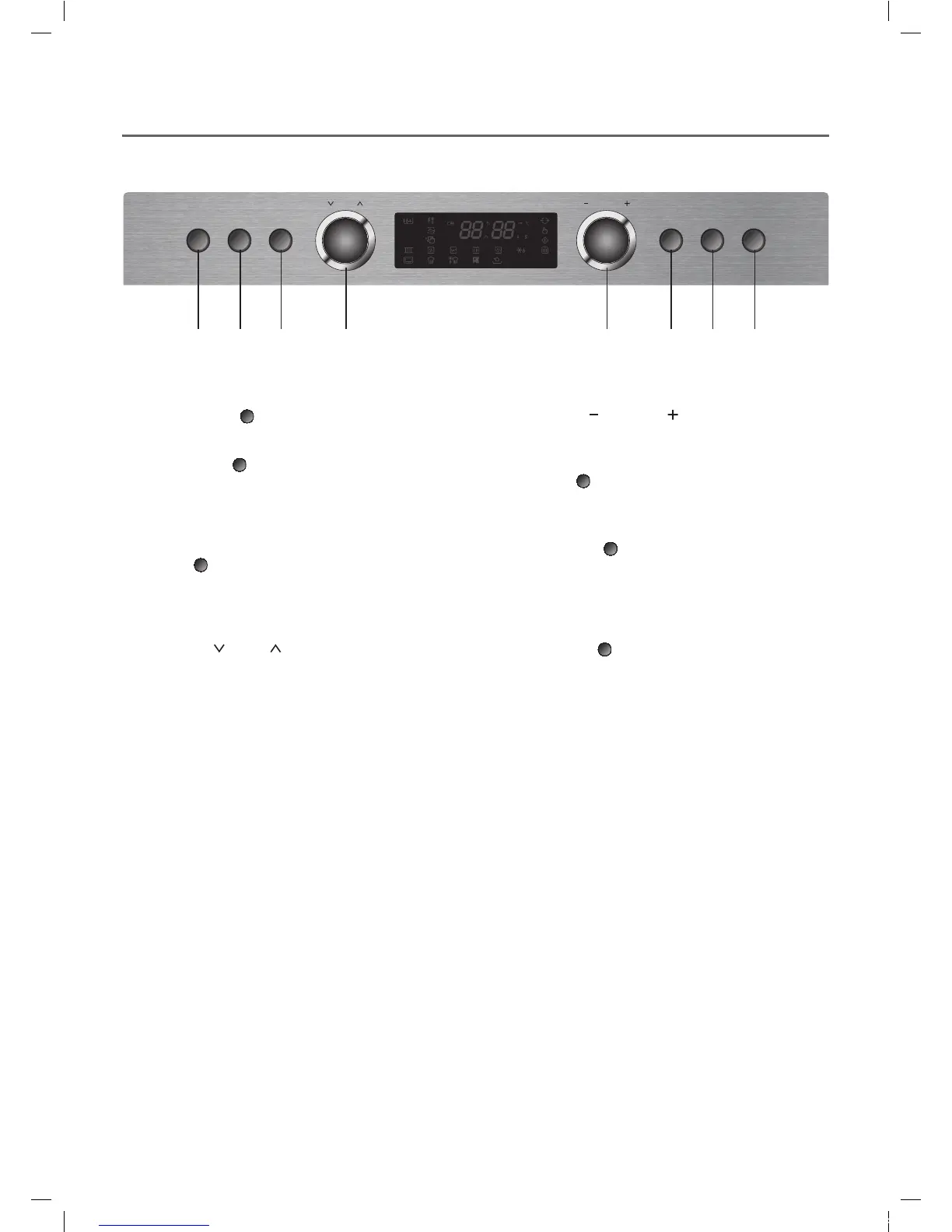
Quick
Defrost
Power
SteamClean
Start/
+30sec
Stop/
CancelSelection
MENU CONTROL
1234 5678
1 Quick Defrost (
) button
Press to defrost a 500 grams of food quickly and easily.
2 Power Clean (
) button
This function helps you to clean the oven. It has four
special functions such as deodorization, steam
cleaning, making steam boiler empty and steam boiler
cleaning.
3 Steam (
) button
Press to select Steam cook (manual cooking).
Make sure that water is enough in the water tank
before cooking.
4 Menu Dial (
) knob :
Turn to select cooking menu and functions.
5 Control Dial (
) knob :
Turn to enter cooking time, quantity, weight, and
temperature.
6 Selection (
) button :
Press to confirm selection.
7 Start/ +30 sec (
) button :
- Press once to begin Microwave cooking at power
level 10 for 30 seconds. Press again to add 30
seconds. Continue pressing to add up to 5 minutes.
- Press to start cooking after selection is confirmed.
8 Stop/ Cancel (
) button:
Press to stop operation or clear settings.
EMS3477X(KOS-1C5K5R)(영)_E-LUX.indd 8 2014-10-06 오전 11:44:36







 To Next Page