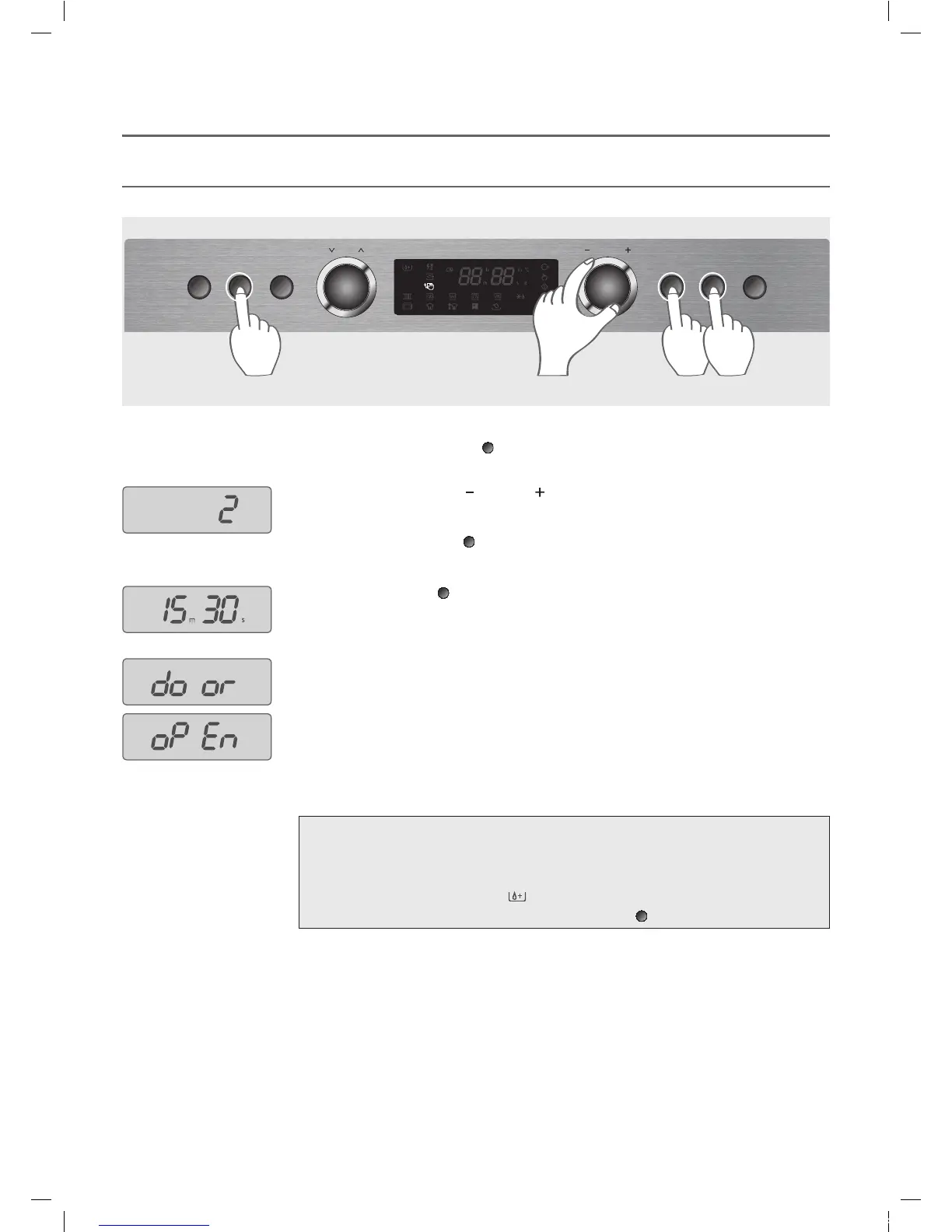
This function helps you to clean the inside of oven easily.
Make sure that water is enough in the water tank before steam cleaning.
STEAM CLEANING (Power Clean 2)
1. Press the Power Clean button (
).
The oven will start working immediately and it will work for 15 minutes 30 seconds.
Make sure that water is enough in the water tank before steam cleaning.
5. The display shows “door” and “oPEn” in turns for 5 minutes if the operation is finished.
6. Open the door and wipe out the inner cavity with a dry cloth.
NOTE:
•
Use only potable water(purified) for the water tank.
• Do not use hot water for the water tank.
• Discard any water in the water tank after finishing steam cleaning.
• When the water tank would have lack of water on working, the oven would pause working.
Then Water Replenishment
( ) would light up in the display.
After filling the water tank up, press the START button (
)
.







 To Next Page